

The best walking pad for a home office is the WalkingPad P1, a slim 180-degree folding treadmill that slides under a desk and stores flat. The UREVO Smart Walking Pad is the best budget pick, and the UREVO Walking Pad with Incline is the best choice for burning more calories at a low speed.
Walking pads turn desk time into steps without swallowing a whole room. Unlike a full treadmill, these compact, handrail-free decks tuck under a standing desk while you work, then fold or slide out of sight when you clock off. The catch is that "walking pad" now covers everything from a barely-there slab to a 2.5 HP machine with an incline, and the specs that matter for eight hours of office use are not the ones on the front of the box.
This comparison skips the marketing noise and picks three pads that genuinely suit working at a desk: one refined all-rounder, one wallet-friendly starter, and one incline model for people who want more of a workout without breaking into a jog. All three are compact, quiet enough for calls, and currently available.
Who This Comparison Is For#
- Remote and hybrid workers who sit through back-to-back calls and want to close their step goal during the workday instead of squeezing in a walk afterward.
- Small-apartment and small-office owners who have no room for a full treadmill and need a deck that folds flat or slides under a sofa, bed, or desk.
- Standing-desk users who already stand while they work and want to add gentle, continuous movement without buying a bulky machine.
- Anyone easing back into exercise who wants low-impact activity they will actually keep up because it happens while they are already at their desk.
How We Picked#
- Quiet enough to work on. A pad that drowns out your microphone is useless at a desk. We favored machines quiet enough at walking speeds to take calls while you walk.
- A true under-desk footprint. Every pick is handrail-free and slim enough to live under a standing desk, and either folds or stores on its side in a closet.
- The right speed range for working. Office walking happens at 1 to 3 mph. We looked for smooth low-speed control rather than headline top speeds you will never use while typing.
- Proven brands with real support. We stuck to WalkingPad (KingSmith) and UREVO, two of the most established walking-pad makers, rather than unbranded decks that fail early or vanish for warranty claims.
- A pick for every budget and goal. The three span an entry-level starter, a refined daily driver, and an incline model for people who want to raise their heart rate at a slow pace.
We also excluded any model under an active safety recall so every pick here is one you can buy with confidence today.
Product 1 — WalkingPad P1 (Best Overall)#
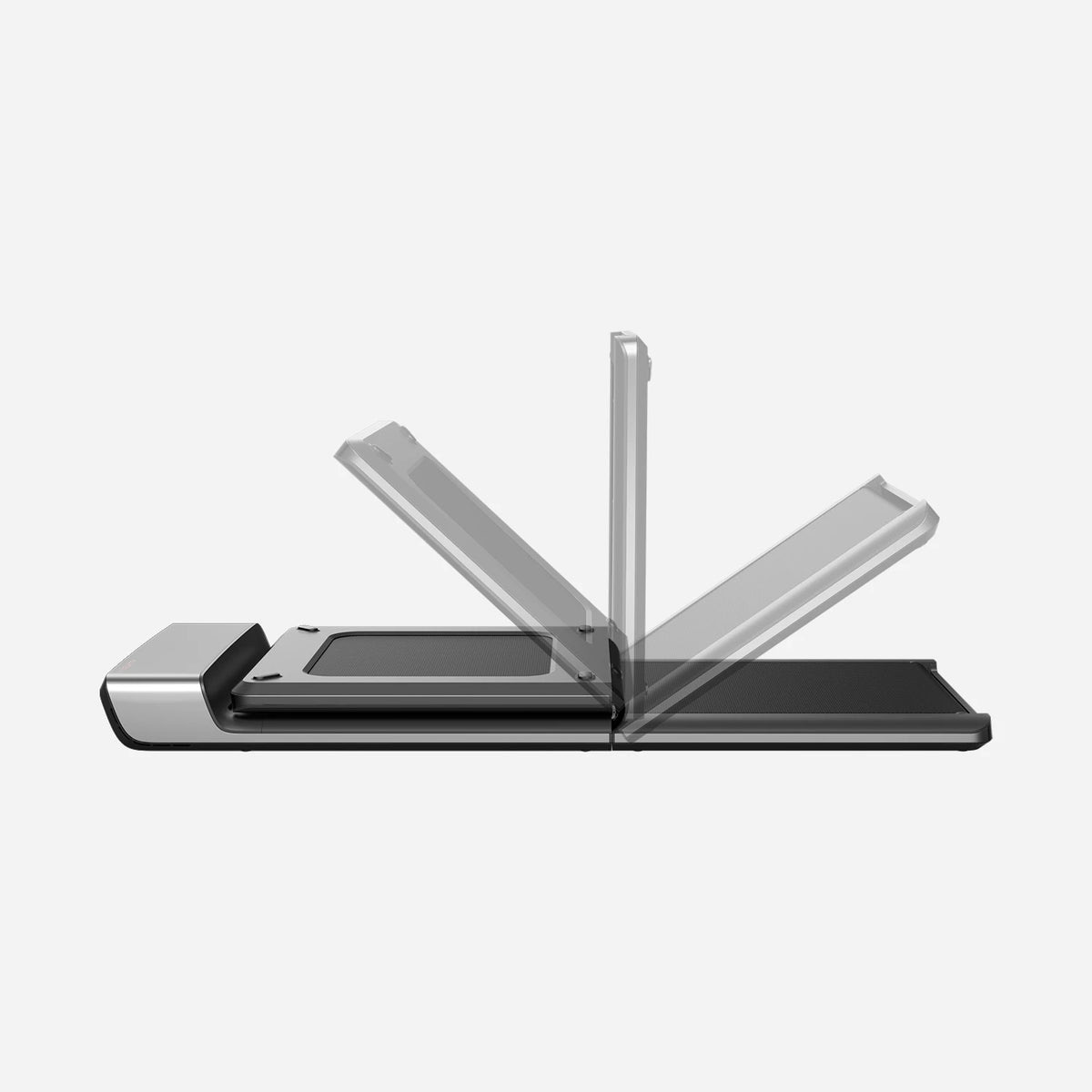
The WalkingPad P1 is the pad most home-office workers will be happiest with. It is the model that made this category mainstream, and years of refinement show in how thin, quiet, and fuss-free it is. If you want one deck that gets the fundamentals right and disappears when you are done, this is it.
The headline trick is the 180-degree fold. The P1 hinges in the middle so it collapses to roughly half its length, small enough to stand in a closet or slide under a bed. That matters in a home office where the floor doubles as living space. Deployed, it is low-profile enough to run under most standing desks so you can walk and work at the same time.
It runs two ways. In automatic mode, built-in FootSense sensors adjust the belt speed to where you stand on the deck, so you speed up by stepping forward and slow down by drifting back, all hands-free. Prefer manual control, and the included remote sets a fixed pace and shows your time, steps, distance, and calories without you looking down. The 1 HP motor stays quiet enough for meetings, and the companion app logs your sessions if you want the data.
At a slim walking-focused speed range, the P1 is tuned for exactly what a desk worker needs: steady, low-impact steps for hours, not sprint intervals. Build quality feels a cut above the budget crowd, with a solid aluminum-alloy frame despite the thin profile.
Key Specs#
Type : Handrail-free, 180-degree foldable walking pad
Top Speed : Up to about 3.7 mph (6 km/h), walking focused
Control : Automatic FootSense speed sensing plus included remote and app
Weight Capacity : Around 220 lb (100 kg)
Folded Size : Roughly 32.3 x 21.5 x 5.1 in, stores upright or under furniture
Motor : Quiet 1 HP drive
Bottom Line#
The best all-round walking pad for a home office: slim, genuinely quiet, hands-free if you want it, and it folds down small enough to vanish between sessions.
Product 2 — UREVO Smart Walking Pad (Best Budget)#
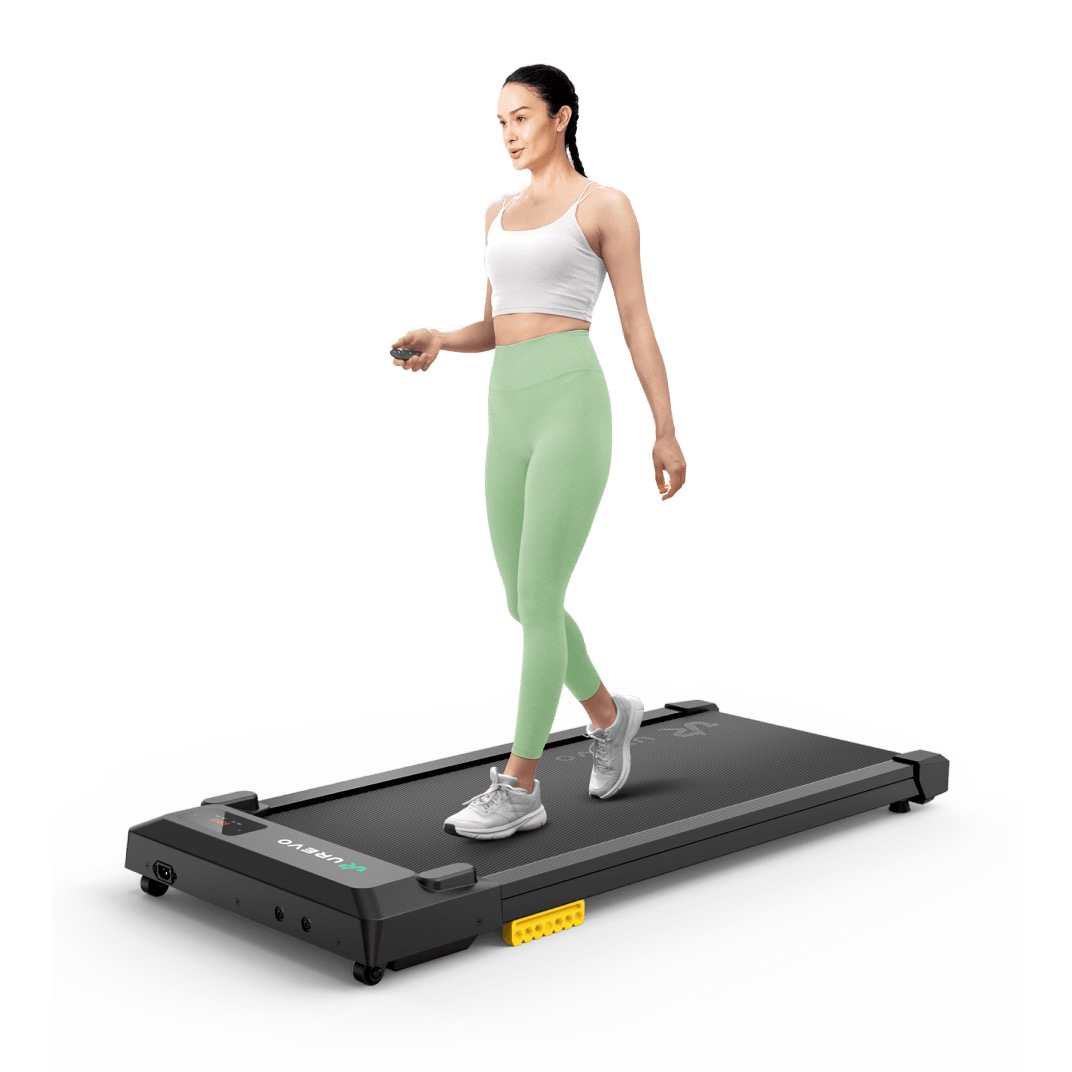
The UREVO Smart Walking Pad is the smart starter when you want to add steps to your workday without spending much. It is the most affordable pick here that still walks like a real machine, and for a lot of desk workers it does everything they need.
Do not mistake budget for flimsy. This pad carries a 2.5 HP motor and a 265 lb weight capacity, which is higher than many pricier compact decks. A wide, five-layer anti-slip belt over silicone shock absorbers and rubber pads takes the sting out of each step, so your knees and downstairs neighbors both thank you. UREVO rates it around or below 45 dB, quiet enough to keep on during calls.
You control it with the bundled remote and an LED display that shows speed, time, distance, and calories, and the companion app tracks sessions if you want history. The trade-off versus the pricier picks is refinement rather than capability: it is a flat deck with no incline and no auto speed-sensing, and it does not fold in half. It is slim enough to slide under a bed or sofa, but it stores as one long piece rather than collapsing.
For clearing a step goal at your desk on a budget, none of that gets in the way. It is also the easiest pad here to justify buying now and upgrading later if you catch the habit.
Key Specs#
Type : Flat, handrail-free under-desk walking pad
Motor : 2.5 HP
Top Speed : Up to about 4 mph (6.4 km/h)
Weight Capacity : Up to 265 lb (120 kg)
Belt / Cushioning : Wide five-layer anti-slip belt with silicone shock absorbers
Control : Remote and LED display, plus companion app
Bottom Line#
The budget pad to grab if you just want more steps for less money, with the honest caveat that it is flat-only and stores as one piece instead of folding in half.
Product 3 — UREVO Walking Pad with Incline (Best for Incline Training)#
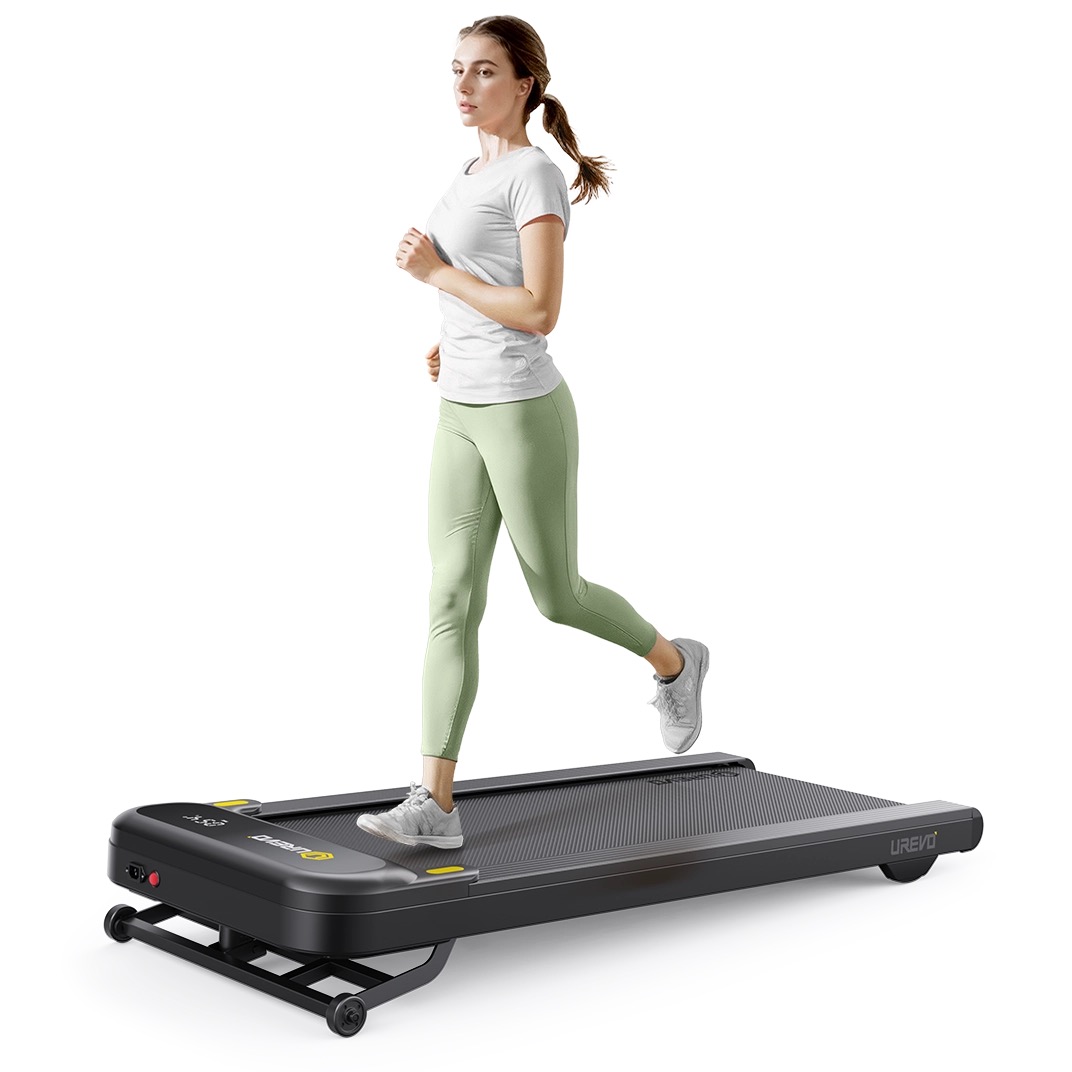
The UREVO Walking Pad with Incline is the pick for people who want a real workout at a slow pace. Adding a gentle grade to the deck raises your heart rate and calorie burn far more than speeding up on a flat pad, which is exactly what you want when you are trying to move at a desk without jogging.
The incline is the whole point. Raising the deck to a grade of up to roughly nine percent turns an easy 2 mph stroll into meaningfully harder work, engaging your calves, glutes, and hamstrings the way an outdoor hill would. Because the effort comes from the slope rather than speed, you can push your effort up while still typing or reading, which flat pads simply cannot match.
Underneath, a strong 2.5 HP motor supports up to 265 lb even on a grade, with dual shock absorption to keep impact and noise down. A remote and LED display handle speed and incline, and the deck stays quiet enough for a home office. It is a bit chunkier and heavier than the flat pads thanks to the incline mechanism, and the raised rear frame means it does not tuck away quite as invisibly, but that is the cost of the extra burn.
If your goal is fitness rather than just standing in for a chair, the incline model earns its keep. Beginners who want gentler sessions can simply keep the deck flat and treat it as a sturdy, powerful standard walking pad.
Key Specs#
Type : Under-desk walking pad with adjustable incline
Incline : Raised deck, up to roughly a 9 percent grade
Motor : 2.5 HP, holds pace even at full incline
Top Speed : Up to about 4 mph (6.4 km/h)
Weight Capacity : Up to 265 lb (120 kg)
Control : Remote and LED display with dual shock absorption
Bottom Line#
The best pad for turning desk time into a genuine workout: the incline delivers a hill's worth of effort at a walking pace, at the cost of a bulkier frame that does not hide away as neatly.
Which One Should You Buy?#
If you want one pad that gets everything right, buy the WalkingPad P1. Its slim 180-degree fold, hands-free speed sensing, and genuinely quiet motor make it the default choice for a home office, and it is the pick most people will be happiest living with day to day.
If you are watching your budget or just want to start adding steps, the UREVO Smart Walking Pad is the sensible starter. Accept that it is a flat deck that stores as one piece rather than folding in half, and it delivers a strong motor, a high weight capacity, and quiet operation for the least money.
If your goal is fitness and you want to raise your heart rate without jogging, go for the UREVO Walking Pad with Incline. The grade turns a slow walk into real work, and its 2.5 HP motor holds pace even at the full nine percent grade, as long as you can live with a chunkier frame that does not tuck away as invisibly.
Still not sure? Match the pad to your goal. Choose the P1 for the cleanest, most space-saving daily driver, the flat UREVO to spend the least, and the incline UREVO to get the hardest workout at the same slow, desk-friendly speed.
FAQ#
What is the best walking pad for a home office?#
For most people the WalkingPad P1 is the best overall pick because it is slim, quiet, folds in half to store flat, and offers hands-free speed sensing. Choose the UREVO Smart Walking Pad to spend less, or the UREVO Walking Pad with Incline if you want a harder workout at a walking pace.
Are walking pads quiet enough to use during video calls?#
Yes. UREVO rates both of its picks here around or below 45 dB — roughly the level of a quiet office or light rain — and the WalkingPad P1 stays similarly unobtrusive at walking speeds. At a normal 1 to 2 mph working pace the belt noise sits below your voice on most microphones, though very sensitive setups may still pick up a faint hum, so a quick test before an important call is worth it.
Can you use a walking pad under a standing desk?#
Yes, and that is what they are designed for. Each pad here is handrail-free and slim enough to sit under most standing desks. Set your desk to a comfortable standing height, keep your walking speed low, around 1 to 2 mph, so you can still type accurately, and you can log steps continuously through the workday.
Do I need an incline walking pad?#
Only if your main goal is fitness rather than just movement. An incline raises your heart rate and calorie burn far more than speed does, so it is worth it if you want a real workout at a slow pace. If you only want to break up sitting and add steps, a flat pad like the WalkingPad P1 or UREVO Smart Walking Pad is simpler and stores more easily.
How much space does a walking pad need to store?#
Very little. The WalkingPad P1 folds in half to roughly 32 inches long and stands upright in a closet or slides under a bed. The flat UREVO pads do not fold but are slim enough to store on their side or under a sofa. Always leave clear space around the deck while walking so you can step off safely.
What walking speed should I use while working?#
Keep it slow. Most people type and read comfortably at 1 to 2 mph and reserve anything faster for breaks between tasks. Starting slow also lets you build the habit without fatigue, and on the incline model you can keep the speed low while raising the grade to increase effort instead.