

Summary#
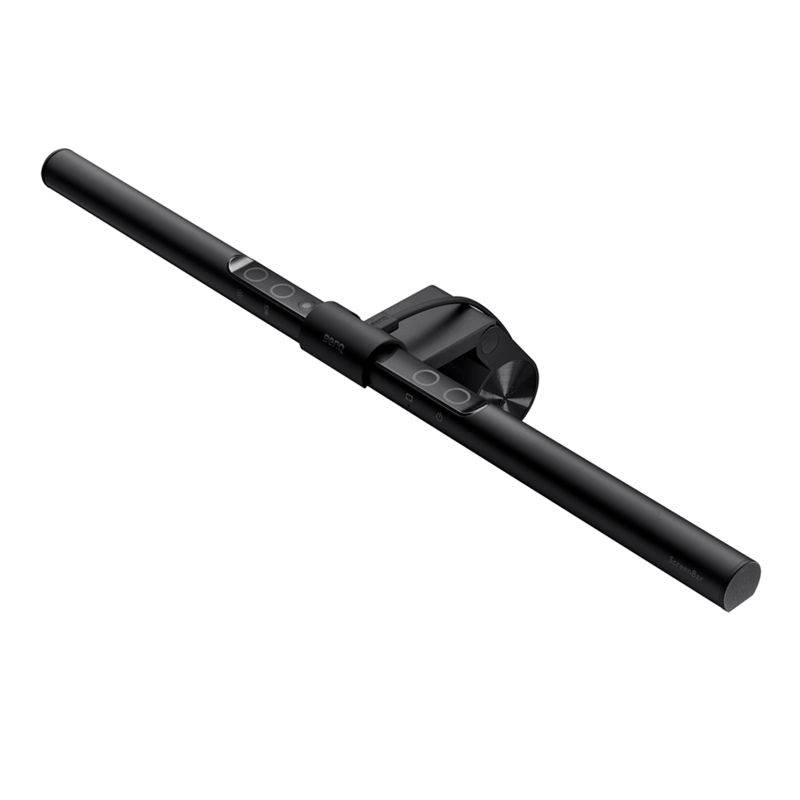
The BenQ ScreenBar is a USB-powered LED monitor light bar that illuminates your desk without causing screen glare, thanks to its patented asymmetric optical design. With Ra95+ color rendering, real-time auto-dimming, and a space-saving clamp that mounts directly on your monitor, it eliminates eye strain during long work sessions while taking up zero desk space.
At a Glance#
Product : BenQ ScreenBar LED Monitor Light Bar
Brand : BenQ
Best For : Remote workers and creators who spend 8+ hours at their monitors daily
Form Factor : 45cm aluminum light bar with weighted clamp mount
Buy Now : BenQ ScreenBar on Amazon
Key Highlights:
- Asymmetric optics direct light onto your desk, not your screen — zero glare
- Ra95+ color rendering index reveals true colors for design and photo editing
- Built-in ambient light sensor auto-adjusts brightness to 500 lux
- Patented weighted clamp fits monitors 1-3cm thick with no tools needed
- USB powered at just 5W — plug into your monitor or laptop
Who Should Buy This#
The BenQ ScreenBar solves a problem most desk workers don't realize they have: uneven lighting that causes eye strain, headaches, and fatigue. Traditional desk lamps eat up space and bounce glare off your screen. The ScreenBar eliminates both issues in a form factor that disappears once installed.
Perfect for:
- Remote workers who stare at screens 8-10 hours daily and suffer from eye fatigue by evening
- Designers and photographers who need Ra95+ color accuracy for editing work
- Small desk users who can't spare space for a traditional lamp but need proper task lighting
- Late-night coders who want adjustable warm-to-cool lighting without disturbing others in the room
Design & Build Quality#
The ScreenBar is built from aluminum alloy and polycarbonate, giving it a premium feel that matches high-end monitors. At 45cm wide and just 530 grams, it sits unobtrusively on top of your display. The matte black finish absorbs light rather than reflecting it, keeping the focus on your workspace.
The patented weighted clamp is the engineering highlight. It uses gravity and a counterweight to balance on your monitor bezel — no screws, no adhesive, no adjustments. Place it on top, and it stays put. The clamp accommodates bezels from 1cm to 3cm thick, covering the vast majority of flat and curved monitors on the market.
Key Features#
Asymmetric Optical Design — No Screen Glare#
This is the feature that justifies the BenQ premium. Unlike desk lamps that scatter light in all directions, the ScreenBar uses an asymmetric lens array to project light forward and downward at a precise angle. The result: your desk gets illuminated with even, balanced light while your screen stays completely glare-free.
Traditional desk lamps create a 45-degree cone of light that inevitably hits your display. The ScreenBar's optics create a sharp cutoff line right at the monitor surface. You get 930 lux at desk level (measured at 45cm height) with zero light pollution on screen.
Real-Time Auto-Dimming#
The built-in ambient light sensor continuously monitors your environment and adjusts brightness to maintain the recommended 500 lux illuminance level. Walk into a bright room with afternoon sun, and it dims down. Close the curtains at night, and it ramps up automatically.
This matters more than most people think. The human eye adapts to gradual light changes, but the mismatch between a bright screen and dark surroundings forces your pupils to constantly adjust — the primary cause of screen-related eye fatigue. The ScreenBar keeps that contrast ratio balanced all day long.
Photography-Grade Color Rendering#
With a Color Rendering Index above 95 (out of 100), the ScreenBar reproduces colors almost as accurately as natural daylight. For context, most office fluorescent lights score around Ra 80, and cheap LED desk lamps often sit at Ra 70-75. The difference is immediately visible when reviewing printed photos, fabric samples, or design proofs at your desk.
Eight color temperature presets range from warm 2700K (relaxed evening light) to cool 6500K (focused daylight). All eight levels are ANSI-compliant, meaning they match standardized lighting benchmarks rather than arbitrary LED values.
Space-Saving Clamp Design#
The ScreenBar occupies exactly zero desk space. It clips onto your monitor bezel and hangs there, freeing up the footprint that a traditional desk lamp would claim. For small desks, standing desk setups, or multi-monitor configurations, this alone justifies the purchase.
Installation takes under 30 seconds. Lift the clamp, place it on your monitor, drop the light bar into the cradle. Done. The weighted design keeps it stable even if you bump your desk, and it survives BenQ's own 10,000-cycle durability test for the clamp mechanism.
Touch Controls with 120 Combinations#
The top of the bar features four capacitive touch zones: power, brightness, color temperature, and auto-dimming. With 15 brightness levels and 8 color temperature options, you get 120 possible lighting combinations to dial in your perfect setup.
The auto-dimming button is the one you'll use most. One tap activates the ambient sensor, and the ScreenBar handles everything from there. Manual adjustments are smooth and responsive — no lag, no flickering between levels.
Technical Specifications#
Light Source : Dual Color LED
Color Rendering Index : Ra ≥ 95
Center Illuminance : 930 lux (at 45cm height)
Lighting Coverage (at 500 Lux) : 60cm × 30cm
Color Temperature Range : 2700K – 6500K (8 levels)
Brightness Levels : 15 levels
Power Input : 5V / 1A USB
Power Consumption : Max 5W
Dimensions : 45 × 9 × 9.2 cm
Weight : 530g (light bar + clamp)
USB Cable Length : 150cm
Monitor Compatibility : Flat and curved monitors, 1-3cm bezel thickness (0.4″–1.2″)
Pros & Cons#
Pros:
- Asymmetric optics eliminate screen glare completely — the core selling point
- Ra95+ color rendering rivals natural daylight for accurate color work
- Auto-dimming sensor maintains optimal 500 lux without manual adjustment
- Zero desk footprint saves space on small and standing desks
- Aluminum alloy construction feels premium and dissipates heat efficiently
- USB powered at just 5W — no extra power outlet needed
- 120 brightness and temperature combinations for precise customization
Cons:
- Premium price point compared to generic monitor light bars under $20
- Only fits monitors with 1-3cm bezels — some ultra-thin displays may not work
- Touch controls on the bar require reaching up, no wireless remote included
- USB-A power cable limits placement options on newer USB-C-only setups
Final Verdict#
Buy it. The BenQ ScreenBar is the monitor light bar that started the category, and it remains the best option for anyone who values their eyesight and desk space. The asymmetric optics, Ra95+ color rendering, and auto-dimming sensor deliver measurable improvements to your workspace lighting that cheaper alternatives simply cannot match.
Our recommendation: If you work at a screen for more than 4 hours a day, the ScreenBar pays for itself in reduced eye strain alone. Grab one and your future self will thank you. BenQ ScreenBar on Amazon