

At a Glance#
Product : CUKTECH 30 Ultra 300W Desktop Charging Station
Exact Variant : TA3005U silver-and-black US model with DC tips and a 240W USB-C cable
Brand : CUKTECH
Best For : Multi-device desks with one or two USB-C laptops, a high-power gaming laptop, and smaller daily electronics
Charging System : Five outputs: one DC port, three USB-C ports, and one USB-A port
Buy Now : View on Amazon
Key Highlights:
- A 300W total power ceiling supports demanding desk setups from one compact station
- Two USB-C PD 3.1 ports each reach 140W, so either can handle a high-power compatible laptop
- The dedicated DC output reaches 300W for supported gaming and workstation laptops
- A 1.83-inch color display shows live power, voltage, and current across connected outputs
- The angled stand, GaN design, and front-facing USB ports keep everyday charging visible and organized
Who Should Buy This#
The CUKTECH 30 Ultra targets a specific problem: too many high-power devices and too many separate charging bricks around one desk. Its mix of USB-C, USB-A, and DC output can consolidate a work laptop, a personal laptop, a phone, and accessories. The screen also makes power sharing less mysterious because you can see what each connected device receives.
This is more capable than most travelers need. It makes the most sense as a fixed desktop hub where its power ceiling, display, and DC compatibility earn their space. Buyers with only a phone and a thin laptop will leave much of that capability unused.
Perfect for:
- Gaming-laptop owners who want a supported DC connection without keeping the original power brick on the desk
- Creative professionals who charge two USB-C laptops alongside a phone, tablet, camera, or handheld console
- Hybrid workers who want one visible charging point instead of adapters spread across a power strip
- Charging enthusiasts who want live wattage, voltage, and current data instead of guessing how power is allocated
Design & Build Quality#
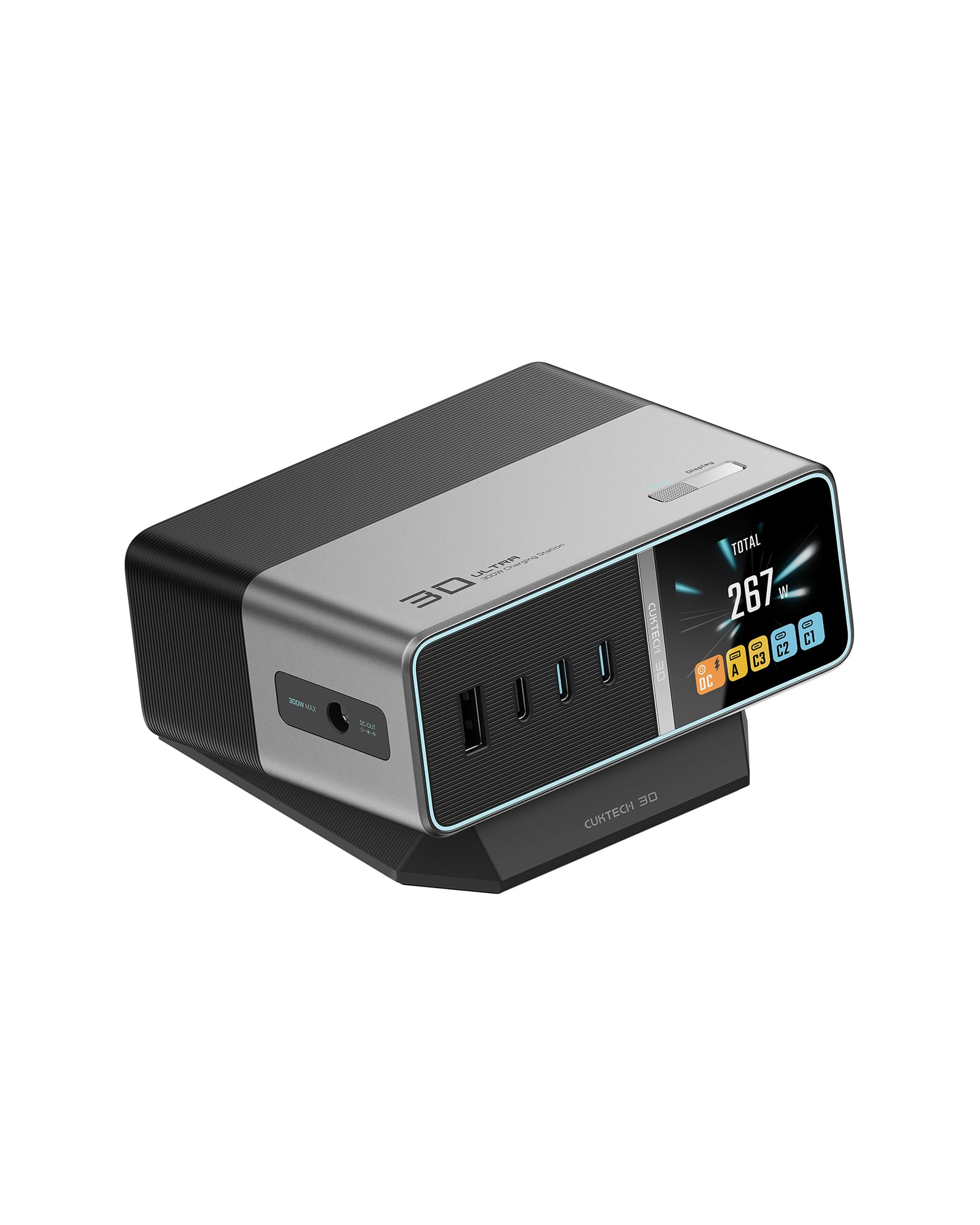
The TA3005U uses a horizontal silver-and-black enclosure with everything on one face: the DC jack at the far left, labelled 300W MAX, then a recessed black strip carrying USB-A and the three USB-C ports, then the colour display at the right. Every cable goes in from the front, which is the right call for a station that lives at the back of a desk, and the physical gap between the DC jack and the USB row keeps the laptop connection from crowding the small-device ports.
CUKTECH includes a wedge-shaped stand that angles the front panel upward. That improves screen visibility and cable access on a desk. The station measures 43 by 85 by 108 millimeters before accounting for the stand, so it occupies less surface area than a row of separate adapters.
The station is built around GaN power electronics and accepts 100–240V AC input. Its braided AC cord lets the main unit sit where you can reach it rather than hanging directly from a wall outlet. CUKTECH also lists active temperature control, over-voltage protection, and over-current protection.
The package includes a 240W USB-C PD 3.1 cable, the braided power cord, and DC tips. That is a useful starting kit, but the DC side demands more care than USB-C. A tip must match the laptop physically and electrically, so buyers should verify the exact laptop model and tip requirements before use.
If this desktop-first layout fits your setup, check the exact TA3005U package and availability here: View on Amazon
High-Power Charging Without a Row of Bricks#
The 30 Ultra has a 300W maximum across its outputs. That ceiling is the core reason to choose it. A work laptop, personal laptop, phone, and accessories can share one central station without turning the desk into a collection of wall chargers.
USB-C1 and USB-C2 are the primary general-purpose outputs. Each supports USB Power Delivery 3.1 and can reach 140W when the connected device and cable negotiate that level. This makes both ports suitable for compatible high-power laptops rather than reserving full output for only one connector.
The third USB-C port reaches 33W, while the USB-A port reaches 18W on the US model. Those lower-power outputs make sense for phones, earbuds, watches, controllers, and other accessories. Keeping them separate from the two main USB-C ports helps preserve a logical cable layout: computers at the high-power ports, smaller gear at the remaining ports.
Power is shared dynamically when several devices connect. The 300W figure is a system maximum, not a promise that every port will deliver its individual peak simultaneously. Actual output depends on the connected devices, their charging protocols, the cables, and the active port combination.
This matters in practice. A laptop that accepts 140W over USB-C may draw less once another demanding device joins the station. The 30 Ultra gives you the capacity to run a serious multi-device setup, but it cannot override the charging limits built into each device.
A Dedicated 300W DC Route for Supported Laptops#
The dedicated DC port is what separates the 30 Ultra from an ordinary multi-port USB-C charger. It can provide up to 20V at 15A, or 300W, for a supported laptop. That gives compatible gaming and mobile-workstation systems access to more power than the 140W ceiling of either USB-C port.
CUKTECH positions this output for demanding laptops from brands such as Lenovo, HP, and Acer, and the Amazon package includes a selection of tips. The listing also names gaming systems from Razer, Alienware, and ASUS as target devices. Compatibility still needs verification at the exact laptop-model level.
Do not treat a connector that happens to fit as proof of compatibility. The laptop must accept the station’s supported voltage and current through the correct tip. Buyers should match the laptop model against CUKTECH’s guidance before replacing an original adapter.
The US manual also describes a DC power setting for high-output use. This is a desktop power system with selectable behavior, not a passive barrel adapter. Read the included manual before enabling the highest DC mode, especially when USB devices are connected at the same time.
There is one limit CUKTECH publishes in its own manual that changes how you should think about this port, and it lands hardest on US buyers. CUKTECH's wording is that prolonged high-power output may trigger the over-temperature protection. Its stated internal test used a Lenovo Legion Y900P — a machine whose original adapter is 330W — with Lenovo's own "Beast Mode" performance profile switched on: at 200–240V input, protection is expected after roughly 60 minutes; at 100–130V input, after roughly 30 minutes. US mains is the 100–130V case. Times will vary by laptop and room, but the shape of it is clear: this is a station for charging a gaming laptop and for normal work, not for feeding one at full draw through a long gaming session. Worth reading alongside the operating range CUKTECH prints two lines below the dimensions: 0–25°C. A warm room is not outside the spec by accident, it is outside the spec.
So for a compatible machine the benefit is real but bounded: the original high-wattage brick can stay in a bag for travel and daily charging, while a laptop that genuinely pulls near its 300W ceiling for hours is still happier on its own adapter. For an unsupported machine, the DC port adds no value. USB-C charging remains available, but only within the laptop’s USB-C input capability.
Dual 140W USB-C Ports for Modern Workflows#
Two equal high-power USB-C ports make the station easier to live with. You do not have to remember that only one connector is the “laptop port.” Either USB-C1 or USB-C2 can reach 140W with a compatible device and an appropriate cable.
That arrangement works well for a two-computer desk. You can connect a larger laptop to USB-C1 and a second USB-C laptop to USB-C2, then use USB-C3 and USB-A for smaller gear. The station’s total power ceiling leaves room for meaningful multi-device charging, although negotiated output can change as devices connect and disconnect.
USB Power Delivery 3.1 support matters for laptops designed to accept more than 100W over USB-C. CUKTECH includes one 240W-rated cable, so one high-power path is ready in the box. A second laptop needs its own cable rated for the output it requests.
Cable capability is easy to overlook. A low-rated USB-C cable may still connect and charge, but it can prevent a device from reaching the port’s advertised maximum. The station cannot compensate for a cable without the necessary current and power rating.
USB-C3 is intentionally a smaller-device port. Its 33W ceiling is ample for many phones, tablets, handheld accessories, and camera batteries charged through a compatible USB-C device. USB-A remains useful for older cables, though its 18W maximum puts it firmly in the accessory role.
The Display Makes Power Sharing Understandable#
The 1.83-inch color screen shows charging information for all five outputs. CUKTECH lists real-time wattage, voltage, and current, letting you see whether a laptop is pulling high power or whether a phone has tapered as its battery fills.
This is more than decoration on a station built around shared power. Output can change as devices connect, disconnect, or approach full charge. The screen turns those changes into information you can use.
For example, a laptop may charge below its theoretical maximum because its battery is nearly full, its own temperature management has reduced demand, or the cable has become the limiting factor. Seeing the negotiated result helps distinguish normal device behavior from a setup problem.
The display also makes port management easier. If a device is charging more slowly than expected, you can move it to USB-C1 or USB-C2, verify the cable, and watch the reading change. That is more direct than testing several combinations with no feedback.
The screen does not certify performance or diagnose every compatibility issue. It reports what the station sees, while the connected device remains in control of its requested power. Still, it is one of the strongest reasons to choose this model over a charger that hides all allocation behavior.
Buyers who value that visibility can confirm the exact 1.83-inch-display model here: View on Amazon
Smart Allocation and Built-In Protection#
The 30 Ultra automatically allocates power among active outputs. This keeps the station useful when your setup changes during the day. Connect a laptop in the morning, add a phone later, and plug in accessories without manually assigning a wattage to every USB port.
Power allocation can change when devices are connected or disconnected. Check the display after changing the setup to confirm the current distribution across active outputs.
CUKTECH lists active temperature control alongside over-voltage and over-current protection. Those safeguards are important in a station capable of sustained high output. GaN components also help the design handle substantial power in a relatively compact enclosure.
No high-power charger should be buried under papers, fabric, or other items that trap heat. Give the intake and enclosure space around the unit, keep liquids away, and use undamaged cables. CUKTECH marks the station indoor use only, rates it for a 0–25°C operating range, and warns in the manual that holding a high output for a long stretch may trip the over-temperature protection — so placement is not cosmetic, it directly affects how long the station will hold its peak.
One further note from CUKTECH's safety documentation, aimed at anyone wiring this into an unusual setup: the station's output exceeds the PS2 limit, so connected equipment is expected to have a fire enclosure meeting IEC/EN/UL 62368-1.
The station carries a 24-month manufacturer warranty on the Amazon listing. That coverage adds reassurance for a desktop device expected to handle repeated daily connections, though warranty terms and support procedures should be checked at purchase.
Setup and Daily Use#
Start by placing the 30 Ultra in its angled stand on a stable surface. Connect the braided AC cable directly, then attach devices one at a time. This makes it easier to confirm that each port, cable, and device negotiates as expected.
Use USB-C1 and USB-C2 for the most demanding USB-C devices. Reserve USB-C3 for a phone, tablet, or accessory within its 33W ceiling, and use USB-A for legacy gear that does not need high output. This arrangement keeps the station’s hierarchy clear even before you look at the display.
For DC charging, identify the exact laptop model and required adapter specification first. Select only the confirmed tip, connect it firmly, and follow the manual’s DC-mode instructions. If the laptop or tip is not explicitly supported, keep using the original adapter or a verified USB-C charging path.
The live display becomes the quickest daily check. It shows whether each connected output is active and how power is moving. If a device reports slow charging, verify its port, cable rating, connector seating, and own charging limits before assuming the station is faulty.
This is not a battery or an uninterruptible power supply. It must remain connected to AC power, and attached devices lose power if the wall supply is interrupted. Its job is consolidation and conversion, not backup power.
Technical Specifications#
Model : TA3005U, silver-and-black US desktop charging station
Maximum Combined Output : 300W across the active outputs
DC Output : Up to 20V at 15A, 300W maximum, for supported laptops and the correct tip
USB-C1 Output : Up to 140W with USB Power Delivery 3.1
USB-C2 Output : Up to 140W with USB Power Delivery 3.1
USB-C3 Output : Up to 33W on the US model
USB-A Output : Up to 18W on the US model
Port Count : Five outputs total: one DC, three USB-C, and one USB-A
Display : 1.83-inch color screen with real-time wattage, voltage, and current information
AC Input : 100–240V, 50/60Hz
Dimensions : 43 × 85 × 108 millimeters for the charging unit
Included Accessories : Angled stand, 240W USB-C PD 3.1 cable, DC tips, braided AC power cord, and documentation
Combined Output : 300W maximum with two, three, four or five ports in use
Protection : Active temperature control, over-voltage protection, and over-current protection
Sustained High Output : CUKTECH's manual expects over-temperature protection after roughly 30 minutes at maximum draw on 100–130V input, or 60 minutes on 200–240V
Operating Temperature : 0–25°C (32–77°F)
Placement : Indoor use only
Warranty : 24 months according to the Amazon listing
Pros & Cons#
Pros:
- A 300W system ceiling can consolidate several demanding devices at one workstation
- Two USB-C PD 3.1 ports each support up to 140W for flexible laptop placement
- The dedicated 300W DC output serves compatible gaming and workstation laptops
- The 1.83-inch screen makes real-time power allocation visible instead of hidden
- Three USB-C ports plus USB-A preserve support for modern and legacy accessories
- The included stand, high-rated USB-C cable, power cord, and DC tips create a useful starter package
- GaN construction and automatic allocation pack substantial charging capability into a compact desktop footprint
Cons:
- DC compatibility must be checked by exact laptop model and tip before use
- Only one 240W USB-C cable is included, so a second high-power laptop needs another suitable cable
- USB-C3 and USB-A are much lower-power outputs than the two primary USB-C ports
- The station requires AC power and is too specialized for buyers who only charge a phone and light laptop
- Power allocation can change when devices are added or removed
- Prolonged high-power output may trip over-temperature protection — CUKTECH's own figure is about 30 minutes on US 100–130V mains, and its rated operating range tops out at 25°C
Final Verdict#
Buy it. The CUKTECH 30 Ultra is a strong desktop choice for power users who need dual 140W USB-C charging, a compatible 300W DC laptop path, and clear live power data in one organized station.
Our recommendation: Choose it when you can use at least two of its high-power outputs, then verify your laptop’s DC tip and cable requirements before reorganizing the desk. Go in knowing CUKTECH's own thermal figure — roughly 30 minutes at maximum draw on US mains — so treat the DC port as a desk-charging solution rather than a permanent replacement for a gaming brick under sustained load. View on Amazon