

Summary#
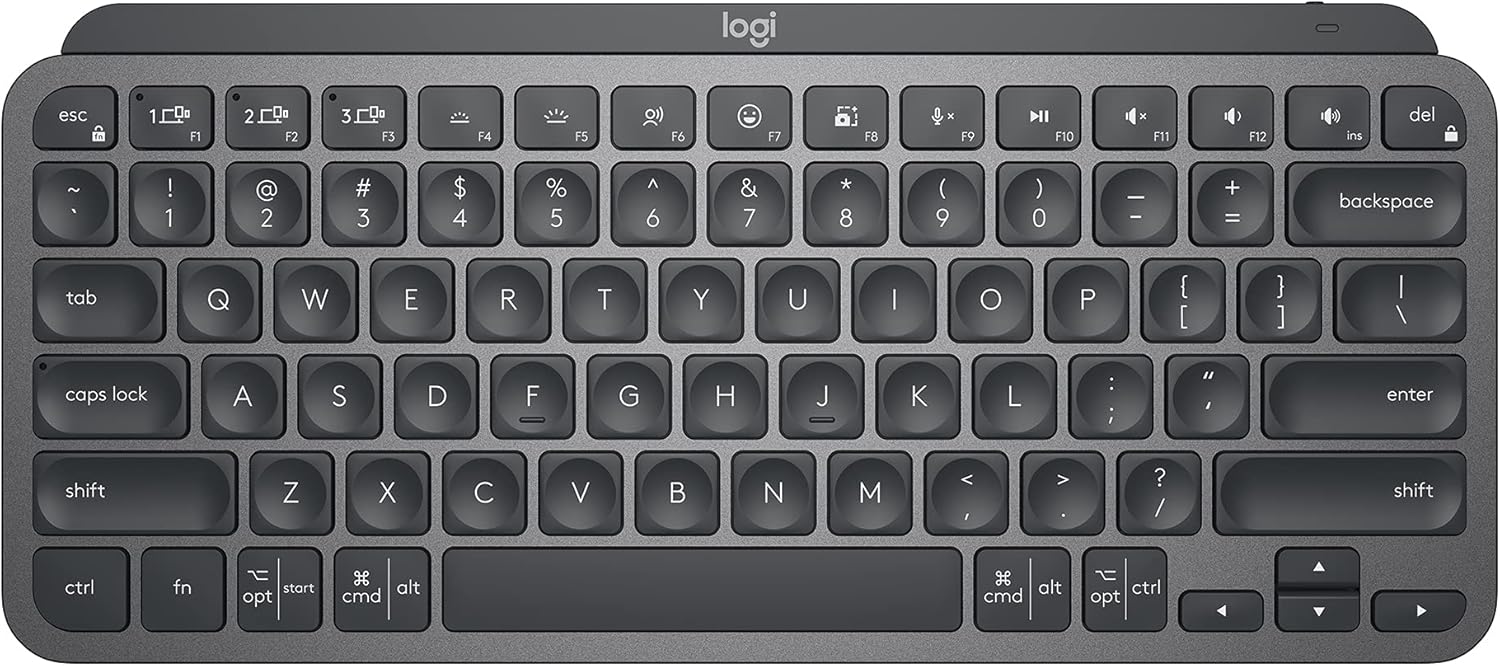
The Logitech MX Keys Mini is a premium compact wireless keyboard that delivers laptop-quality typing in a space-saving 75% layout with smart backlighting and multi-device Bluetooth. With spherically-dished keys, a solid metal build, USB-C rechargeable battery lasting up to 5 months, and seamless switching between 3 devices, it's the ideal keyboard for productivity-focused users who want a clutter-free desk without sacrificing typing comfort.
At a Glance#
Product : Logitech MX Keys Mini
Brand : Logitech
Best For : Professionals and multi-device users who want a premium compact keyboard for focused work
Connectivity : Bluetooth Low Energy (up to 3 devices)
Buy Now : 🇺🇸 Logitech MX Keys Mini on Amazon US | 🇩🇪 Logitech MX Keys Mini on Amazon DE
Key Highlights:
- Spherically-dished keys shaped for fingertips deliver precise, comfortable typing
- Smart backlighting adjusts automatically to ambient light and turns off when you step away
- Switch seamlessly between 3 paired devices with dedicated F-key shortcuts
- USB-C rechargeable with up to 10 days battery (5 months with backlight off)
- Solid aluminum and metal build at just 506g with minimalist footprint
Who Should Buy This#
The MX Keys Mini hits the sweet spot for professionals who want a premium typing experience without a full-size keyboard eating up their desk space. It delivers backlit keys, multi-device connectivity, and smart software integration that competing compact keyboards charge similar prices for but rarely match in build quality.
Perfect for:
- Remote workers and hybrid professionals who switch between a laptop and desktop throughout the day and need seamless device toggling
- Minimalist desk enthusiasts who want a keyboard that looks as good as it types, with a compact footprint that leaves room for a mouse closer to center
- Mac and Windows power users who work across both platforms and need a keyboard that handles both without adapter headaches
- Writers and content creators who type for hours and need comfortable, quiet, low-profile keys with smart shortcuts like Dictation and Emoji
Design & Build Quality#
The MX Keys Mini makes a strong first impression. At 11.65 x 5.19 x 0.83 inches and 506g, it has a reassuring heft that keeps it planted on your desk. The top plate is aluminum with a clean, matte finish that resists fingerprints better than glossy alternatives. The Graphite colorway looks professional without being boring.
Logitech dropped the number pad entirely, giving you a true 75% layout. This means your mouse sits closer to your keyboard, reducing shoulder strain during long work sessions. The key spacing is full-size, so there's no awkward adjustment period coming from a standard keyboard.
Key Features#
Perfect Stroke Keys with Spherical Dish#
Each key cap has a subtle spherical dish designed to match the shape of your fingertips. It sounds like marketing fluff until you type on it. The concave surface guides your fingers to the center of each key, reducing mistypes. Combined with a scissor-switch mechanism that delivers a satisfying 1.8mm of travel, typing feels stable and precise without the mushiness you get from most membrane boards.
The quiet keystroke profile makes it office-friendly. You won't annoy coworkers on video calls, and the low-profile design keeps your wrists in a more natural position compared to taller mechanical keyboards.
Smart Illumination That Reads the Room#
The MX Keys Mini's backlighting does more than glow. A proximity sensor detects when your hands approach and lights up the keys automatically. Walk away, and the backlight fades to save battery. The brightness adjusts dynamically based on ambient lighting conditions, so you always get readable keys whether you're typing in a dim room or next to a window.
This smart behavior directly impacts battery life. Instead of burning power at full brightness all day, the keyboard manages its own energy consumption. With backlighting active, expect about 10 days between charges. Turn it off entirely and you'll get up to 5 months from a single USB-C charge.
Multi-Device Switching with Flow#
Pair the MX Keys Mini with up to 3 devices via Bluetooth Low Energy. Switching is as simple as pressing the F1, F2, or F3 key — each one mapped to a specific device. The transition takes about 1-2 seconds, which is fast enough to feel seamless in practice.
Where it gets interesting is Logitech's Flow feature. Pair the keyboard with a compatible MX mouse (like the MX Master 3S or MX Anywhere 3S) and you can type and move your cursor across multiple computers as if they shared one screen. Copy text on your Mac, move your cursor to your Windows PC, and paste. It works across operating systems and feels like magic when your workflow depends on multiple machines.
Smart Keys and Logi Options+ Customization#
Three dedicated smart keys give you one-tap access to Dictation, Emoji, and Mic Mute/Unmute — features built for the modern video-call-heavy work environment. The Dictation key activates your OS's native speech-to-text, so you can talk instead of type when drafting emails or notes.
Through Logi Options+, the free companion software, you can remap the entire F-key row to match your workflow. Assign app-specific shortcuts, create custom macros, or adjust keyboard behavior per application. The software supports both Windows and macOS, though Linux users are limited to basic functionality without custom key mapping.
Technical Specifications#
Layout : 75% compact (no number pad)
Switch Type : Scissor membrane with 1.8mm travel
Connectivity : Bluetooth Low Energy 5.0 (up to 3 devices)
Battery : LiPo rechargeable via USB-C
Battery Life : Up to 10 days (backlit) / 5 months (backlight off)
Dimensions : 11.65 x 5.19 x 0.83 inches (295.99 x 131.95 x 20.97 mm)
Weight : 17.86 oz (506.4g)
Compatibility : Windows, macOS, iPadOS, iOS, Android, Chrome OS, Linux
Backlighting : White LED with proximity sensor and auto-brightness
Software : Logi Options+ (Windows and macOS)
In the Box : Keyboard, USB-C charging cable, documentation
Recycled Content : 30% post-consumer recycled plastic (Graphite model)
Pros & Cons#
Pros:
- Premium aluminum build feels solid and professional at just over 500g
- Spherically-dished keys noticeably reduce typing errors over extended sessions
- Smart backlighting with proximity sensor maximizes battery efficiency
- Seamless 3-device Bluetooth switching with dedicated shortcut keys
- Flow feature enables cross-computer typing and file transfer with MX mice
- USB-C charging with up to 5 months battery life (backlight off)
- Compatible with virtually every major operating system
Cons:
- No included USB receiver — Bluetooth only out of the box (Logi Bolt sold separately)
- Logi Options+ software not available on Linux, limiting customization
- Pale Grey model has poor backlight visibility due to white-on-white contrast
- No mechanical switch option for users who prefer tactile feedback
Final Verdict#
Buy it. The Logitech MX Keys Mini is the best compact wireless keyboard for productivity-focused users, delivering a typing experience that rivals laptop keyboards at their best while adding smart features that justify the premium over budget alternatives.
Our recommendation: Pair it with the Logitech MX Master 3S or MX Anywhere 3S mouse to unlock Flow cross-computer functionality — it transforms a multi-device setup from a hassle into a seamless workflow. 🇺🇸 Logitech MX Keys Mini on Amazon US | 🇩🇪 Logitech MX Keys Mini on Amazon DE