

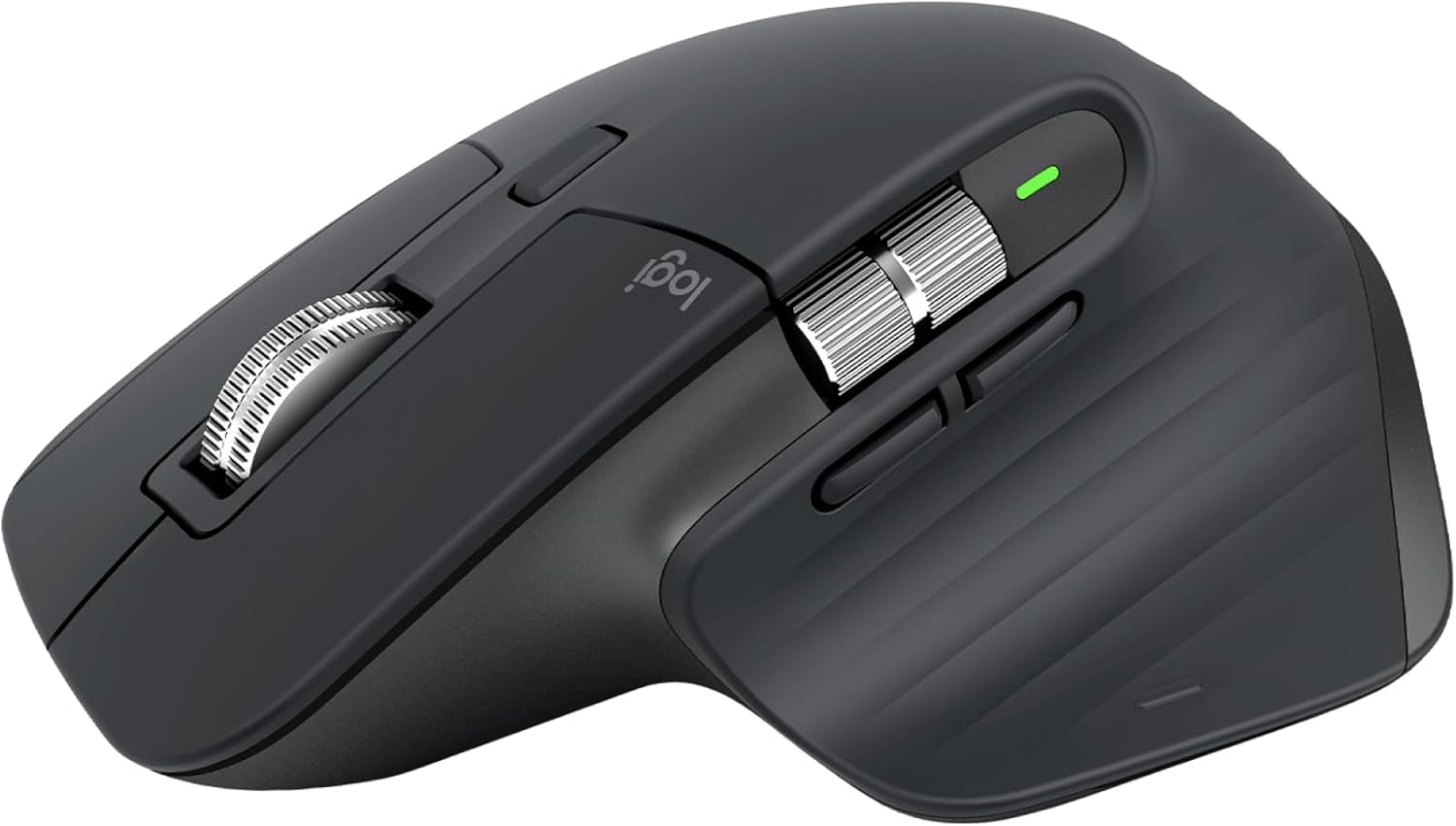
Summary#
The Logitech MX Master 3S is a premium ergonomic wireless mouse built for professionals who spend hours at a desk. With an 8K DPI Darkfield sensor that tracks on any surface including glass, near-silent clicks, and a MagSpeed scroll wheel that handles 1,000 lines per second, it delivers precision and comfort that cheaper mice simply cannot match.
At a Glance#
Product : Logitech MX Master 3S
Brand : Logitech
Best For : Professionals, designers, and developers who need precise, comfortable all-day mousing across multiple devices
Connectivity : Bluetooth Low Energy + Logi Bolt USB receiver (2.4 GHz)
Buy Now : Logitech MX Master 3S on Amazon
Key Highlights:
- 8K DPI Darkfield sensor tracks on any surface, including glass
- Quiet clicks reduce noise by 90% compared to the MX Master 3
- MagSpeed electromagnetic scroll wheel scrolls 1,000 lines per second
- 70-day battery life on a single USB-C charge
- Connect and switch between 3 devices with one button
Who Should Buy This#
The MX Master 3S hits a sweet spot for knowledge workers who want a mouse that keeps up with their workflow without slowing them down. It delivers ergonomic comfort, multi-device switching, and app-specific customization that basic mice and even most premium competitors lack.
Perfect for:
- Software developers who juggle multiple machines and need precise cursor control across large monitors
- Creative professionals who rely on smooth scrolling through timelines, layers, and long documents
- Remote workers who switch between a laptop and desktop throughout the day and want one mouse for both
- Spreadsheet power users who scroll through thousands of rows and need a wheel that can keep pace
Design & Build Quality#
The MX Master 3S keeps the iconic sculpted shape that made the MX Master line famous. The right-hand ergonomic design fills your palm naturally, with a textured thumb rest that prevents fatigue during long sessions. At 141 grams, it feels substantial without being heavy.
The shell uses a combination of matte-finish plastic and silicone grips. Build quality is excellent — no creaks, no flex, no wobble. The graphite colorway looks professional on any desk. The USB-C charging port sits at the front, and Logitech includes a USB-C to USB-A cable in the box.
Key Features#
8K DPI Darkfield Sensor#
The optical sensor tracks at up to 8,000 DPI — four times the resolution of the original MX Master. More importantly, Darkfield tracking works on virtually any surface, including glass as thin as 4mm. You can skip the mousepad entirely and work directly on your desk, a coffee table, or even your laptop lid.
For most users, 1,000-1,600 DPI is the sweet spot for daily work. The range up to 8,000 DPI matters for large or multi-monitor setups where you need to cover a lot of screen real estate without lifting the mouse.
MagSpeed Electromagnetic Scroll Wheel#
This is the feature that separates the MX Master 3S from everything else. The steel scroll wheel uses electromagnetic resistance instead of mechanical ratchets, giving you two modes: precise line-by-line scrolling and free-spinning mode that covers 1,000 lines per second.
The wheel auto-shifts between modes based on how fast you flick it. Slow scrolling feels tactile and controlled. A fast flick sends you flying through a 500-page document in under a second. The horizontal thumb wheel handles side-scrolling in spreadsheets and timelines.
Quiet Clicks#
Logitech reduced click noise by 90% compared to the MX Master 3. The primary buttons feel crisp and satisfying without the sharp clack. This makes a real difference in quiet offices, shared workspaces, and late-night sessions when someone is sleeping nearby.
The click force and travel remain similar to the previous generation, so you get quieter operation without sacrificing tactile feedback.
Multi-Device Connectivity#
Three Easy-Switch buttons on the bottom let you pair the mouse with three different devices and switch between them instantly. The MX Master 3S supports both Bluetooth Low Energy and the included Logi Bolt USB receiver for a more reliable 2.4 GHz connection.
Pair it with Logitech Flow software and you can move the cursor between two computers seamlessly — drag a file from your work laptop and drop it on your personal desktop. It works across macOS and Windows.
App-Specific Customization#
Logitech Options+ software lets you assign custom actions to every button, and those assignments can change depending on which app you are using. Set the thumb button to switch desktops in macOS, then have it toggle layers in Photoshop, and zoom in Premiere Pro — all automatically.
Pre-built profiles exist for popular apps like Chrome, Excel, Zoom, Adobe Creative Suite, and Final Cut Pro. You can also create your own.
Technical Specifications#
Sensor : Darkfield high precision, 8K DPI optical
DPI Range : 200 – 8,000 DPI (adjustable in 50 DPI increments)
Buttons : 7 (left, right, middle click, 2 thumb buttons, scroll mode shift, gesture button)
Scroll Wheels : MagSpeed main wheel + horizontal thumb wheel
Connectivity : Bluetooth Low Energy + Logi Bolt 2.4 GHz USB receiver
Battery : Rechargeable lithium polymer, up to 70 days on full charge
Charging : USB-C (1 minute charge = 3 hours of use)
Weight : 141 g (4.97 oz)
Dimensions : 124.9 x 84.3 x 51 mm (4.92 x 3.32 x 2.01 in)
Compatibility : Windows 10+, macOS 10.15+, iPadOS 14+, ChromeOS, Linux
Software : Logitech Options+ (free, macOS and Windows)
Pros & Cons#
Pros:
- MagSpeed scroll wheel is unmatched — nothing else scrolls this fast and this precisely
- 8K DPI Darkfield sensor tracks on glass and any surface without a mousepad
- 90% quieter clicks without losing tactile feel
- 70-day battery life eliminates charging anxiety
- Seamless switching between 3 devices with dedicated buttons
- App-specific button customization adapts to your workflow
- Ergonomic shape supports comfortable all-day use
Cons:
- Right-hand only — no left-hand version available
- Premium price sits in the $90-100 range, well above basic wireless mice
- Logitech Options+ software required for full customization and is not available on Linux
- At 141 grams, it is too heavy for competitive gaming
- No dedicated tilt-click on the main scroll wheel
Final Verdict#
Buy it. The Logitech MX Master 3S is the most complete productivity mouse you can buy — the MagSpeed scroll wheel alone justifies the price, and everything else from the sensor to the ergonomics to the battery life is best-in-class.
Our recommendation: If you work across multiple devices, this mouse pays for itself in saved frustration within a week. Grab it here: Logitech MX Master 3S on Amazon
Check current availability: Logitech MX Master 3S on Amazon