

At a Glance#
Product : Insta360 X6
Brand : Insta360
Best For : 360 shooters who capture everything and choose the framing afterwards, in the Insta360 app or Insta360 Studio
Max 360 Video : 8K at 50fps (7680 × 3840)
Buy Now : View on Amazon
Key Highlights:
- Dual custom 1/1.1-inch square sensors behind an F2.0 lens, at a 7.78 mm equivalent focal length
- Native 8K50fps 360 video and 120MP 360 photos, with a camera maximum bitrate of 360 Mbps
- The 140-minute runtime in the listing title is the 8K30 number; at 8K50 the battery table gives about 79 minutes, both in 360 mode at standard bitrate
- 64 GB of internal storage with 47 GB available before you add a card, and a microSD slot rated to 1TB, for a UHS-I card rated V30 or higher
- IPX8 to 65.6 ft (20 m) without a case, IP6X dust-tight, and a 2.32-inch OLED screen
Who Should Buy This#
Two custom 1/1.1-inch square sensors, native 8K50fps capture, 120MP 360 stills and a camera maximum of 360 Mbps all serve one job: record the whole sphere, and choose the crop afterwards.
Less suited to anyone who wants finished 360 clips straight off the card. In-camera FlowState Stabilization on the X6 covers only some of the flat and single-lens modes, and is listed as Not Supported for the 360 shooting modes, so 360 footage is stabilized after import. The same page states that the X6 does not currently support live streaming, nor can it connect to the Insta360 app for live streams. If live is the job, this is the wrong camera.
Design & Build Quality#
The body measures 50 × 100 × 26.4 mm excluding the lenses and weighs about 196 g (6.91 oz). The screen is a 2.32-inch OLED panel at 480 × 600 pixels. Transfers run over Type-C USB 3.1, with Wi-Fi 6 and BLE 5.3 for the phone. Audio is recorded at 48 kHz, 16-bit AAC, and the camera's audio modes include Auto Wind Noise Reduction, Engine Sound Enhancement and Voice Enhancement.
It is rated IPX8 and good for 65.6 ft (20 m) of water on its own, or 196.9 ft (60 m) inside the Dive Case, and IP6X — which Insta360 describes as completely dust-tight, with no dust ingress.
The waterproofing FAQ says water refraction can affect lens focus and stitching quality, and recommends the Dive Case with anti-fog inserts for the best shots. Going in without the case is a procedure rather than a dunk: Insta360's FAQ sets out a before-use and after-use routine of seal checks, rinsing and drying, and ends it with "Do not remove the battery or perform any other operations until the camera surface is completely dry." The rating is about the camera coming back. It is not a promise about the footage.
We have not handled this camera and we do not test hardware, so nothing here is a judgement about how it sits in the hand. Want to check the current details before you commit? View on Amazon
Key Features#
The Flagship Mode Costs You Runtime#
The listing title pairs 8K video with 140 minutes. Both figures are real, and they do not describe the same mode — the listing's own battery bullet gives that runtime "when shooting in 8K30fps".
Insta360's battery table, measured in a laboratory at 25°C in 360 Lens Mode with the screen off, Wi-Fi on and both bitrate and color left on Standard, puts the X6 and its included Xtreme Battery at about 140 minutes at 8K30fps — and at about 79 minutes at 8K50fps, the native mode the listing itself calls flagship. Same camera, same 2600 mAh battery, a little over half the recording time.
Stepping down helps, but how much depends on the frame rate you keep: about 90 minutes at 6K60fps, about 170 minutes at 6K30fps, and about 200 minutes in the 6K24fps Endurance Mode. Charging takes about 24 minutes to 80%, measured with the camera powered off and a 30W adapter supporting PD3.0 PPS 3A protocol — and the listing's In The Box list is the camera, the battery, a USB-C cable, a pouch and a cloth, so that adapter is yours to supply.
None of that is a defect; it is what the table records. But shooting the mode you bought the camera for means planning around about 79 minutes per charge of the included Xtreme Battery.
The card is the other thing to plan. Insta360 asks for a UHS-I, V30-or-higher microSD card formatted as exFAT, and its guidance rules out UHS-II and UHS-III cards outright, because compatibility issues can stop recording. Our Insta360 X6 accessories guide covers the card, the Dive Case and the spare battery.
Stabilization, and Where It Stops#
In-camera, FlowState Stabilization is enabled by default, and Insta360 states that this feature cannot be manually disabled. The useful detail is where it applies. On the X6, in-camera stabilization covers Video, Loop Recording, PureVideo and InstaFrame 2.0 in the flat and single-lens modes, and is listed as Not Supported for the 360 shooting modes. Post-production stabilization covers all 360 video modes, and on the flat side it covers FreeFrame Video and InstaFrame 2.0.
A 360 clip is written as INSV, and the stabilized version of it is the one that comes out of the Insta360 app or Insta360 Studio. Flat video is written as MP4, and FreeFrame Video is the flat mode the same table puts under post-production only. If you want the sphere, budget for the edit.
The First Edit Happens While It Charges#
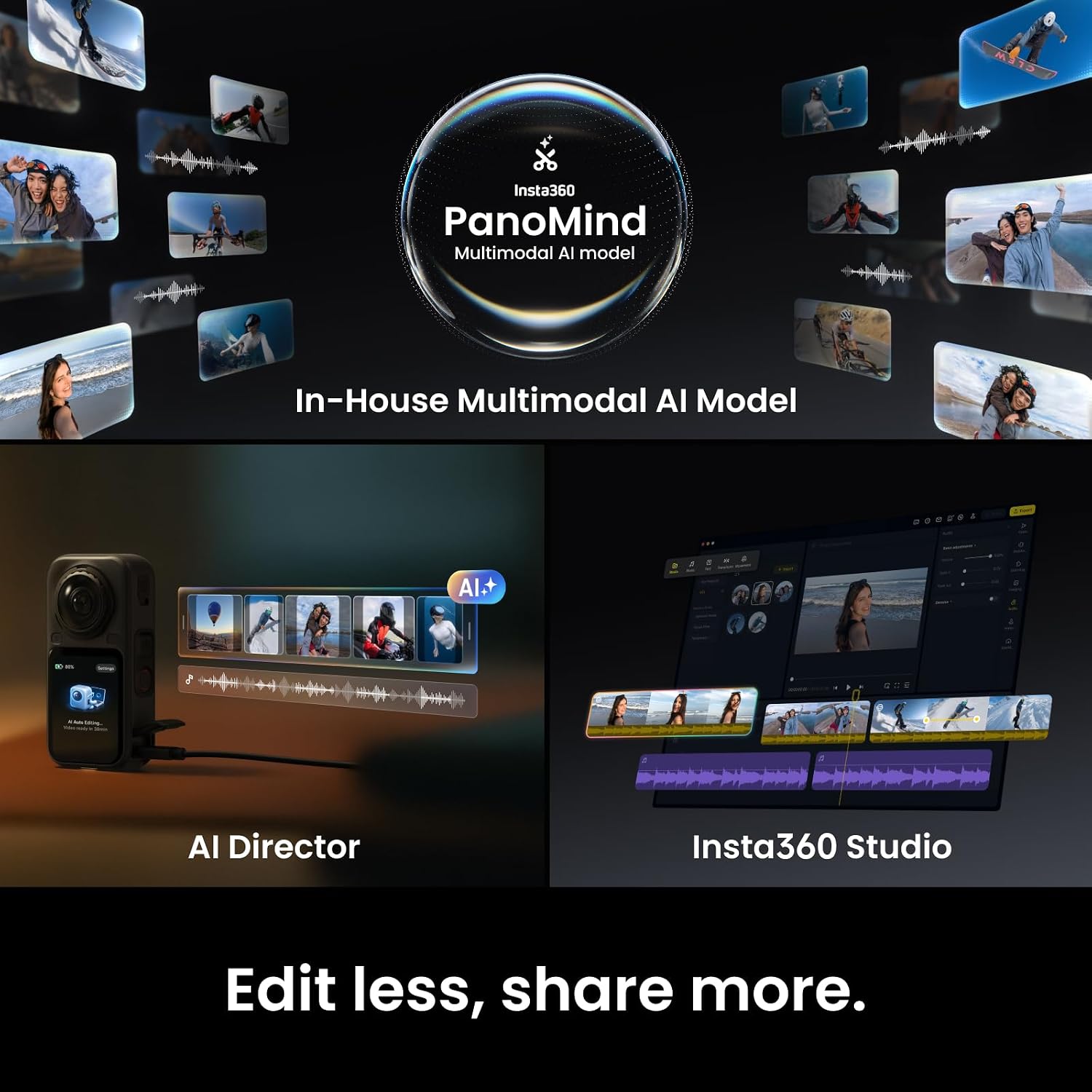
AI Director is the part of that edit the camera will do for you. Power it off, plug it in, and it analyzes your clips during idle charging time. Insta360's FAQ is blunt about where the finished video appears: "The final video from AI Director is synthesized and exported in the Insta360 app." Set to Efficiency Priority, it analyzes during recording as well, which speeds up output and increases power consumption.
It is on by default, and its published limits matter. It looks only at video shot within the last 30 days, it does not currently analyze photos or footage shot in I-Log, and the troubleshooting FAQ says each clip must be longer than one minute. That FAQ also lists the only shooting modes it reads: in 360, Video Mode, PureVideo, TimeShift and Timelapse; in flat, Video Mode, PureVideo and Gimbal Mode 2.0.
Technical Specifications#
| Specification | Value |
|---|---|
| Sensors | Dual custom 1/1.1-inch square |
| Lens aperture | F2.0 |
| Equivalent focal length | 7.78 mm |
| Max 360 video | 8K, 7680 × 3840 at 50fps |
| Max flat video | Up to 5K60fps, or 4K at 120fps |
| Max 360 photo | 120MP |
| Maximum bitrate | 360 Mbps |
| In-camera color profiles | Standard, Dolby Vision, I-Log 10-bit |
| 360 video format | INSV |
| Screen | 2.32-inch OLED, 480 × 600 pixels |
| Internal storage | 64 GB, 47 GB available |
| Card slot | microSD up to 1TB, UHS-I, V30 or higher, exFAT |
| Audio | 48 kHz, 16-bit, AAC |
| Battery | Xtreme Battery, 2600 mAh, included |
| Runtime, 8K30fps | About 140 minutes (360 mode, Standard bitrate) |
| Runtime, 8K50fps | About 79 minutes (360 mode, Standard bitrate) |
| Runtime, 6K60fps | About 90 minutes (360 mode, Standard bitrate) |
| Charging | About 24 minutes to 80%, powered off, 30W PD3.0 PPS 3A adapter |
| Waterproof | IPX8, 65.6 ft (20 m), no case |
| With Dive Case | 196.9 ft (60 m) |
| Dustproof | IP6X |
| Connectivity | Type-C USB 3.1, Wi-Fi 6, BLE 5.3 |
| Weight | About 196 g (6.91 oz) |
| Dimensions | 50 × 100 × 26.4 mm, excluding lenses |
| In the box | Camera, Xtreme Battery, USB-C cable, pouch, cloth |
Pros & Cons#
Pros:
- Native 8K50fps 360 capture from dual custom 1/1.1-inch square sensors, at a camera maximum of 360 Mbps
- 120MP 360 stills, and a choice of Standard, Dolby Vision or I-Log 10-bit color profiles in camera
- IPX8 to 65.6 ft (20 m) without a case and IP6X dust-tight, with the Dive Case rated to 196.9 ft (60 m)
- Auto Wind Noise Reduction, Engine Sound Enhancement and Voice Enhancement among the camera's audio modes
- AI Director analyzes your footage on the camera while it charges, and the Insta360 app synthesizes the finished video
Cons:
- The 140-minute runtime belongs to 8K30fps; in the native 8K50fps mode the camera is sold on, the same 360-mode, standard-bitrate table gives about 79 minutes
- In-camera stabilization is listed as Not Supported for the 360 shooting modes, so 360 clips are stabilized only after import
- Insta360 states that the X6 does not currently support live streaming and cannot connect to the app for live streams
- Insta360's card guidance rules out UHS-II and UHS-III microSD cards, so the fastest card on the shelf is the wrong buy
- Underwater without the Dive Case, Insta360 publishes a before-and-after routine of seal checks, rinsing and drying, and refraction still affects lens focus and stitching quality
- The 24-minutes-to-80% charge is measured with a 30W adapter supporting PD3.0 PPS 3A protocol, and no adapter ships in the box — camera, battery, USB-C cable, pouch and cloth
Final Verdict#
Buy it if you shoot 360 and finish in software. Skip it if you want stabilized 360 clips straight off the card, or if you stream.
The capture side is strong: 8K50fps in 360, 120MP stills, dual 1/1.1-inch square sensors, and a camera maximum of 360 Mbps. It is also, on its own published tables, a camera that expects a second step. A 360 clip leaves it in INSV and unstabilized; the stabilized version comes out of the app or Studio. AI Director will make a first pass for you while the camera charges, on the last 30 days of video, and the app turns that pass into something you can watch. Plan the battery around the mode you actually shoot: the 140 minutes belongs to 8K30fps, and 8K50 is the one you bought it for.
Our recommendation: if 8K50 360 capture is what you came for and an editing pass is normal for you, this is the camera to buy. Check the current details first, and use our accessories guide to plan a UHS-I card rated V30 or higher and the spare battery. View on Amazon