

At a Glance#
The five decisions : Power source, coverage width, storage location, night vision type, detection quality
The one most people get wrong : Storage — a camera that needs a subscription to keep footage is a recurring bill, not a purchase
Hardest to change later : Power, because it dictates where the camera can physically go
Cheapest upgrade : Coverage — one wide-angle camera often replaces two narrow ones
Key Highlights:
- Wired cameras never need charging but limit you to where outlets already are
- A 180-degree dual-lens camera can cover a driveway, porch and both approaches from one mount
- Local microSD storage keeps footage yours; cloud plans keep charging monthly
- Colour night vision needs a spotlight or a very good sensor — infrared alone gives you grey shapes
- "AI detection" is only useful if it distinguishes people from cars, pets and moving branches
Who This Is For#
This is for anyone standing in front of a wall of near-identical camera boxes wondering why one costs four times another. The honest answer is that most of the price gap comes down to the five decisions below, and depending on where you are mounting the camera, several of them may not matter to you at all.
Especially useful if you are:
- A first-time buyer who wants to understand the trade-offs before committing to an ecosystem
- A renter who cannot drill holes or run cable and needs the constraint to lead the choice
- Someone with a wide frontage trying to work out whether to buy one camera or three
- Anyone allergic to subscriptions who wants to know which features survive without a monthly plan
1. Power: Wired, Battery, or Solar#
This is the decision to make first, because it determines where the camera can physically live and everything else follows from that.
Wired cameras run from a permanent outlet. They never need charging, they can record continuously around the clock, and they never wake up late because the battery was conserving power. The cost is placement: the camera goes where the power is, or you pay to run new cable.
Battery cameras go anywhere. That freedom is real, and it is the reason they sell. The trade-off is that battery cameras do not record continuously — they wake on motion, record a clip, and go back to sleep. That sleep is also why they occasionally miss the first second of an event.
Solar is battery with the charging problem removed, provided the panel gets genuine direct sun for a few hours a day. North-facing walls and heavily shaded gardens quietly turn a solar camera back into a battery camera you have to fetch down a ladder to charge. The Tapo C425 is the budget version of that arrangement, wire-free and outdoor-rated — buy it as the kit that bundles the solar panel, since the camera is also sold on its own with the panel as an extra. If that arrangement suits you: View on Amazon
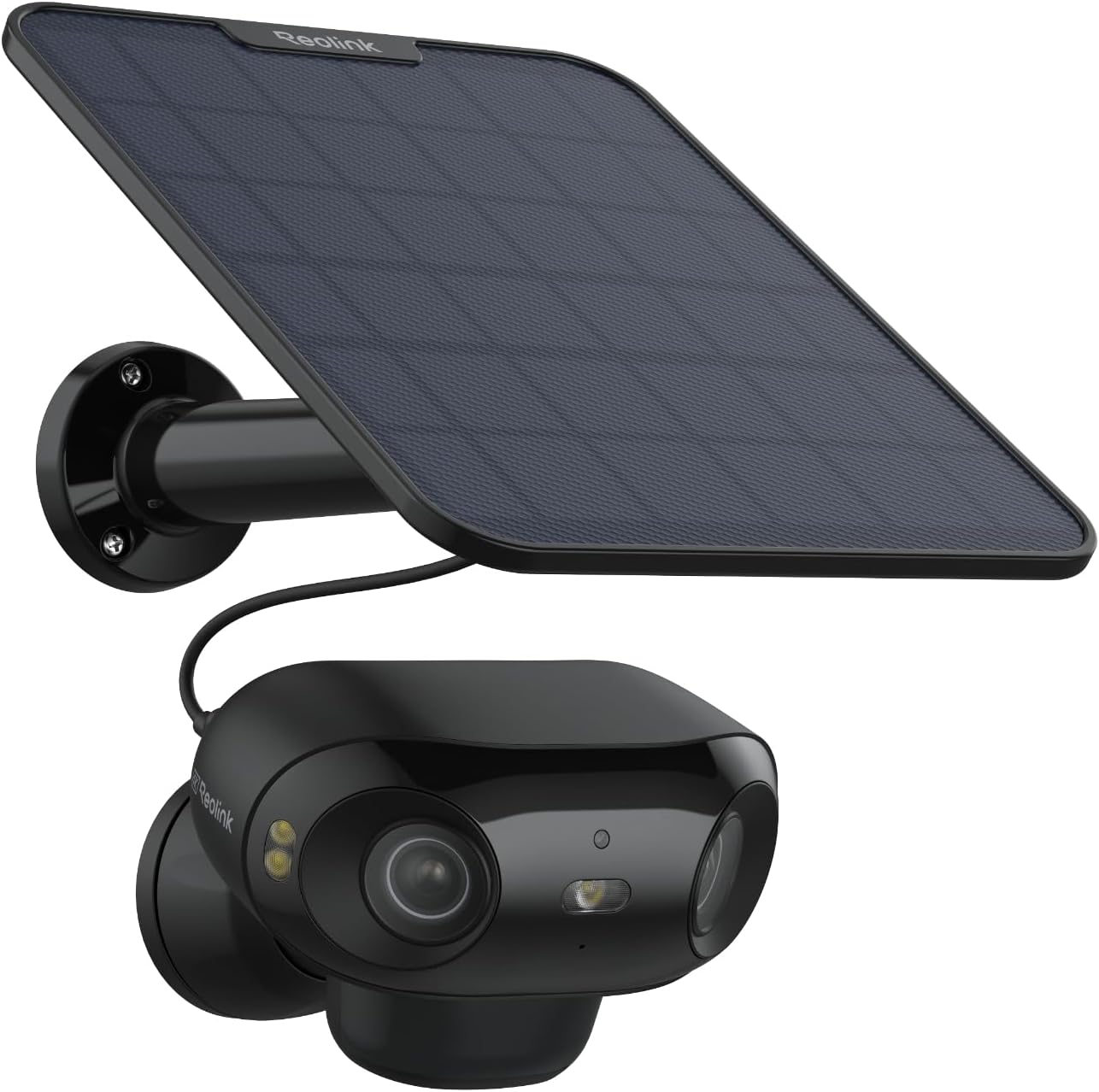
The Reolink Argus 4 Pro is a clean example of the wire-free approach done properly: battery-powered with an optional solar panel, a USB-C port for top-ups, and an IP66 rating so it survives being mounted somewhere inconvenient. It weighs 400g in a 128 x 87 x 80mm body, which is chunkier than a typical bullet camera — that is the dual-lens hardware inside. If you want coverage in a spot with no outlet, this is the shape that solves it: View on Amazon
Our recommendation: decide the mounting position first, then let it choose the power type. Buying a battery camera and then mounting it beside an outlet is paying for flexibility you never use.
2. Coverage: How Much One Camera Actually Sees#
A standard security camera sees roughly a quarter of the horizon. That sounds like plenty until you mount one above a front door and discover it watches the doormat while someone walks along the side of the house unrecorded.
There are three ways to buy more coverage, and they are not equivalent.
More cameras is the obvious answer and the most expensive one, in money and in the number of apps, batteries and mounts you end up maintaining.
Pan and tilt puts the camera on a motor so it can look around and follow movement. The Tapo C520WS does this outdoors with 360-degree coverage — the head itself turns 340 degrees, and the lens angle carries the rest — plus motion tracking that follows a subject across the frame. The catch is inherent to the design: a camera that is looking left is not recording what is happening on the right. Tracking is excellent for watching one thing move; it is not the same as seeing everywhere at once: View on Amazon
Indoors the same mechanism is cheaper and more useful, because a single room is exactly the case a motor handles well — see our Tapo C220 review.
Dual-lens stitching is the newer answer. Two lenses capture side by side and the camera merges them into one continuous ultra-wide image. A 180-degree view mounted above a front door genuinely covers the yard, the driveway and both approaches simultaneously — that is one camera doing the job of two or three, with one battery to charge and one feed to check. Note that the 180 degrees is horizontal only; vertical coverage stays at a normal 50 degrees, so aiming still matters — you are buying a wide band, not a dome.
Our recommendation: stand where the camera will go and look around. If the things you care about are spread across more than a quarter of your view, buy width rather than a second camera. A driveway is the hardest version of this: you want both width and reach, and reading a licence plate needs the vehicle within roughly 15–20 feet of a wired camera, or 15–25 feet of a spotlight-assisted one — so mount for the distance the plate actually sits at, not just the far end of the approach.
3. Where the Footage Lives#
This is the decision with the longest financial tail, and the one buried deepest in the marketing.
Local storage means a microSD card in the camera. Footage is yours, there is no monthly cost, and it keeps recording when the internet drops. The limits are real: cards fill up and overwrite, and a stolen camera takes its footage with it.
Cloud storage uploads clips to the manufacturer's servers. It survives theft, it is accessible anywhere, and it is almost always a subscription — one that renews for as long as you own the camera. The camera is a one-off purchase; the plan is not.
Worth checking before you buy: which features stop working without a plan. On some cameras the subscription only buys storage. On others, person detection, notification detail, or even video history quietly sit behind the paywall too. Cameras like the Reolink Argus 4 Pro take local microSD up to 512GB with detection included and no plan at all, which is a materially different long-term proposition from a cheaper camera that needs a monthly fee to be useful.
Our recommendation: work out the subscription cost over the years you expect to own the camera and add it to the purchase price. The ranking changes more often than you would expect.
4. Night Vision: Grey Shapes or Real Colour#
Most break-ins happen in the dark, so this is where a camera earns its keep — and where the spec sheet is most misleading.
Infrared is the traditional approach. Invisible IR LEDs light the scene and the camera records in black and white. It works, it does not announce itself, and it is on the large majority of cameras sold — though not all: the newest low-light colour cameras, including the Argus 4 Pro below, ship with no IR emitters at all and treat that as a selling point. What infrared cannot tell you is that the jacket was red or the car was blue, which is precisely the detail that matters afterwards.
Spotlight colour night vision switches on a visible white light so the sensor records in full colour. You get usable detail; you also get a light that turns on in your neighbour's bedroom window at three in the morning. The Tapo C120 takes this route with dual spotlights, and it is a sound trade for a driveway or a side passage: View on Amazon
Low-light colour is the premium answer: a fast lens and a large sensor holding colour in near-darkness on whatever ambient light exists. Reolink markets this as ColorX on the Argus 4 Pro. Read "near-darkness" literally, though — it needs some residual light, and the Argus 4 Pro still carries five spotlights for the genuinely black cases. On this model they are tied to ambient light rather than to motion: the choice is off, or an automatic mode that fires whenever the scene goes fully dark. That is the less forgiving of the two behaviours, because the light comes on and stays on rather than flicking on for an event. If a light must never come on, off is the setting to find on day one.
A budget version of low-light colour exists too, and it is the gentler-on-neighbours option: the TP-Link Tapo C325WB pairs a large sensor — 1/1.79" on the V1 revision, a 1/1.88" unit TP-Link labels Starlight on the V2 — with an f/1.0 aperture, so it holds full colour at night without a spotlight firing. It is not spotlight-free in every condition: the V2 spec sheet lists IR night vision alongside ColorPro, and TP-Link says "the IR mode will turn on when there is no light at all". The other catch is that it is wired, so it needs a weatherproof outlet or a PoE run within reach.
Our recommendation: decide whether a light going on at night is acceptable where the camera is mounted. If it is not, shop for low-light colour specifically — and then check what triggers the spotlight and how to disable it, because most cameras in this class keep a spotlight as a fallback.
5. What "AI Detection" Actually Means#
Every camera on the shelf claims AI detection. The phrase covers everything from genuinely useful to actively annoying, and the difference is what it can tell apart.
Basic motion detection fires on any pixel change. Rain, headlights sweeping a wall, a cat, a branch in the wind. Within a week you stop reading the notifications, which defeats the entire point of having the camera.
Object classification distinguishes people from vehicles from animals, so you can ask to be told about people only and ignore everything else. This is the feature that decides whether you keep notifications switched on after month one. Every camera named here includes it without a plan — all three Tapo models detect people, vehicles and pets, and the Reolink detects people, vehicles and animals.
Two things worth verifying before you buy: whether classification is free or subscription-gated, and whether the camera lets you draw activity zones so it ignores the pavement and watches only your path.
Our recommendation: treat free person-detection as the baseline, not a premium feature. A camera that charges monthly to tell people from cars is charging you to make its notifications tolerable.
Four Cameras, Four Different Answers#
The point of the framework is that different cameras resolve these trade-offs differently, and none of them is the winner in the abstract.
The Tapo C120 answers the budget question. 2K resolution at 2560x1440, IP66 weatherproofing rated from -25°C to 45°C, free AI detection for people, pets and vehicles, and dual spotlights for colour at night. It mounts on a magnetic base with a jointed arm, so one hand is enough to re-aim it — which is why it suits renters and anyone testing whether they want cameras. The metal plate the magnet grips goes up either on the supplied adhesive pad, which needs no drilling, or on screws and anchors for anywhere the adhesive will not hold. It runs on 2.4GHz Wi-Fi and needs mains power: View on Amazon
The Tapo C520WS answers the coverage question on a budget. Also 2K, also outdoor-rated, but on a motor: 340 degrees of mechanical pan giving 360-degree coverage, with tilt and motion tracking that follows a subject across the frame. Storage goes to an SD card or the cloud, and it supports continuous 24/7 recording rather than motion clips alone. Person, pet, vehicle and motion detection are included with no plan: View on Amazon
The Tapo C425 answers the no-outlet question at the budget end. Also 2K and outdoor-rated, wire-free on a rechargeable battery, and sold as a kit with a solar panel so it tops itself up wherever it gets a few hours of sun. Free person, pet and vehicle detection, local storage or cloud. It is the one to reach for when the spot has no power and the Reolink is more camera than the job needs: View on Amazon
The Reolink Argus 4 Pro answers the "no compromises, no cables, no subscription" question. 4K across a stitched 180-degree dual-lens view, ColorX colour night vision, Wi-Fi 6 on both bands, battery with optional solar, IP66, and up to 512GB of local storage with AI detection and no plan required. It is the most expensive here, and it is the one that replaces two or three cameras with one: View on Amazon
How to Choose in Five Minutes#
Work through the decisions in order and most of the market eliminates itself.
Start with where it goes, because that settles power. If there is an outlet, wired is simpler and records continuously. If there is not, you are buying battery, and if the spot gets real sun you should be buying solar. If drilling is not an option at all — a rental, a listed building, a shared wall — start from wire-free cameras instead, and let the mounting constraint lead the choice.
Then stand there and look. If what you care about spans a wide arc, buy a wide camera rather than a second one — a dual-lens 180-degree view is genuinely cheaper than two cameras once you count mounts, batteries and your own attention.
Then check the subscription page, not the product page, and find out what stops working without a plan.
Then decide whether a light can come on at night in that position. If not, you need low-light colour, and that narrows things sharply.
Finally, confirm the camera can tell a person from a car without charging you for it. If it cannot, you will switch the notifications off within a month, and a camera you have stopped listening to is not doing its job.
If you want one camera to cover a wide frontage without wiring or monthly fees, the Argus 4 Pro is the one that clears all five: View on Amazon