

Summary#
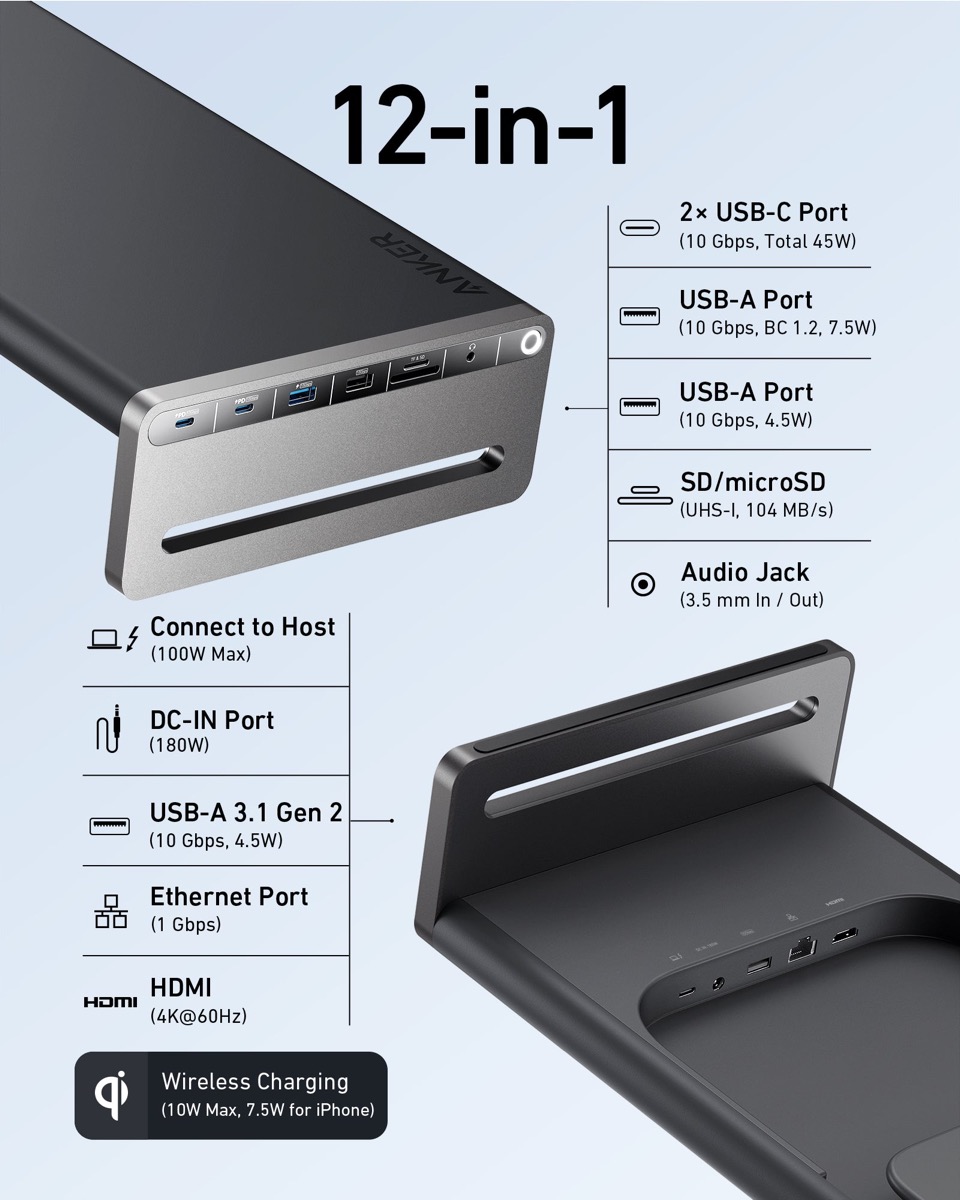
The Anker 675 USB-C Docking Station is a 12-in-1 hub that doubles as a monitor stand and wireless charger. It delivers 100W laptop charging, 4K@60Hz HDMI output, 10Gbps data transfer, gigabit Ethernet, and card readers in a cable-hiding aluminum body that replaces five separate desk accessories for anyone building a clean, single-cable workstation.
At a Glance#
Product : Anker 675 USB-C Docking Station (12-in-1, Monitor Stand, Wireless)
Brand : Anker
Best For : Remote workers and laptop users who want to declutter their desk with one device that handles charging, display, data, and ergonomics
Form Factor : Aluminum monitor stand with integrated docking station and wireless charger
Buy Now : View on Amazon
Key Highlights:
- 12-in-1 connectivity replaces a USB hub, monitor stand, wireless charger, card reader, and Ethernet adapter
- 100W USB-C Power Delivery charges laptops at full speed through a single cable
- 4K@60Hz HDMI output drives a crisp external display without a separate adapter
- 10Gbps USB-C and USB-A ports transfer a 1GB file in under one second
- Built-in wireless charging pad tops up your phone without another cable on the desk
Who Should Buy This#
The Anker 675 hits a sweet spot for laptop users who are tired of a desk covered in dongles, adapters, and tangled cables. It consolidates a monitor stand, USB-C hub, wireless charger, card reader, and Ethernet adapter into one aluminum slab, at a price lower than buying those five accessories separately.
Perfect for:
- Remote workers with a single laptop who want to plug in one USB-C cable and instantly connect to a monitor, keyboard, mouse, Ethernet, and charging
- Creative professionals who regularly transfer large files from SD cards and need 10Gbps ports plus a 4K display output
- Desk setup enthusiasts who want clean cable management with all wires hidden underneath the stand instead of sprawling across the desk
- Mac and Windows users who switch between laptops and want a universal docking station that works with any USB-C laptop without driver installs
Design & Build Quality#
The Anker 675 measures 540 × 220 × 90 mm (21.26 × 8.66 × 3.54 inches) and supports monitors up to 22 lbs. The full-aluminum construction feels substantial and premium, a noticeable step up from the plastic hubs that dominate the under-$100 market. The matte silver finish pairs naturally with Apple and Dell hardware, though it works with any setup.
The standout design choice is cable routing. All cables plug into ports underneath the stand and route through a rear channel, completely hidden from view. Set it up once and you see a clean aluminum slab on your desk with a single USB-C cable running to your laptop. The wireless charging pad sits on the right side of the top surface, marked by a subtle ring, so your phone charges without adding yet another cable to the desk.
Key Features#
100W USB-C Power Delivery#
Plug your laptop into the upstream USB-C port and it receives up to 100W of charging power. That is enough to charge a 14-inch MacBook Pro or a Dell XPS 15 at full speed while driving an external display and transferring data simultaneously. Most competing monitor stand hubs cap out at 60W or 85W, which leaves larger laptops charging slowly or not at all under heavy workloads.
4K@60Hz HDMI Display Output#
The HDMI 2.0 port drives a 4K display at a full 60Hz refresh rate. You get a sharp, smooth image for productivity work, photo editing, or video playback. Connect your laptop, and the external monitor fires up instantly with no drivers to install. The 60Hz refresh rate means scrolling and cursor movement feel fluid, not choppy like the 30Hz output on older hubs.
10Gbps USB-C and USB-A Ports#
Five downstream data ports run at USB 3.2 Gen 2 speeds: two USB-C and three USB-A. At 10Gbps, you can transfer a 4K video file from an external SSD in seconds rather than minutes. The USB-C ports also share 45W of power delivery for charging phones, tablets, or accessories. Three USB-A ports handle peripherals like a keyboard, mouse, and webcam without running out of connections.
Built-In Wireless Charging#
The right side of the top surface houses a Qi wireless charging pad rated at 10W for Android devices and 7.5W for iPhones. Drop your phone on the pad when you sit down, and it charges throughout the workday without a cable. The charging area is recessed slightly to keep your phone from sliding off, and an LED indicator confirms active charging.
Gigabit Ethernet and Card Readers#
The RJ45 port delivers gigabit Ethernet (10/100/1000 Mbps), giving you a wired connection for video calls and large downloads where WiFi falls short. The SD and microSD card slots both support UHS-I speeds at 104MB/s, making it easy to import photos or video footage directly without a separate card reader.
Technical Specifications#
Total Ports : 12 (2 USB-C, 3 USB-A, 1 HDMI, 1 Ethernet, 1 SD, 1 microSD, 1 Audio, 1 Wireless Charger, 1 USB-C Upstream)
Upstream USB-C : 100W Power Delivery (laptop charging)
Downstream USB-C : 2× USB 3.2 Gen 2, 10Gbps, 45W PD shared
USB-A Ports : 3× USB 3.2 Gen 2, 10Gbps
Display Output : HDMI 2.0, 4K @ 60Hz
Ethernet : RJ45, 10/100/1000 Mbps
Card Readers : SD + microSD, UHS-I, 104MB/s
Audio : 3.5mm combo jack, 96KHz/24-bit
Wireless Charging : Qi, 10W (Android) / 7.5W (iPhone)
Dimensions : 540 × 220 × 90 mm (21.26 × 8.66 × 3.54 in)
Power Input : 180W DC adapter
Compatibility : Windows 10/11, macOS 10.14+, Chrome OS
Pros & Cons#
Pros:
- Replaces five desk accessories with one device: hub, stand, charger, card reader, Ethernet adapter
- 100W PD charges even power-hungry 15-inch laptops at full speed
- Cable management hides every wire underneath the stand for a clean desk
- 10Gbps across all five data ports handles external SSDs without bottlenecks
- Wireless charging pad eliminates one more cable from the desk
- Plug-and-play on Mac, Windows, and Chrome OS with zero driver installs
Cons:
- Premium pricing puts it above budget USB-C hubs
- Single HDMI output limits you to one external monitor
- Underside port placement makes initial cable setup harder than front-facing designs
- No DisplayPort output for daisy-chaining or high-refresh monitors
Final Verdict#
Buy it. The Anker 675 USB-C Docking Station eliminates desk clutter like nothing else in its class, consolidating five accessories into one aluminum slab that raises your monitor to ergonomic height while hiding every cable from view.
Our recommendation: If you work from a laptop and want the cleanest possible desk setup with a single cable connection, this is the hub to get. Check it out here: View on Amazon