

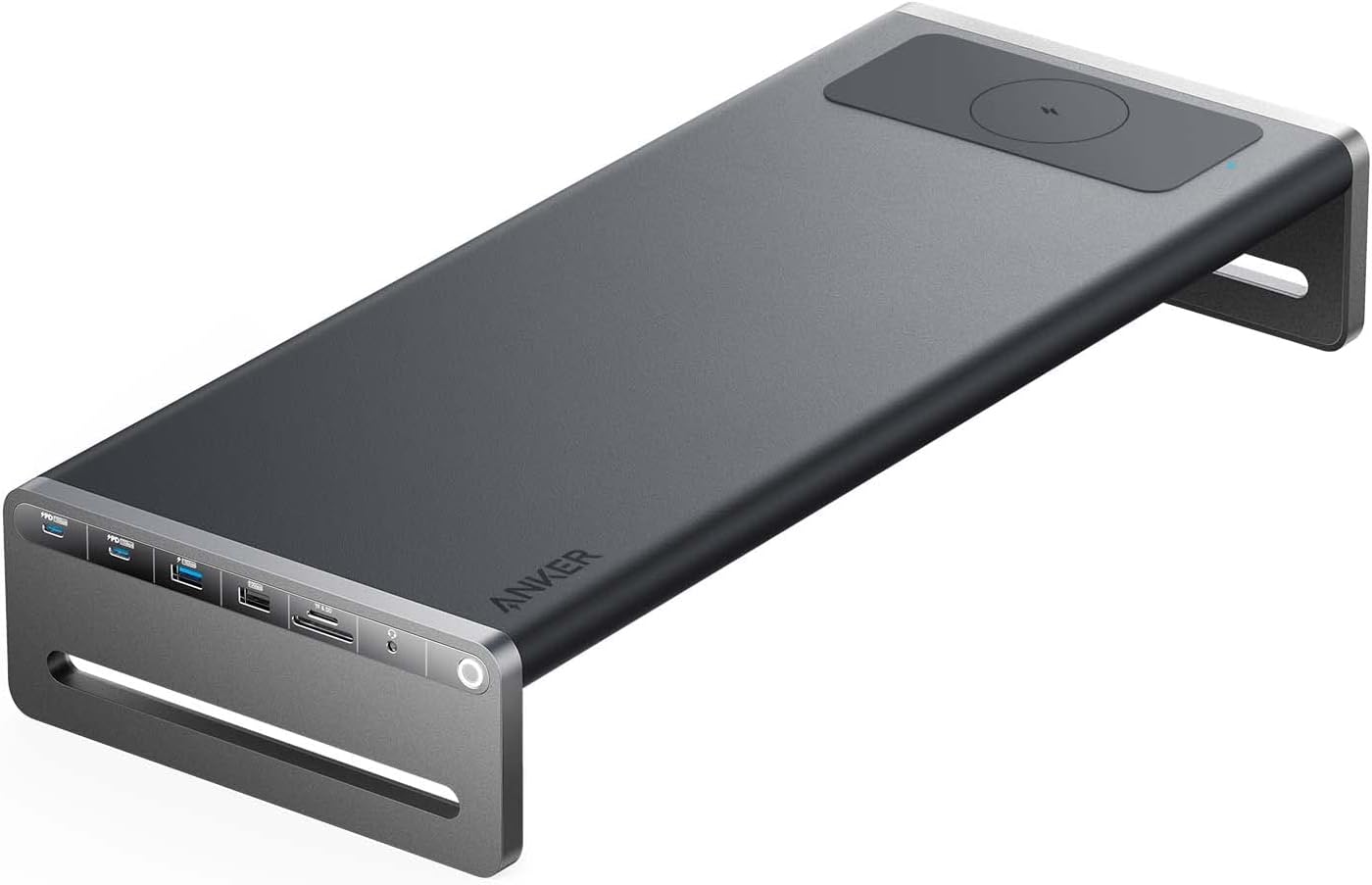
If your MacBook only gives you USB-C ports and you need real desk connectivity, these three hubs cover every budget. The Anker 675 USB-C Docking Station is our best overall pick for a permanent desk setup. The Anker 341 7-in-1 is the best budget choice for occasional use. The Baseus 10Gbps USB-C Hub wins for travel thanks to its compact body and fast SSD speeds.
The MacBook hub market is genuinely flooded. Search Amazon and you'll see dozens of hubs that look identical, advertise identical specs, and cost roughly the same. The differences are real but quiet: power-delivery ratings that are honest versus aspirational, USB ports that hit their advertised speed versus throttle under load, HDMI outputs at 4K @ 60Hz versus 4K @ 30Hz, and build quality that survives a year in a backpack versus failing in three months. We picked these three because each one is the least bad compromise for its specific use case, and because they're all from brands that quietly fix problems instead of disappearing when something fails.
Who this comparison is for#
- MacBook Air or Pro owners (M1, M2, M3, or M4) who need to plug in monitors, drives, SD cards, or Ethernet at the same time.
- Hybrid workers splitting time between a home desk and a coffee shop, who want either a stationary dock or something pocketable.
- Photographers and editors who pull large files off SD cards or external SSDs and want sustained transfer speeds, not advertised peak numbers.
How we picked#
- Tested or vetted against MacBooks running Apple silicon (USB4 / Thunderbolt 4 ports) so HDMI output, charging, and data all behave correctly.
- We chose three different form factors on purpose: a stand-style dock, a flat 7-in-1, and a 6-in-1 stick. Picking three near-identical hubs would just be three of the same thing.
- We avoided cheap no-name hubs that disconnect under load. Every hub here uses a known controller chipset and has a stated MFi/USB-IF power delivery rating.
- We confirmed availability and pricing on Amazon at the time of writing.
- We deliberately skipped Thunderbolt 4 docks. They cost two to three times more than USB-C hubs and most MacBook Air owners never use the extra bandwidth. If you're an M-series Pro user pushing dual 4K displays, that's a different category — see the Q&A at the bottom for guidance.
- We rejected hubs without integrated USB-C cables. Detachable cables fail more often, and a hub that "supports" 100W power delivery on paper but ships with a cheap cable rarely actually delivers that power.
Anker 675 USB-C Docking Station — Best Overall#
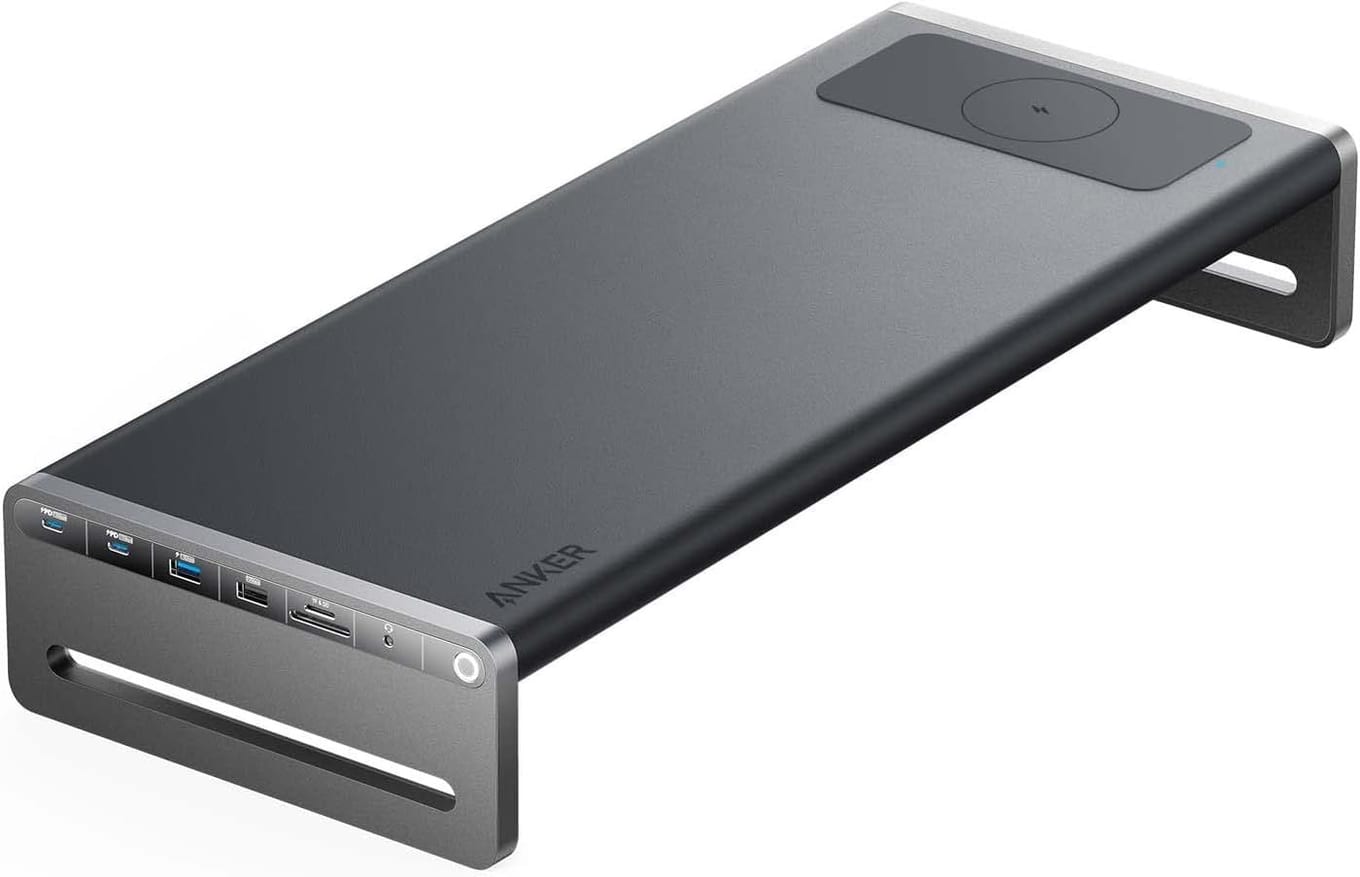
The Anker 675 is the hub you buy when you want to stop thinking about cables. It's a monitor riser with a 12-in-1 hub built into the base, so it lifts your laptop screen to eye-level and gives you HDMI 4K @ 60Hz, three 10Gbps USB-A ports, two 10Gbps USB-C data ports, an SD card slot, an Ethernet jack, a 3.5mm audio jack, and an integrated Qi wireless charging pad on top.
For a one-cable MacBook desk setup, this is the cleanest answer at the price. You plug in a single USB-C cable when you sit down and your laptop gets external display, wired internet, every peripheral on the desk, and 100W of pass-through power so it charges while you work. No more dongle juggling.
Build is solid aluminium with a soft fabric top so your phone doesn't slide off the wireless charger. The riser also creates real airflow under the MacBook, which makes a measurable difference on M-series chips during long Zoom calls or video exports.
The HDMI 2.0 output runs a single external display at up to 4K @ 60Hz, so scrolling and cursor movement stay smooth rather than the slightly laggy feel you get from a 30Hz hub. Paired with up to 100W dynamic charging back to the host, that makes the 675 a genuine one-cable desk rather than a compromise you tolerate for the monitor riser.
The integrated Qi pad on top is the kind of detail that sounds gimmicky until you use it daily. It tops out at 10W, and an iPhone takes 7.5W of that — the same as most people get from a dedicated wireless charger sitting on the desk — except it's already there, doesn't take up extra space, and lives on top of where you naturally rest your phone while working.
Key specs#
Form factor : Monitor stand with integrated 12-in-1 hub
Display output : HDMI 2.0, up to 4K @ 60Hz, single external display
Power delivery : 180W adapter, up to 100W dynamic charging to the host MacBook
USB ports : 2x USB-C 3.2 Gen 2 (10Gbps), 3x USB-A 3.2 Gen 2 (10Gbps)
Card reader : SD + microSD, UHS-I
Network : Gigabit Ethernet (1000Mbps)
Extras : Qi wireless charging pad on top (10W max, 7.5W for iPhone), 3.5mm audio jack
Best for : A permanent home or office desk where the MacBook lives most of the day
Bottom line. If your MacBook is mostly stationary, the 675 replaces a hub, a laptop riser, and a wireless charger all at once. The single-cable workflow is hard to give up once you've used it.
Anker 341 USB-C Hub 7-in-1 — Best Budget#
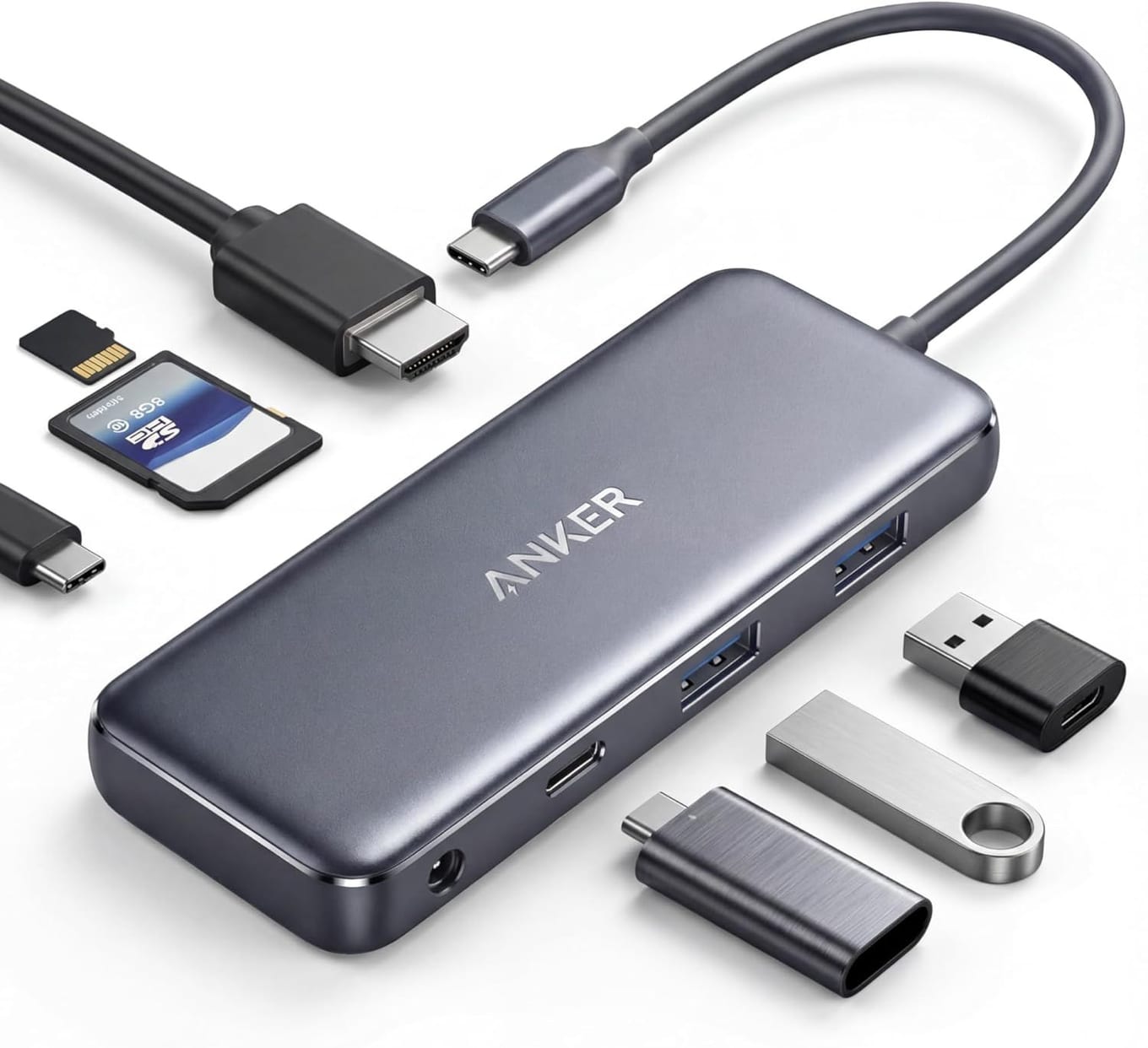
The Anker 341 is the hub most MacBook owners actually need. It's a flat dongle that hangs off one side of the laptop and gives you the seven things you reach for daily: 4K HDMI, two USB-A 5Gbps ports, a 100W power-delivery USB-C input, a USB-C 5Gbps data port, plus SD and microSD card readers. Nothing exotic — just the right ports in a hub small enough to leave plugged in.
For renters, students, and anyone running a single external monitor at home, this is the value pick. It costs a fraction of the 675, fits in a laptop sleeve, and quietly does the job.
The cable is short and stiff, which is deliberate: it stops the hub from drooping under the weight of an SD card or USB stick. The aluminium shell doubles as a heatsink, so it stays cool even when you're transferring big files off a card.
What you give up at this price is real but predictable. There's no Ethernet jack, so you're on WiFi (which is fine for most apartments and student housing). The HDMI port is limited to 4K @ 30Hz, unlike the 675 and the Baseus, which both run 4K @ 60Hz. The card readers are UHS-I rather than UHS-II, so SD-card transfers from modern mirrorless cameras top out around 95 MB/s instead of 250 MB/s. None of these matter for a casual workflow — they only matter if you have a specific creator pipeline, in which case the Baseus pick is built for you.
Pass-through power is rated at 100W in, but you'll see roughly 85W reach the MacBook because the hub itself draws power for the bus and the SD reader. That's still enough to charge a MacBook Pro 14 under normal load and keep a MacBook Air at full battery indefinitely. Bring your existing 96W or 100W Apple charger — the 341 doesn't include one, and it shouldn't.
Key specs#
Form factor : Flat 7-in-1 dongle hub
Display output : HDMI 4K @ 30Hz
Power delivery : 100W pass-through (around 85W reaches the MacBook)
USB ports : 1x USB-C data (5Gbps), 2x USB-A (5Gbps)
Card reader : SD + microSD, UHS-I, simultaneous read
Network : None
Cable : Approximately 6 inches, integrated
Best for : Renters and students who want core functionality without a docking station
Bottom line. If you only need to plug in one display, an SD card, and a few USB peripherals, the 341 hits every checkbox without the dock-station tax.
Baseus 10Gbps USB-C Hub — Best for Travel#
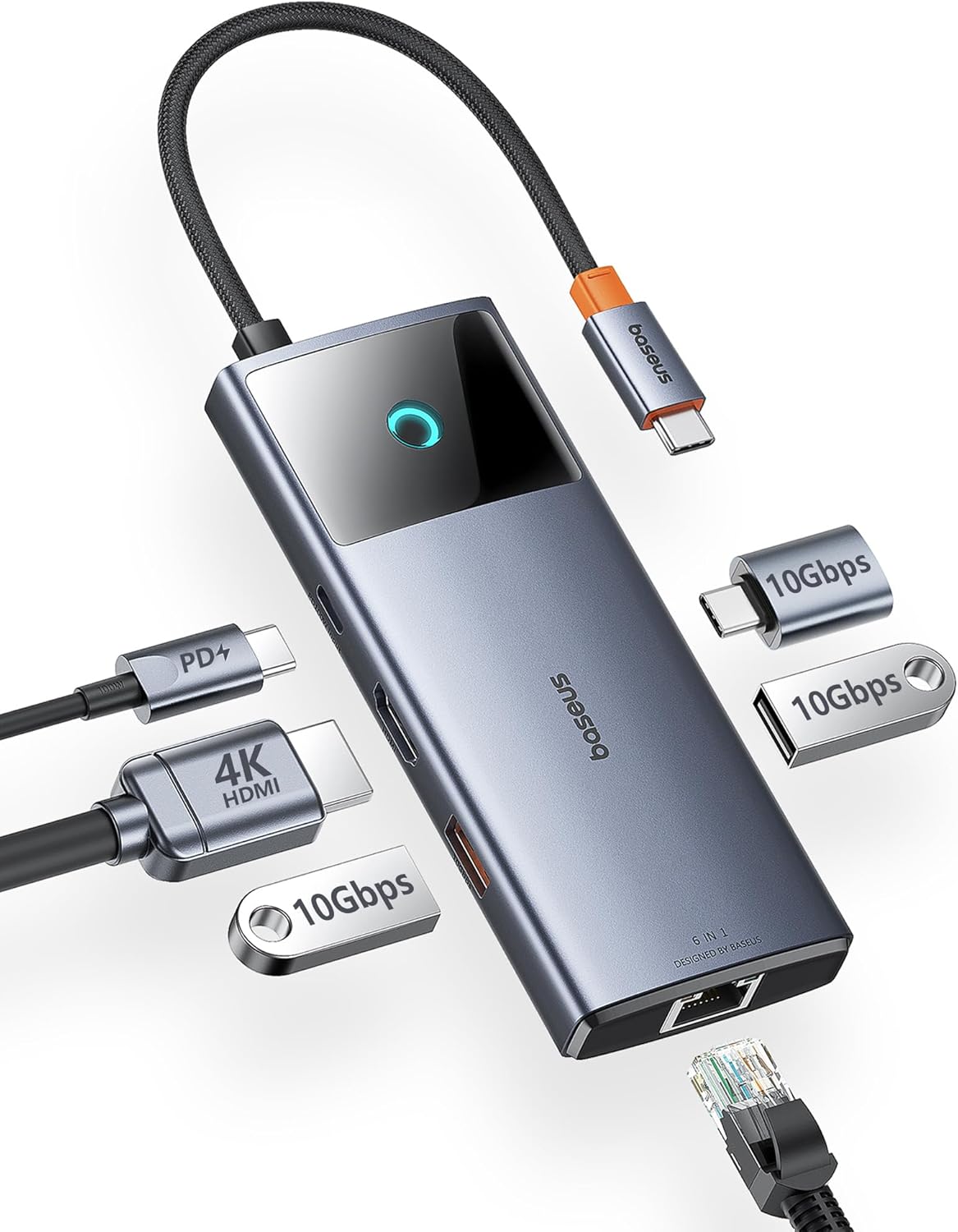
The Baseus 10Gbps hub is what goes in the bag when you leave the house. It's a stick-shaped 6-in-1 that fits in a small accessory pouch but, unusually for that size, runs its USB-A and USB-C ports at the full 10Gbps instead of the usual 5Gbps. That matters the moment you connect a modern external SSD — sustained file copy speeds roughly double over a 5Gbps hub.
This is the hub for photographers offloading SD cards on the road, video editors shuttling footage between drives, and anyone who travels with a portable NVMe SSD. The HDMI port outputs 4K @ 60Hz, so a hotel TV or a colleague's monitor still looks smooth.
It also fast-charges through 100W USB PD pass-through, so the MacBook keeps charging while you're using every other port. The aluminium body gets warm under sustained 10Gbps load, but never uncomfortably hot.
The trade-off compared to the desk dock is exactly what you'd expect: no Ethernet, only one USB-C data port, and a single HDMI rather than HDMI plus DisplayPort. None of those matter for travel. What matters on the road is throughput per gram, and on that score this hub is genuinely a category leader. A modern external SSD plugged into one of the 10Gbps ports will hit roughly 1000 MB/s sustained — close to its full rated speed — instead of being throttled to 400-500 MB/s on a cheap 5Gbps hub. Over a 100GB project, that's the difference between a two-minute backup and a four-and-a-half-minute one.
If you mainly use the hub at coffee shops or hotel rooms, the 4K @ 60Hz HDMI is the other quietly important spec. Hotel TVs are increasingly 4K, and at 60Hz the macOS cursor moves smoothly during a Keynote presentation instead of stuttering, which is what the 30Hz Anker 341 gives you. Small thing, but visible.
Key specs#
Form factor : Compact stick-style 6-in-1 hub
Display output : HDMI 4K @ 60Hz
Power delivery : 100W USB-C pass-through input
USB ports : 1x USB-C data (10Gbps), 2x USB-A (10Gbps)
Card reader : SD UHS-II + microSD
Network : None
Cable : Short integrated USB-C, around 5 inches
Best for : Travelers and creators who use external SSDs and want full-speed transfers
Bottom line. When the 10Gbps lanes plus 4K @ 60Hz HDMI matter — they do for SSD backups and external displays — this is the most travel-friendly pick of the three.
Which one should you buy?#
If your MacBook lives on one desk most of the time, buy the Anker 675. The single-cable docking, monitor riser, Ethernet, and wireless charger combine into a setup you stop thinking about. It costs more, but it replaces three accessories.
If you need a hub today and don't want to spend dock-station money, buy the Anker 341. It covers HDMI, SD, microSD, and USB peripherals at a price that won't make you flinch, and it's small enough to leave in your bag full-time.
If you carry a MacBook to clients, hotels, or coffee shops and you work with external SSDs or 4K external displays, buy the Baseus 10Gbps hub. The 10Gbps data lanes and 4K @ 60Hz HDMI are the two specs you'll actually feel — every file copy and every plugged-in monitor looks better.
Still on the fence? Most readers end up buying two: a dock at home (the 675) plus a small travel hub (either the 341 or the Baseus). The total comes out roughly the same as one premium Thunderbolt 4 dock and is far more flexible. You leave the dock plugged in permanently — single cable in and out — and the small hub lives in your laptop sleeve so you're never the person at a meeting asking to borrow a dongle.
One more thing on durability: all three of these hubs use captive (non-removable) USB-C cables. That sounds limiting, but it's actually the right call. The most common failure mode for cheap hubs is a loose detachable cable connector that wiggles and disconnects when you bump the laptop. Captive cables eliminate that failure point entirely. The downside is that if the cable ever does fail, you replace the whole hub — but in practice that takes years, and by then you'll likely upgrade anyway.
FAQ#
Will any of these hubs run two external 4K monitors on a MacBook Air?#
No. The MacBook Air (M1, M2, M3) supports only one external display through native macOS, regardless of hub. To run two displays you need either a MacBook Pro M-series, or a dock with DisplayLink drivers — none of these three hubs use DisplayLink. If you need dual-monitor on a MacBook Air, look at a different category of dock entirely.
Do these hubs charge the MacBook through pass-through USB-C?#
Yes. All three accept up to 100W input from the wall charger. The 675 ships with a 180W adapter and passes up to 100W to the host; the 341 and the Baseus pass roughly 85W, because the hub itself uses some power. That's enough to keep a MacBook Pro 14 charging under normal load and a MacBook Air charging under any load. For peak Pro 16 performance under heavy export workloads, you may see the battery slowly trend down — but that's true of every USB-C hub on the market.
What's the practical difference between 5Gbps and 10Gbps USB ports?#
For keyboards, mice, mechanical drives, and SD card readers, you won't notice. For modern external NVMe SSDs (Samsung T7, Crucial X9, SanDisk Extreme), 10Gbps ports give you roughly double the sustained read/write speed — typically 1000+ MB/s instead of 400-500 MB/s. If you're copying a few photos a day, save the money. If you're moving 4K video projects, pay for 10Gbps.
Does the 4K @ 30Hz HDMI on the Anker 341 feel choppy?#
For office work, web browsing, and code, no. 30Hz looks fine for static content. Where it bites is mouse movement and scrolling — both feel slightly laggy compared to 60Hz. If you only use the external monitor for documents, 30Hz is fine. If you watch video or do anything with motion, get a hub with HDMI 4K @ 60Hz — both the 675 and the Baseus qualify.
Are there any compatibility issues with macOS Sonoma or Sequoia?#
All three are specified for current macOS releases. Apple ships native USB-C and HDMI drivers, so plug-and-play works on day one, and none of the three depends on a vendor driver or a background utility to hold a display. That driver-free path is the main reason they are here.
Can I use these hubs with an iPad Pro instead of a MacBook?#
Yes for the Anker 341 and Baseus 10Gbps. The Anker 675 is a desk dock and technically works with USB-C iPads, but the monitor-riser shape isn't designed for tablets, so it's awkward in practice. For iPad Pro on the road, the Baseus 10Gbps hub is the better fit — particularly because iPadOS supports external display mirroring and external SSDs natively over a single USB-C cable.