

At a Glance#
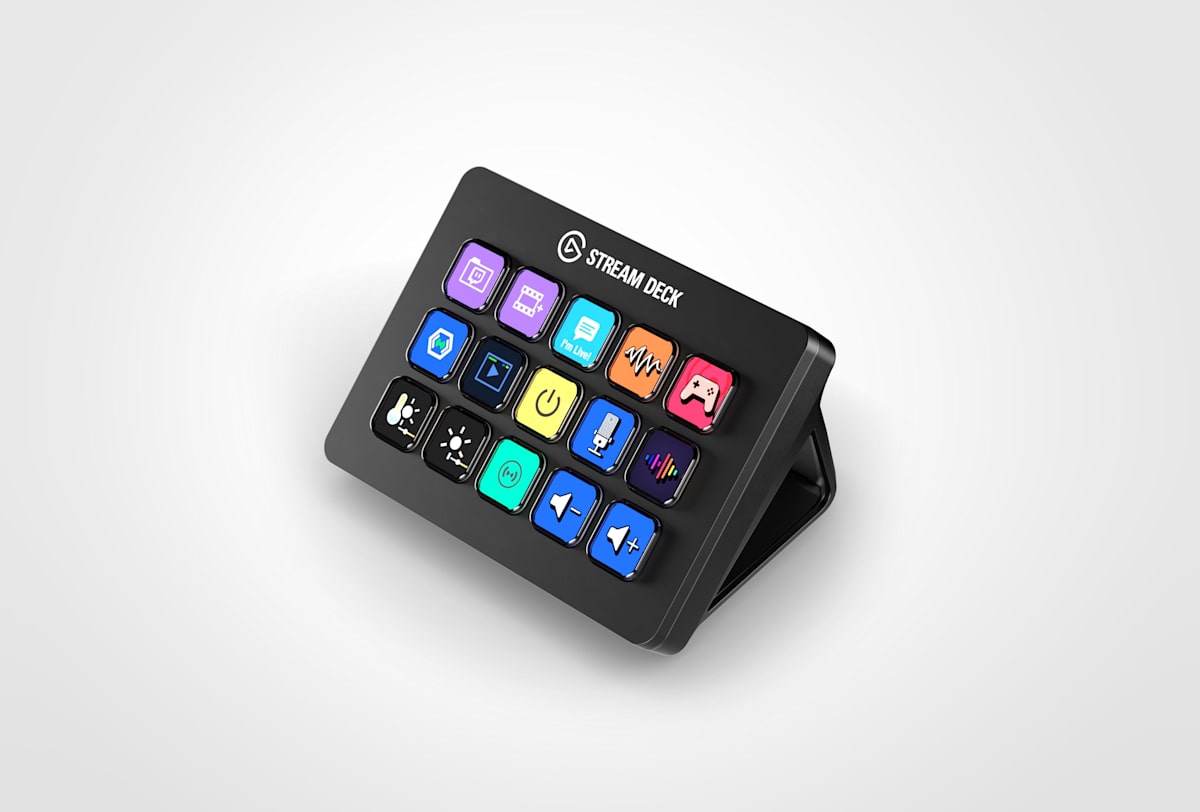
Product : Elgato Stream Deck MK.2
Brand : Elgato
Best For : Streamers and content creators who juggle multiple apps and want instant, glanceable control instead of memorizing dozens of keyboard shortcuts
Form Factor : 15-key desktop LCD controller with magnetic stand
Buy Now : View on Amazon
Key Highlights:
- 15 LCD keys you can relabel on the fly, so each button shows exactly what it does
- One-tap scene switching and muting in OBS keeps your stream smooth without alt-tabbing
- Nested folders expand 15 physical keys into hundreds of actions across pages
- Free Stream Deck software adds plugins for Twitch, Discord, Spotify, Philips Hue, and more
- Interchangeable faceplates let you change the color without buying a new unit
Who Should Buy This#
The Stream Deck MK.2 hits a sweet spot for anyone whose workflow lives across several apps at once. It replaces a wall of keyboard shortcuts with a tactile panel where every button is labeled, lit, and one press away. That speed adds up fast for live work, where fumbling for a hotkey can cost you the moment.
It is not just streaming gear, though. Plenty of buyers use it as a productivity macro pad for launching projects, running scripts, and toggling smart-home devices.
Perfect for:
- Live streamers who need to switch scenes, mute mics, and fire alerts mid-broadcast without breaking eye contact with chat
- Video editors and podcasters who want one-tap markers, transport controls, and export presets instead of digging through menus
- Remote workers who jump between Zoom, Slack, and Teams and want instant mute, camera, and screen-share toggles
- Power users and developers who automate repetitive tasks like launching dev environments, running terminal commands, or triggering smart lights
Design & Build Quality#
The Stream Deck MK.2 is compact and dense, measuring 118 x 84 x 25 mm without the stand and weighing 145 grams on its own, or 270 grams once the stand is fitted. Elgato lists the stand as removable and magnetic, so it snaps on for an angled desktop position and pops off if you would rather lay the unit flat or mount it.
The 15 keys are backlit LCD squares, each rendering a full-color icon or live label, and Elgato describes them as premium membrane switches under classic keycaps. The cable is not captive: it is a detachable USB-C to USB-C lead with a 90-degree connector, 150 cm long, so you can route it cleanly or replace it without sending the whole device in. A set of interchangeable faceplates lets you change the bezel color to match your desk.
One naming point is worth knowing before you shop. Elgato's store now sells it as the Stream Deck OG 15-Key Control Pad, offered with Classic Keys or Scissor Keys, and the old /stream-deck-mk2 URL simply redirects there. MK.2 survives in Elgato's own asset and support filenames, and it is still what the Amazon listing calls it, but the unit Elgato identifies is SKU 10GBA9901.
Key Features#
15 Customizable LCD Keys#
Each of the 15 keys is a small LCD screen, not a static printed button. You assign an action, then drop in any icon or text label so the key shows exactly what it triggers. Change the action and the label updates instantly.
This solves the core problem of macro pads: remembering what each button does. You glance down and see "Mute Mic," "Scene 2," or a Spotify cover instead of decoding a blank key. For live work, that visual confirmation is the difference between a smooth show and an awkward pause.
One-Tap Control for OBS, Twitch, and Discord#
The free Stream Deck software ships with native integrations for the apps creators actually use. You can switch OBS scenes, toggle sources, start and stop recording, fire Twitch markers, post canned chat messages, and mute Discord, all from dedicated keys.
Because the actions are hardware buttons, they work even when the target app is in the background. You do not have to bring OBS to the front to switch a scene, which is exactly what you want while a game or full-screen app holds focus.
Nested Folders and Multi-Actions#
Fifteen keys sound limited until you use folders. Any key can open a new page of keys, and those pages can nest further, so a single device can hold hundreds of actions organized by context: one folder for streaming, one for editing, one for meetings.
Multi-Actions take it further by chaining several steps into one press. A single "Going Live" button can switch the scene, start recording, play a sound, post to chat, and dim your smart lights in sequence. Check current availability: View on Amazon
A Plugin and Icon Ecosystem#
Beyond the built-in actions, the Stream Deck Marketplace carries free and paid plugins, profiles, icon packs, screensavers, and soundboards. You can control Philips Hue lighting, Spotify playback, Elgato Key Lights, OBS audio mixers, and even custom system commands.
This ecosystem is the real reason the device sticks. As your workflow grows, the hardware keeps up because the community and Elgato keep adding integrations, so you rarely outgrow the 15 keys in front of you.
Technical Specifications#
LCD Keys : 15 customizable backlit LCD keys
Dimensions : 118 x 84 x 25 mm (4.6 x 3.3 x 1.0 in), without stand
Weight : 145 g without stand, 270 g with magnetic stand
Connectivity : USB 2.0 via USB-C connector
Cable : Detachable USB-C to USB-C with 90-degree connector, 150 cm (59 in)
Stand : Removable magnetic desktop stand included
Faceplate : Interchangeable faceplates (extra patterns sold separately)
Key Type : Premium membrane switches with classic keycaps
Windows Support : Windows 11 or newer
macOS Support : macOS 13 or newer
Software : Free Stream Deck app with plugins, profiles, folders, and Multi-Actions
Pros & Cons#
Pros:
- 15 relabeling LCD keys mean every button shows exactly what it does at a glance
- One-tap scene switching, muting, and alerts keep live work smooth without alt-tabbing
- Nested folders turn 15 keys into hundreds of organized actions
- Multi-Actions chain several steps into a single press for repeatable routines
- Marketplace plugins, profiles and icon packs cover OBS, Twitch, Discord, Spotify, and smart home
- Removable magnetic stand and detachable USB-C cable make setup and cable routing clean
- Interchangeable faceplates let you restyle the unit without replacing it
Cons:
- Classic membrane keys, so buyers who want Elgato's faster-actuating scissor switches need the separate Scissor Keys model
- The software has a learning curve before your layout feels second nature
- Needs a permanent USB connection, occupying one of your desk ports
- 15 physical keys can feel tight once you build deep multi-app workflows that lean on folders
Final Verdict#
Buy it. The Stream Deck MK.2 converts scattered hotkeys and buried menus into tactile, labeled, one-tap controls that genuinely speed up live and repetitive work.
Our recommendation: Start by mapping your five most-used actions, then build folders as your workflow grows. Pair it with a set of interchangeable faceplates to match your desk, and grab it here: View on Amazon