

The advice everyone repeats is about a different console#
There is a piece of received wisdom that follows every Nintendo handheld around: never put a screen protector on it. People repeat it with real conviction, and for one console they were right. It does not apply to the Switch 2.
That warning came from the Nintendo Switch OLED. Its screen carried an anti-glare coating, and Nintendo cautioned that adhesive protectors could interfere with that coating. Stick tempered glass on an OLED and you risk fighting the very surface treatment you paid for. So the caution was earned, and it stuck in people's heads.
The Switch 2 is a different machine. Its screen is glass over an LCD, not an OLED panel, and Nintendo has issued no comparable warning against putting a protector on it. Reviewers and outlets have gone the other way and recommend adding tempered glass on top.
There is one instruction people confuse with the old warning. The Switch 2 ships with a thin factory anti-shatter film already on the screen. Nintendo's health-and-safety text says do not peel that film. Its job is to hold the glass fragments together if the screen ever cracks, the way a car windshield stays in one piece. That is not a rule against screen protectors. It is a rule about the film underneath them. You leave the factory film exactly where it is and apply the tempered glass over it.
So the lead is simple. The Switch 2 screen is glass, glass scratches and shatters, and nothing about this console tells you to leave it bare. The GlasTR EZ Fit is there to take the abuse the screen would otherwise take itself.
How to install it without bubbles#
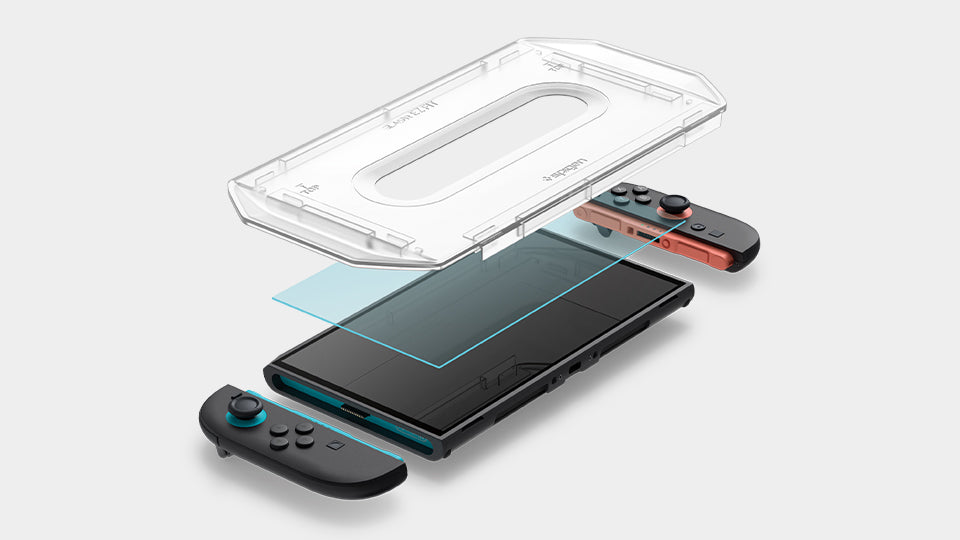
The hard part of any screen protector is not the glass. It is getting it straight and getting it down without trapping air or dust. Spigen's answer is the EZ Fit alignment tray, and it is the reason this two-pack is worth buying over a bare sheet of glass.
The tray is a frame that drops over the console and holds the protector in the correct position before it ever touches the screen. You clean the surface, seat the tray, lay the glass into it, and press. The tray decides the alignment, so you are not eyeballing a floating sheet and hoping it lands centred. That removes the single most common way a first-timer ruins an install.
Before any of that, leave the factory anti-shatter film in place. Do not peel it. The tempered glass goes on top of that film, not in place of it. Clean the film's surface of dust and fingerprints, because anything trapped under the glass will show as a bubble or a lifted edge, and the tray cannot fix debris you sealed in.
If you do trap dust on the first try, this is where the two-pack earns its keep. You have a second protector in the box, so the first mistake costs you nothing but a few minutes. That safety net is the difference between a relaxed install and a tense one.
Key Specs#
Product : Spigen AluminaCore Screen Protector Tempered Glass [GlasTR EZ Fit]
Compatibility : Nintendo Switch 2
Material : AluminaCore tempered glass, aluminum-enhanced durability
Hardness : 10H+
In the box : Two protectors plus the EZ Fit alignment tray
Install method : Tray-guided, applied over the factory anti-shatter film
A screen protector is the one accessory that pays for itself the first time you set the console down on something it should not have touched. Check current availability: View on Amazon
Pair it with a grip, but know the catch#
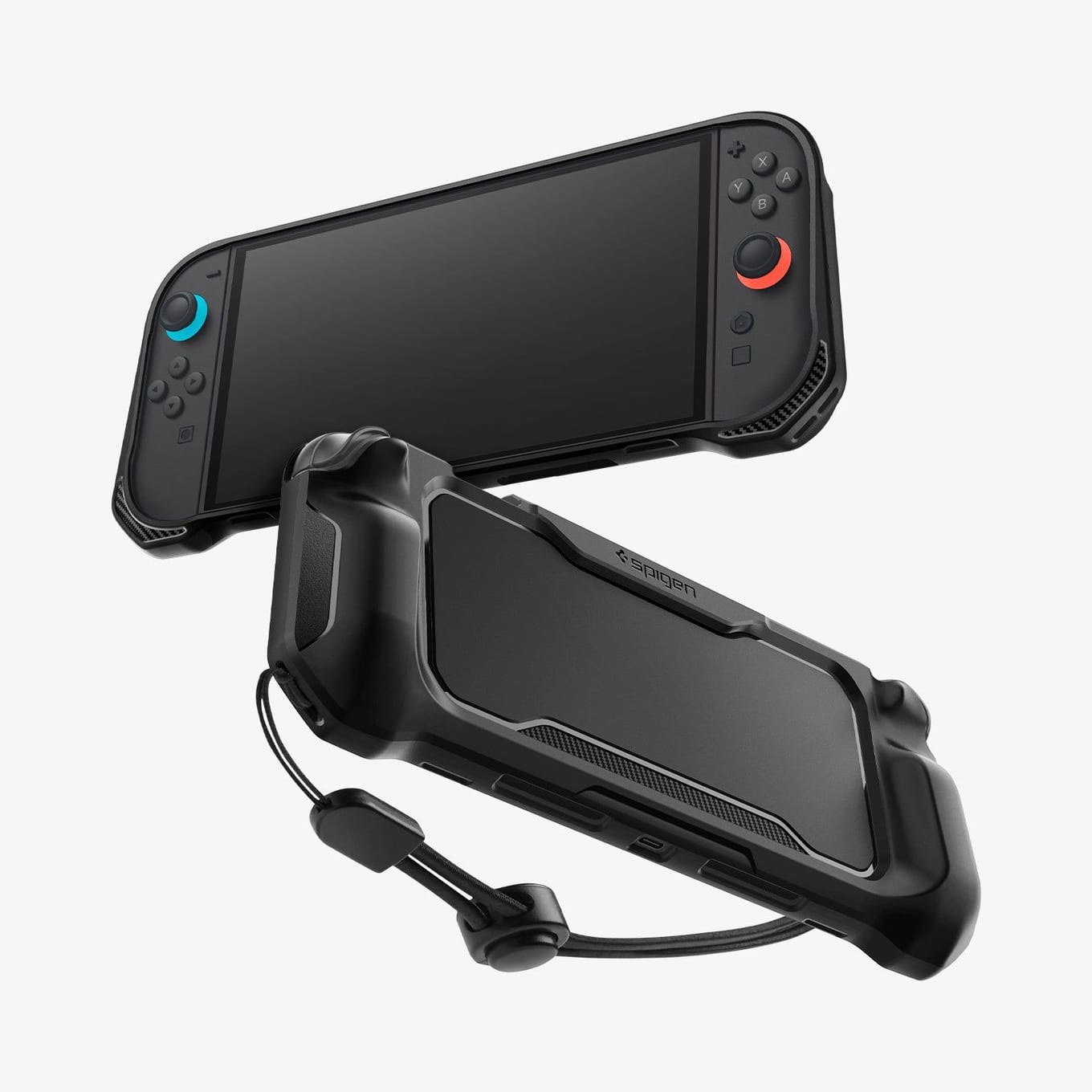
The glass guards the screen. It does nothing for the rest of the console, and in handheld mode the Switch 2 spends a lot of time being held, dropped, and stuffed into bags. If you want a grip that covers the body, Spigen makes a natural match in the Rugged Armor, in matte black.
The Rugged Armor is a handheld case. It wraps the console with an ergonomic grip and a strap for holding it in your hands, and it is built around handheld play. That is the point of it, and it is also the catch.
Spigen labels the Rugged Armor "Not Compatible with Switch Dock" in plain text on its own listing. There is no dodging it: you take the console out of the grip before you dock it, and you put the grip back on when you pick it up again. If you dock every night, that is a small routine you sign up for. If you mostly play handheld, you will barely notice. Just go in knowing the grip and the dock are an either-or, not both at once.
The screen protector has no such conflict. It stays on through docking, handheld play, and travel. And it fits inside a case: slim Switch 2 carrying cases, such as the tomtoc carrying case, leave clearance for a standard tempered-glass protector, so you are not forced to choose between protecting the screen and protecting the whole console in transit.
Grab the matching grip here: View on Amazon
For the rest of the Switch 2 kit, see our best Switch 2 accessories guide.
Pros & Cons#
Pros:
- Foolproof install: The alignment tray centres the glass for you, so a bubble-free, straight application is close to automatic.
- 10H+ AluminaCore glass: Spigen's aluminum-infused glass carries its stated 10H+ rating for scratch resistance.
- Two in the box: The two-pack means your first mistake costs nothing and you have a spare for later.
- Safe over the factory film: It goes on top of the anti-shatter film Nintendo tells you to keep, so you protect the screen without breaking Nintendo's own instruction.
- No Nintendo warning against it: Unlike the Switch OLED, the Switch 2 carries no Nintendo caution against protectors, so you are not gambling on your coating.
Cons:
- Slight added thickness: Any tempered glass sits proud of the bare screen, so you feel a hair more depth than the naked panel.
- Grip comes off to dock: The matching Rugged Armor grip is "Not Compatible with Switch Dock," so you remove it before docking.
- Dust is unforgiving: The tray cannot rescue an install if you seal debris under the glass, so a clean surface still matters.
Final Verdict#
Buy it. The alignment tray makes a bubble-free, centred install nearly foolproof, the two-pack gives you a free second attempt, and the Switch 2's glass screen genuinely wants the protection. The old "never protect a Nintendo screen" advice was about the OLED's anti-glare coating and has nothing to say about this console.
Our recommendation: Install one protector now and hold the second as your insurance for the day you drop the console face-down. If you play mostly in handheld mode, add the Rugged Armor grip too, and just make undocking-to-dock part of your routine.
FAQ#
Q: Doesn't Nintendo warn against screen protectors? A: That warning was about the Nintendo Switch OLED, whose screen carried an anti-glare coating that adhesive protectors could damage. The Switch 2 has a glass LCD screen and no such warning. Nintendo does tell you not to peel the factory anti-shatter film, so leave it in place and apply the tempered glass over it.
Q: Should I remove the film that came on my Switch 2? A: No. That film exists to hold the glass fragments together if the screen ever cracks, and Nintendo explicitly says do not peel it. The tempered-glass protector goes on top of it.
Q: Can I dock the Switch 2 with the Spigen Rugged Armor grip on? A: No. Spigen labels it "Not Compatible with Switch Dock," so the console comes out of the grip before it goes into the dock.
Q: Will the protector fit inside a carrying case? A: Yes. Slim Switch 2 cases, such as the tomtoc carrying case, leave clearance for a standard tempered-glass protector, so you can protect the screen and still zip the console into a slim case.