

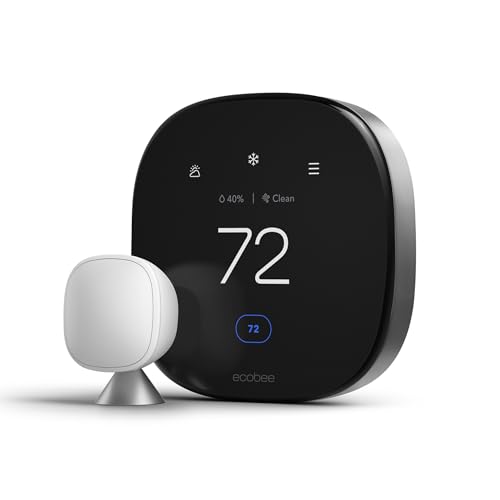
For energy savings, the ecobee Smart Thermostat Premium is the best overall pick with occupancy radar and an air-quality monitor, the Amazon Smart Thermostat is the best budget choice using Honeywell sensing, and the Google Nest Learning Thermostat 4th gen is best for hands-off auto-scheduling.
Who this comparison is for#
This roundup is built for people who want to cut heating and cooling waste without overthinking the install.
- Homeowners replacing an old dial or 7-day programmable thermostat who want measurable savings on their energy bill.
- DIY upgraders comfortable with a 30-minute wiring swap (all three are designed for self-installation).
- Smart-home builders who want their thermostat to answer to Alexa, Google Assistant, or Apple Home alongside their other devices.
How we picked#
We focused on thermostats that actually move the needle on energy use, not just ones with the flashiest screen.
- Real energy savings: each pick uses occupancy, geofencing, or learning to stop heating an empty house. ENERGY STAR certification was a baseline requirement.
- Wide compatibility: all three work with the most common 24V heating and cooling systems, and two include hardware to solve the missing C-wire problem.
- Proven reliability: every pick has thousands of reviews averaging 4 stars or better, so you are not beta-testing firmware.
- Voice and app control: each integrates with at least two major smart-home ecosystems, so it fits the platform you already use.
- Honest price spread: we deliberately span the range from entry-level to flagship so there is a sensible pick at every budget.
Product 1 — ecobee Smart Thermostat Premium (Best Overall)#
The ecobee Smart Thermostat Premium is the most capable mainstream thermostat you can buy without stepping into pro-installer territory. It pairs a vivid edge-to-edge touchscreen with built-in radar that senses when a room is genuinely occupied, so it stops conditioning empty space instead of guessing from a single wall location. That occupancy awareness, combined with the bundled remote SmartSensor, is what separates it from cheaper units that only read the temperature where they happen to be mounted.
What pushes it into "best overall" is everything stacked on top of the core thermostat. There is a built-in air quality monitor that flags rising VOCs and nudges you to change your furnace filter, a smart speaker with your choice of Alexa or Siri built in, and security features that can use the radar as a motion detector. It works with Siri, Alexa, and Google Assistant, so it slots into whichever ecosystem you already run.
Installation stays approachable despite the feature load. The Power Extender Kit ships in the box, which solves the missing C-wire problem that trips up so many smart-thermostat upgrades, and ecobee rates compatibility at roughly 95% of home systems. If you want the same brand at a lower price, read our full ecobee Smart Thermostat Enhanced review for the step-down model that drops the air-quality sensor and speaker.
Key Specs#
Display : Full-color touchscreen, edge-to-edge glass
Occupancy Sensing : Built-in radar plus included remote SmartSensor
Air Quality : Built-in VOC monitor with filter-change reminders
Voice Assistant : Alexa or Siri built in; works with Google Assistant
C-Wire : Power Extender Kit included (no C-wire required)
Compatibility : Works with roughly 95% of 24V home HVAC systems
Certification : ENERGY STAR certified
Bottom line#
The ecobee Premium is the pick if you want the deepest energy-saving smarts and genuinely useful extras, and you do not mind paying flagship money for them.
🇺🇸 ecobee Smart Thermostat Premium on Amazon US | 🇩🇪 ecobee Smart Thermostat Premium on Amazon DE
Product 2 — Amazon Smart Thermostat (Best Budget)#
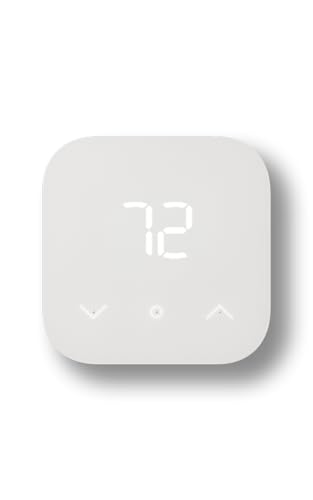
The Amazon Smart Thermostat is the easiest way to get real smart-thermostat savings without spending flagship money. It is built on Honeywell Home thermostat technology, so the underlying sensing and HVAC control come from a company with more than a century of experience, and Amazon wraps it in a clean, minimalist white panel that disappears on a hallway wall. For an entry-level price, you get the parts that matter: scheduling, remote app control, and automatic adjustments that trim waste when nobody is home.
Where it earns its budget crown is value per dollar. It uses Alexa Hunches and routines to set itself back automatically, so the system behaves intelligently even though the hardware is deliberately simple. There is no fancy remote sensor, no air-quality monitor, and no built-in speaker, but for a single-zone home where the thermostat sits in a central spot, you rarely miss them. Energy providers in many regions also offer rebates that can bring the already-low price down further.
The trade-offs are honest ones. Control runs through the Alexa app rather than a dedicated ecobee- or Nest-style ecosystem, and there is no Apple Home or stand-alone Google Assistant support, so it is happiest in an Alexa household. A C-wire (or compatible adapter) is required, so check your wiring before you buy.
Key Specs#
Display : Simple LED readout with touch buttons
Sensing Technology : Honeywell Home thermostat technology
Smart Control : Alexa app scheduling, Hunches, and routines
Voice Assistant : Works with Alexa
C-Wire : Required (no adapter in standard box)
Remote Sensor : Not supported
Certification : ENERGY STAR certified
Bottom line#
If you want legitimate energy savings for the lowest outlay and already live in an Alexa home, this is the smartest dollar-for-dollar thermostat on the list.
🇺🇸 Amazon Smart Thermostat on Amazon US
Product 3 — Google Nest Learning Thermostat 4th gen (Best for Hands-Off Auto-Scheduling)#
The Google Nest Learning Thermostat (4th gen) is the pick for people who never want to build a schedule at all. Its whole identity is learning: for the first week or two you simply adjust it the way you like, and it watches your patterns and builds an automatic schedule around your real routine. Combined with Adaptive Eco and the Home/Away geofencing in the Google Home app, it quietly backs off heating and cooling when you leave and ramps back up before you return, which is exactly the behavior that drives down bills without any daily fiddling.
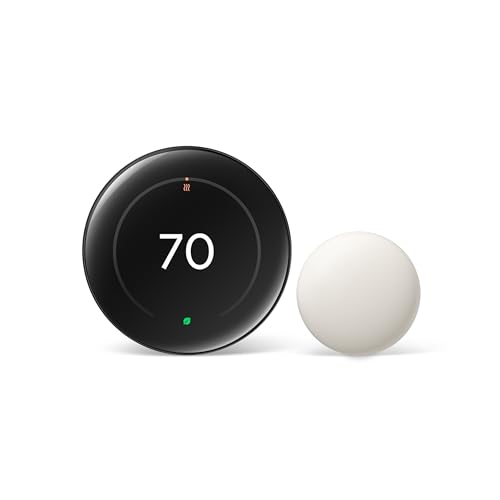
It is also the most striking thermostat here. The 4th-gen redesign brought a larger, edge-to-edge display that wakes as you approach and shows weather, time, or energy info from across the room, and the included Nest Temperature Sensor lets you prioritize comfort in a bedroom or office rather than the hallway. It works with Alexa, Apple Home, and the Google Home app, making it the most cross-platform-friendly pick for mixed households.
The catch is wiring. Nest does not include a Power Extender Kit, so homes without a C-wire may need extra hardware or a workaround, and compatibility is slightly narrower than ecobee's. For the deep dive on living with it day to day, see our full Google Nest Learning Thermostat 4th gen review.
Key Specs#
Display : Large round edge-to-edge color display with proximity wake
Scheduling : Auto-learns your routine; Adaptive Eco and geofencing
Remote Sensor : Nest Temperature Sensor included
Voice Assistant : Works with Alexa, Apple Home, and Google Home app
C-Wire : No Power Extender Kit included; may be required
Compatibility : Works with most common 24V systems (verify before buying)
Certification : ENERGY STAR certified
Bottom line#
Choose the Nest if you want a thermostat that programs itself, looks fantastic on the wall, and plays nicely with Alexa, Apple, and Google alike.
🇺🇸 Google Nest Learning Thermostat 4th gen on Amazon US | 🇩🇪 Google Nest Learning Thermostat 4th gen on Amazon DE
Which one should you buy?#
All three will cut your energy use compared with a dumb thermostat, so the decision comes down to how much you want to spend and how hands-on you want to be.
If you want the most capable thermostat and the deepest savings features, pick the ecobee Smart Thermostat Premium. The occupancy radar, included remote sensor, and air-quality monitor make it the best at not heating empty rooms, and the bundled Power Extender Kit means it installs almost anywhere.
If you are watching every dollar, pick the Amazon Smart Thermostat. It delivers the core of what makes a smart thermostat save money, Honeywell-grade sensing plus automatic setbacks, at a fraction of the flagship price. Just confirm you have a C-wire and live comfortably inside the Alexa ecosystem.
If you would rather never touch a schedule, pick the Google Nest Learning Thermostat 4th gen. It learns your routine, adjusts itself with geofencing, and works across Alexa, Apple Home, and Google. Budget for extra wiring hardware if your system lacks a C-wire.
FAQ#
Which of these thermostats saves the most energy?#
All three are ENERGY STAR certified and cut waste versus a manual thermostat. The ecobee Premium edges ahead in practice because its radar occupancy sensing and included remote sensor stop it from conditioning empty rooms, while the Nest's auto-learning and Adaptive Eco are best for households that won't manage a schedule manually.
Do I need a C-wire to install these?#
The ecobee Smart Thermostat Premium includes a Power Extender Kit, so it works without a dedicated C-wire in most homes. The Amazon Smart Thermostat requires a C-wire. The Nest Learning Thermostat 4th gen does not ship with an extender, so a home without a C-wire may need additional hardware.
Which thermostat works with Apple HomeKit?#
The Google Nest Learning Thermostat 4th gen works with Apple Home, alongside Alexa and the Google Home app. The ecobee Premium offers Siri and Alexa built in. The Amazon Smart Thermostat is Alexa-only and does not support Apple Home.
Are these hard to install yourself?#
No. All three are designed for DIY installation and typically take 20 to 40 minutes with a screwdriver. The trickiest part is wiring, so photograph your existing wires before disconnecting and check each maker's compatibility tool first.
Is the cheapest option good enough?#
For a single-zone home with a central thermostat location and an Alexa setup, the Amazon Smart Thermostat covers the essentials and saves real money. You step up to ecobee or Nest mainly for remote room sensors, occupancy detection, auto-learning, and broader ecosystem support.
Do any of these require a subscription?#
Core scheduling, app control, and energy-saving features work without a paid plan on all three. Optional subscriptions exist for extras such as ecobee's smart-home monitoring or Nest Aware for camera history, but you do not need them to run the thermostat or save energy.