

At a Glance#
Product : Google Nest Learning Thermostat (4th Gen)
Brand : Google Nest
Best For : Homeowners with standard 24V HVAC who want hands-off scheduling and lower energy bills
Protocol : Wi-Fi 2.4/5GHz, works with Google Home and Matter-enabled apps and voice assistants
Buy Now : View on Amazon
Key Highlights:
- 60% larger display than the 3rd gen, with Dynamic Farsight, reads clearly from across the room
- Smart Schedule builds a routine for you instead of asking you to program it
- Bundled Nest Temperature Sensor (2nd gen) balances comfort between rooms
- Adaptive Eco trims energy use automatically when you leave
- Power Sharing means no C wire needed in most homes
- Trim plate and steel plate are both in the box
Who Should Buy This#
The Nest Learning Thermostat (4th gen) is for people who want a thermostat that disappears into the background. Instead of fiddling with weekly programs, you adjust the temperature for a few days and it builds a schedule around your real habits, then quietly nudges that schedule toward efficiency. The included Nest Temperature Sensor (2nd gen) solves the classic problem of a thermostat that is comfortable in the hallway but ignores the bedroom.
Perfect for:
- Busy homeowners who never got around to programming their old thermostat and just want it to handle itself
- Energy-conscious households who want measurable heating and cooling savings without sacrificing comfort
- Smart home builders who already live in Google Home or Alexa and want their climate control in the same app
- Multi-room families who fight over a thermostat that only measures one cold or stuffy hallway
Design & Build Quality#
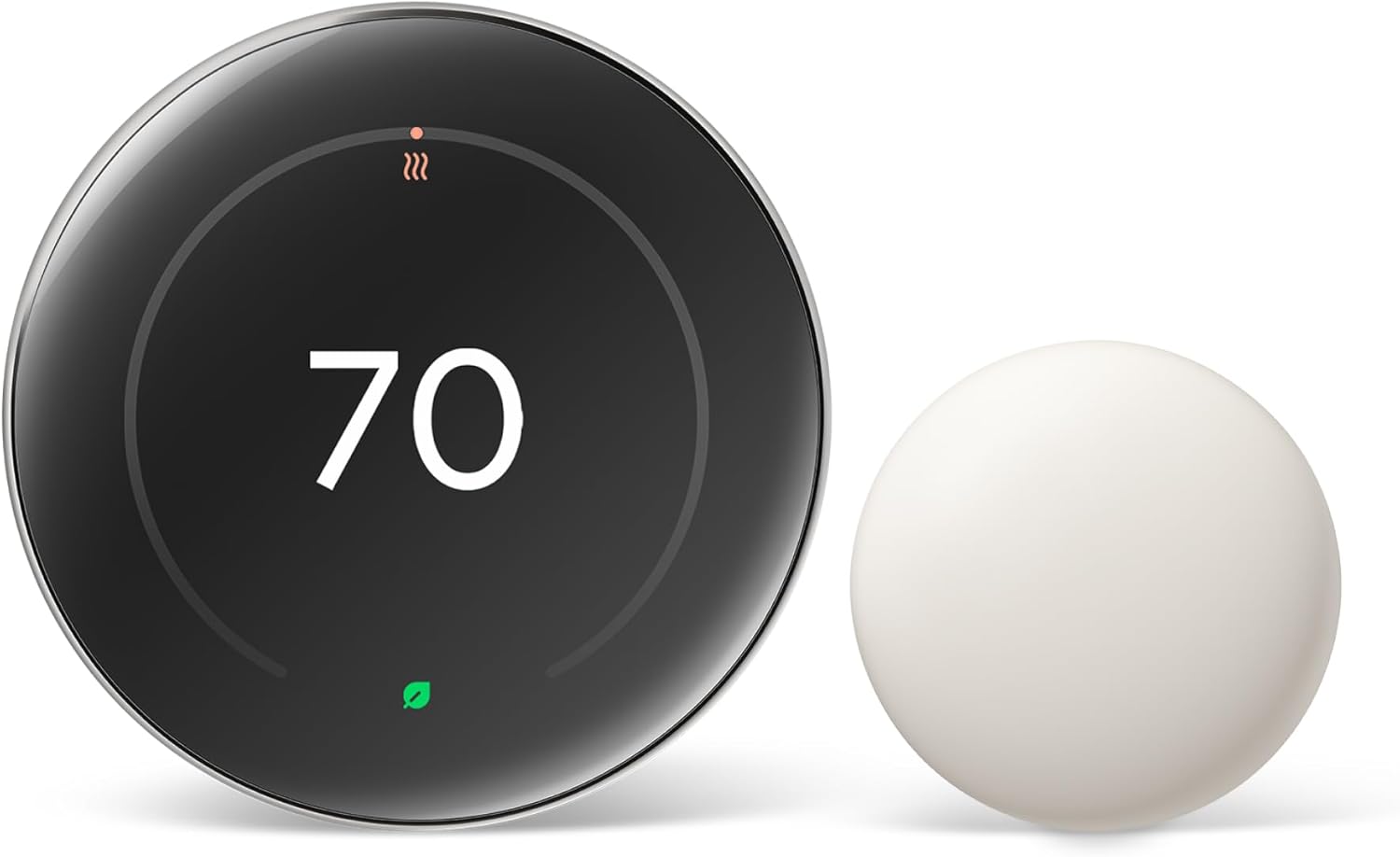
This is the most refined Nest yet. The dial keeps its iconic circular form but loses the bezel, so the screen now runs edge to edge behind a polished ring. Google sells three finishes — Polished Silver (pictured above), Polished Obsidian and Polished Gold — and the Amazon listing linked here defaults to the Polished Obsidian bundle, with the other two a click away in the same twister. Google publishes the body as 3.9 in (98 mm) across, 1.1 in (29 mm) deep and 5.7 oz (161.8 g), with a 2.7 in (68 mm) circular 600 x 600 LCD behind the glass.
The bundled Nest Temperature Sensor (2nd gen) is a small puck — Google calls the colour Porcelain — 2.18 in (55.4 mm) across and 1.3 oz (37 g). It is not a coin cell: Google specifies "one replaceable CR2 3V lithium battery (included)" with "up to 3 years of battery life", and connects it over Bluetooth Low Energy. You can run up to six of them.
Key Features#
Larger, Smarter Display#
The 4th-gen screen is 60% larger than the 3rd-gen Nest, which sounds modest until you see it from the sofa. Google's name for the wake-and-show behaviour is Dynamic Farsight: "The big, borderless display with Dynamic Farsight shows you useful info you can see from across the room. You can choose the design – a clock, the temp, weather, and more." It adjusts brightness automatically, or you can set it by hand.
Smart Schedule Instead of Programming#
Older programmable thermostats fail because nobody programs them. Nest flips that: you change the temperature naturally for the first few days, and it assembles a schedule from what you actually did.
Note the feature name, because it changed with this generation. Google's own thermostat comparison gives the 4th gen "Smart Schedule — learns your preferred temperatures, and responds to your preferences over time. Option to receive suggestions instead of automatic updates," and reserves "Auto-Schedule" for the 3rd gen. The practical difference is that this one can be told to ask. Read Google's support page before you assume it will: "When the Smart Schedule is set to Automatic, optimizations are automatically applied to your schedule. If you prefer to approve any changes to your schedule, you can set Smart Schedule to Suggestions." Automatic is the mode that applies changes on its own and notifies you afterwards; Suggestions is the opt-in that waits for your tap.
Bundled Temperature Sensor for Whole-Home Comfort#
A single thermostat only knows the temperature where it is mounted. The included wireless sensor lets you prioritize a bedroom at night or a home office during the day, so the system stops overheating the entry hall just to make a back room tolerable. Google's description: "put a sensor in any room and use the Google Home app to set the temp it should reach at a certain time of day." Up to six sensors are supported.
Adaptive Eco and Energy Savings#
When you leave, Adaptive Eco "finds an energy-efficient temp that's just right for your home. It saves energy when you leave, and it's comfy when you come back," and it sits alongside Seasonal Savings, natural heating and cooling, and smart ventilation. Google's published savings claim is a single number, and it is worth quoting exactly rather than paraphrasing: "The Nest Learning Thermostat can help save up to 31% on heating and cooling bills." It is Google's own figure, and "up to" is doing real work in it. The energy history in the app shows you when and why the system ran, and a System Health Monitor flags unusual behaviour.
Wide HVAC Compatibility Without a C Wire#
The 4th gen works with most 24V systems — Google lists gas, electric, oil, forced air, heat pump and radiant — and the new backplate adds ventilation, humidifier and dehumidifier support. Patented Power Sharing means "a C wire is not required in most homes," and the thermostat is designed for DIY installation with step-by-step instructions in the Google Home app. Google's own support page puts a number on that: "Most homeowners can easily install a Google Nest thermostat on their own in just 20-30 minutes when they follow the Nest app's step-by-step instructions."
Two Google surfaces qualify that differently and you should read both. The Tech Specs page says: "In limited cases (<1%), a C wire or Nest Power Connector may be necessary to ensure that your HVAC system can provide sufficient power to the thermostat in all conditions." The product page is blunter: "Works with 85% of systems. Some systems, including heating-only, cooling-only, zone-controlled, and heat pump systems require a Nest Power Connector or C wire." Since heat pumps appear on both the compatible list and that caveat list, run Google's compatibility checker before you buy rather than assuming.
Technical Specifications#
Display : 2.7 in (68 mm) circular LCD, 600 x 600 pixels, borderless, 60% larger than 3rd gen, with Dynamic Farsight
Dimensions and Weight : Diameter 3.9 in (98 mm), depth 1.1 in (29 mm), 5.7 oz (161.8 g)
Connectivity : Wi-Fi 802.11n (2.4 GHz / 5 GHz) is Google's only published connectivity entry for the thermostat; the bundled sensor reaches it over Bluetooth Low Energy
Install Time : Google publishes 20-30 minutes for a DIY Nest thermostat install
Ecosystem : Google's spec reads "Works with Google Home and Matter. Installation and setup requires the Google Home app."; the listing adds voice control "with Alexa, Siri, or Google Assistant smart speaker"
HVAC Compatibility : Most 24V systems: gas, electric, oil, forced air, heat pump, radiant; plus humidifier, dehumidifier and ventilation
C Wire : Not required in most homes (patented Power Sharing); Google notes <1% of homes may still need a C wire or Nest Power Connector
Included Sensor : Nest Temperature Sensor (2nd gen), Bluetooth Low Energy, one replaceable CR2 3V lithium battery, up to 3 years
Sensing : Soli sensor for Motion Sense, temperature, humidity, ambient light
Finishes : Polished Silver, Polished Obsidian, Polished Gold
Scheduling : Smart Schedule with Adaptive Eco, Seasonal Savings, natural heating and cooling, and smart ventilation
Alerts : System Health Monitor, with notifications for unusual heating or cooling behavior
In the Box : Thermostat display, thermostat base, trim plate, steel plate, mounting screws and wiring labels, Nest Temperature Sensor (2nd gen)
Power : 24V HVAC system wiring; built-in rechargeable lithium battery; less than 1 kWh/month
Warranty : 2-year standard for retail, 5-year standard for HVAC Pros
Certification : ENERGY STAR certified
Pros & Cons#
Pros:
- Smart Schedule removes the chore of programming, and can be set to Suggestions so it asks before changing anything
- The 60% larger borderless display with Dynamic Farsight is readable across the room
- A Nest Temperature Sensor (2nd gen) is in the box, not an upsell, and up to six are supported
- Adaptive Eco, Seasonal Savings and smart ventilation run without manual tweaking; Google publishes up to 31% off heating and cooling bills
- Power Sharing means no C wire in most homes, and both the trim plate and the steel plate ship in the box
- Works with Google Home and Matter; the listing adds voice control via Alexa, Siri or Google Assistant
- ENERGY STAR certified, so it qualifies for rebates in many areas
Cons:
- Sits at the premium end of the smart-thermostat range
- Setup requires the Google Home app, so long-time users of the standalone Nest app have to migrate
- Google's own two compatibility statements differ — <1% of homes on Tech Specs versus "works with 85% of systems" plus a caveat list including heat pumps on the product page
- Not compatible with high-voltage systems: Google states "High voltage systems, such as electric baseboard heaters, aren't compatible with Nest thermostats"
- Deeply tied to a Google account and ecosystem
Final Verdict#
Buy it for a standard 24V home. The Nest Learning Thermostat (4th gen) earns its place by doing work you never see: Smart Schedule learns your routine and can be set to ask before changing it, the bundled Nest Temperature Sensor (2nd gen) stops the hallway from deciding the bedroom's temperature, and Adaptive Eco and Seasonal Savings trim usage in the background — Google publishes up to 31% off heating and cooling bills. Power Sharing keeps most installs DIY, and the trim plate and steel plate are both in the box. Check compatibility first, though: Google says <1% of homes need a C wire on one page and lists heating-only, cooling-only, zone-controlled and heat-pump systems as needing a Power Connector or C wire on another, and high-voltage electric baseboard heat is ruled out entirely.
Our recommendation: Run Google's compatibility checker against your own wiring before you order. If it passes, this is the most hands-off path to lower bills on the market — pick it up here: View on Amazon