

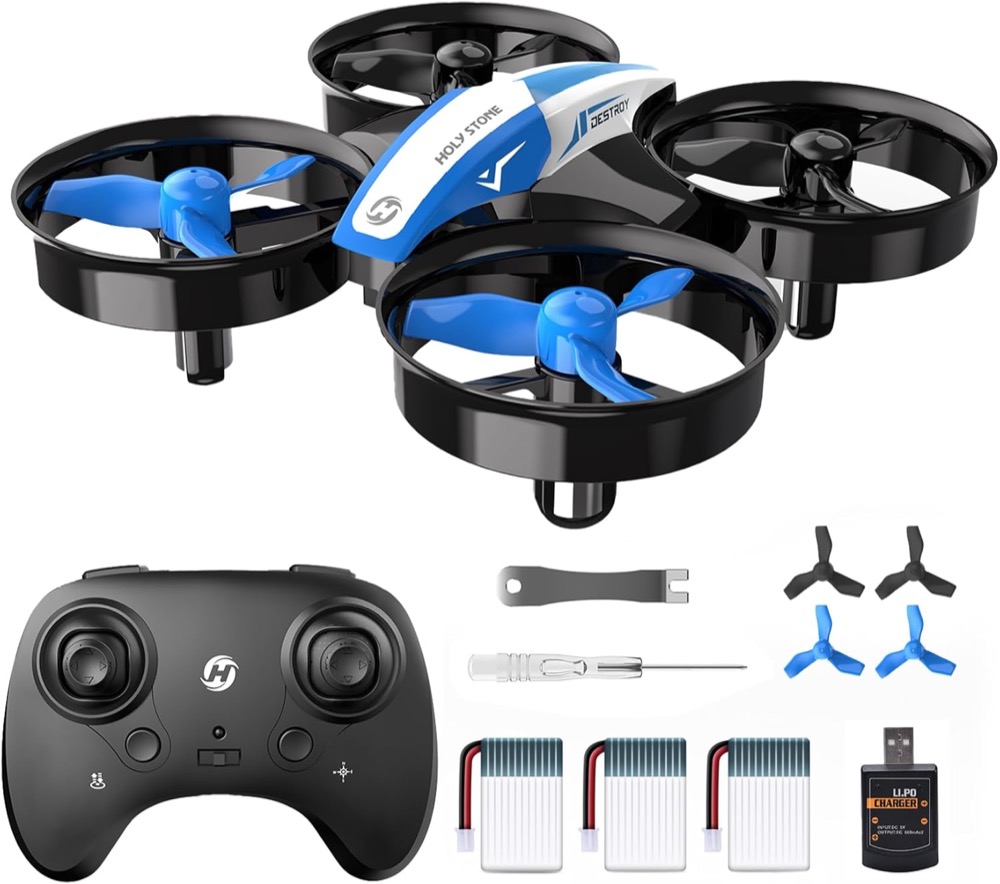
At a Glance#
Product : Holy Stone HS210 Mini Drone
Brand : Holy Stone
Best For : Kids and adult beginners learning to fly indoors
Form Factor : Palm-sized nano quadcopter with full propeller guards
Buy Now : View on Amazon
Key Highlights:
- One-Key Start/Landing gets first-timers airborne without thumb-stick panic - Holy Stone's own listing feature
- Altitude hold locks the drone at a fixed height so it hovers hands-free
- Three included batteries, and Holy Stone's manual revisions disagree on how long each lasts (see below)
- Headless mode removes the "which way is forward" confusion for new pilots
- Prop guards that Holy Stone says protect both fingers and airframe, though it adds they "do not remove all risk"
Who Should Buy This#
The Holy Stone HS210 hits a sweet spot for families who want a real, controllable drone without the price or fragility of a camera quadcopter. Holy Stone's own framing is the same: "Altitude Hold, Headless Mode, and 3 speed modes help beginners start slowly, repeat core movements, and grow more confident", and it positions the HS210 explicitly as the no-camera, no-GPS, no-app step before a camera drone. At well under the cost of a mid-range GPS drone, it is built to be crashed, picked up, and flown again.
Read the age guidance before you buy it as a gift, because the marketing and the safety document disagree. Holy Stone sells this as a children's drone - its own product page is headed "HS210 Mini Drone for Kids & Beginners" - and the A+ content on this listing says "Perfect for young adventurers aged 8-12!" and its listing Q&A answers "HS210 is designed to be easy to fly for pilots of all ages, including kids aged 8 to 12." But the same Amazon page carries a Toy Safety block reading "Manufacturer's minimum age: 14 years" - and that is the figure Holy Stone's own manual backs. Both manual revisions we could read, created 2022-12 and 2023-03, carry the same line in the Disclaimer: "This product is not recommended for people under the age of 14."
Both are Holy Stone. The 8-12 figure is its marketing; the 14 figure is in the safety document that ships in the box and in the listing's regulated toy-safety field, so it is the one to weigh most heavily. Holy Stone's website hedges separately, saying suitability "depends on the child's coordination and the age guidance shown on the current product packaging or sales channel", and that "children under 10 should fly only with close adult supervision." If you are buying for a child under 14, buy it knowing the manual says not to.
Perfect for:
- Parents buying a first drone who want a gift that survives the inevitable living-room crashes
- Supervised younger pilots who need one-key start plus auto-hover - noting the manual's own 14+ recommendation above
- Adult beginners who want to learn stick coordination indoors before investing in a 4K camera drone
- Classroom and STEM hobbyists - Holy Stone sells the HS210 in bulk tiers aimed at schools and camps
Design & Build Quality#
Holy Stone specs the airframe at 80 x 80 x 30 mm, so it is genuinely palm-sized and small enough to fly down a hallway. The body is molded plastic with four arms, and each propeller sits inside a circular guard that doubles as a bumper.
Do not read those guards as a safety guarantee, because Holy Stone does not. Its listing artwork claims "Full protection guards designed for children's safe, ensure that there will be no accident during the game", but its own website FAQ is materially more careful: the guards "help reduce direct contact with the rotating blades during normal indoor practice, but the guards do not remove all risk. Keep hands, hair, loose clothing, faces, and pets away from spinning propellers. Power off the drone before checking or replacing a propeller, and supervise younger pilots closely." Where the two disagree, the hedged one is the one to plan around.
The weight figures disagree, and the reason is that the HS210 manual has been revised. Two revisions are readable: one created 2022-12 specs the drone at 22 g / 0.77 oz, and one created 2023-03 (the copy Amazon hosts under this listing's own "Product guides and documents") specs it at 24.8 g / 0.87 oz. A third, newer file is the one holystone.com links today, but its text is saved as vector outlines rather than characters, so we could not read it and are not going to guess at its contents. The Amazon listing's product summary carries the older 22 g figure while its A+ tech-spec table says 50 grams, which matches neither manual. Treat 22-25 g as the airframe and the 50 g as unexplained. What is not in dispute is that this is a very light drone, and a crash from couch height usually means it bounces rather than breaks. Four spare propellers, a screwdriver and a propeller spanner ship in the box. The compact controller fits small hands, uses simple twin sticks, and Holy Stone specs it for "1.5V AAA Battery (Not included)", so there is no second charger to manage - but there is a battery run to make.
Key Features#
One-Key Start, Landing, and the Emergency Stop#
Holy Stone's feature card on this listing is titled "One-Key Start/Landing" and reads: "Pressing the button to take off or land makes it easy to control, especially for beginners." Press once and the HS210 lifts off and holds its hover; press again and it comes down. This removes the hardest part of learning to fly, where beginners over-throttle and rocket into the ceiling.
There is also an emergency motor cut, and it is worth knowing exactly what it does before you need it, because it is not a gentle abort. The HS210 manual, section 12.1, states: "The Emergency Stop function should only be used in case of emergency during the flight to avoid any of damage or injury. Press the upper left [ ] and upper right [ ] button of the transmitter at the same time, the motors will stop immediately and the drone drops to the ground." (The bracketed gaps are button icons in the original.) The manual continues: "After the drone hits the ground, The LEDs on the drone will keep on flashing. Please put the drone on a level surface again" to reset it.
So it is a last resort that trades the drone's landing for stopping the blades — the right call if it is heading for a face, hair or curtains, and the wrong call as a routine landing. Note the manual is the only place this is documented: the Amazon listing's feature cards name Throw to GO, High Speed Rotation, Altitude Hold, 3D Flips and One-Key Start/Landing, and none of them mention it.
The gentler safeguard is automatic. Holy Stone: "When the drone battery runs low, the indicator lights on the drone will blink continuously. About 1 minute or so the drone will automatically land on low electricity."
For a child's first flights, one-key start and altitude hold do most of the work. You can let them practice steering while the drone manages its own height.
Altitude Hold (Auto-Hover)#
The HS210 uses an altitude-hold system to lock itself at a set height and hover in place when you release the throttle stick. Toy drones without this feature constantly drift up or sink, forcing the pilot to babysit the throttle every second. Here, the drone parks itself in mid-air, giving a new flier time to think about direction instead of fighting gravity.
This is what makes it teachable. A beginner can hover, breathe, and then practice a slow forward push or a gentle turn without the aircraft falling out of the sky.
Headless Mode#
Normally a drone's "forward" is whichever way its nose points, which confuses beginners the moment the drone turns to face them and the controls feel reversed. Holy Stone's manual describes the fix precisely, and the detail matters: "In Headless Mode, the drone always remembers the side its head points to during takeoff as the front side. This means that if the drone takes off with its head pointing forward, it doesn't matter how the drone is oriented in the air, when you push the right joystick forward, the drone will fly forward."
Note what that is not. It does not track where the pilot is standing — it freezes "forward" to the drone's heading at the moment of takeoff. The manual is explicit about the consequence: "The pilot should stay facing the same direction that the drone's head points to when it takes off." Turn around mid-flight and the confusion comes straight back. Holy Stone's Amazon bullet puts it more loosely ("directions are always relative to where pilots face"); the manual is the accurate version. You enter and exit with a short press, and the transmitter beeps continuously while it is on.
3D Flips, Throw to GO, and Three Speed Modes#
Once basic control clicks, the HS210 keeps things fun. Holy Stone's own feature cards name 3D Flips ("Do tricks with 3D flips"), High Speed Rotation and Throw to GO, "a new mode to start the drone flight". The manual adds the part that matters in a living room: flips need height and charge. Section 12.5: "When the drone is at least 10 ft from the ground, press down on the [ ] button, then push the right joystick in any direction. The drone will perform a flip toward that direction. 360° Flip functions better when the battery is fully charged." So the flip direction is whichever way you push the stick, and you need three metres of clearance under the ceiling to use it.
The speed switch is specified precisely too. Holy Stone's card is headed "3 Speeds Switch" and reads: "Comes with Low/Medium/High different modes. Short press the button with the speed sign to switch speed modes". The manual adds the feedback and the default: "The transmitter beeps once to indicate Low Speed, twice to indicate Medium Speed and three times to indicate High Speed. (The Low Speed is the default speed mode.)" Starting in low by default is the right call for a first flight. Holy Stone puts this at the centre of its own pitch: altitude hold, headless mode and the three speed modes are what "help beginners start slowly, repeat core movements, and grow more confident".
Two more transmitter functions sit on long presses rather than short ones, and Holy Stone documents them on the controller diagram: Circle Fly (long press of the speed button) and High Speed Rotation (long press of the flip button).
Three Batteries - and Two Different Flight-Time Numbers#
A common complaint with mini drones is a flight time measured in minutes, then a long wait to recharge. Holy Stone bundles three batteries in the box. How long each one lasts depends on which Holy Stone surface you read, and the gap is not small:
- The Amazon listing says "Flight time is up to 21 Minutes", and its A+ tech-spec table gives a Max Flight Time row of "7 minutes per battery". Its Q&A repeats it: "About 7 minutes per battery. HS210 got 3 batteries, a total of 21 minutes."
- holystone.com specs "Max Flight Time: 9 minutes (in a windless environment)", and its FAQ says "The HS210 manual rates flight time at up to 9 minutes per battery in a windless test environment. With 3 batteries, the theoretical total is up to 27 minutes when the batteries are used one after another".
- The manuals split by revision, and that is the explanation. The 2022-12 manual's section 13.0 gives a Max Flight Time of 7 minutes per battery; the 2023-03 revision gives 9 minutes per battery. The same two revisions carry the two weights above. So the Amazon listing's A+ content is quoting the older revision and holystone.com the newer one.
Plan on seven minutes, which is what the listing you are buying from advertises, and treat nine as the ceiling of the current revision. Recharging is specced at 40-60 minutes per pack, "depends on charging power and remaining battery power", over a 5V/2A (10 W) USB cable, so swapping a depleted pack for a fresh one is what keeps a session going.
Flying Two at Once#
Holy Stone does confirm multi-drone flying, with a procedure attached rather than a frequency-selector feature. Its FAQ: "Yes. Multiple HS210 drones can be flown at the same time. Pair each drone and transmitter one by one before flying." The Amazon listing carries the same instruction as a warning: "When using multiple drones at the same time, please be sure to power on and pair each drone and remote control separately to avoid frequency confusion caused by simultaneously powering on multiple units." So a second unit does let siblings race - just power them up one at a time. If head-to-head play is the actual goal, note that Holy Stone also sells a purpose-built two-player set, the HS210FS, which is a different product from the one this review covers and a different listing.
Check current availability on the HS210 itself here: View on Amazon
Technical Specifications#
Drone Type : Indoor nano quadcopter. Holy Stone: "No camera, no GPS, no app distractions"
Recommended Age : Holy Stone's listing says "aged 8-12"; the same listing's Toy Safety block says "Manufacturer's minimum age: 14 years". Its website defers to the packaging and asks for close adult supervision under 10
Model / Size / Weight : HS210, 80 x 80 x 30 mm. Weight 24.8 g in the 2023-03 manual, 22 g in the 2022-12 manual, 50 g in the listing's A+ table
Flight Time : 7 minutes per battery / 21 minutes total per the listing; 9 minutes per battery / up to 27 minutes theoretical per holystone.com
Batteries Included : 3 x 250 mAh 3.7V lithium-ion polymer packs
Charging : 40-60 minutes per battery over a 5V/2A USB cable (10 W)
Control Range : 50 m, which Holy Stone qualifies as "outdoors and unobstructed" (the listing's 160 ft is the same figure)
Radio : 2.4GHz, operating frequency 2452-2474 MHz
Max Speed / Height : 5 m/s and 120 m per holystone.com. Both readable manual revisions instruct "Fly Below 164 feet (50 m)" on their flight-environment page, so treat 50 m as the operating ceiling
Operating Temperature : Both readable manuals give the drone 14° to 104°F; holystone.com's spec page says 32° to 104°F for the same row
Stabilization : Altitude hold (auto-hover)
Flight Aids : One-Key Start/Landing, headless mode, Throw to GO, Trimmer, and an Emergency Stop (both transmitter shoulder buttons together - manual section 12.1)
Tricks : 3D flips in any direction from at least 10 ft up, High Speed Rotation, Circle Fly
Speed Settings : Three modes (low / medium / high)
Safety : Full propeller guards on all four rotors. Holy Stone: guards "do not remove all risk"
In the Box : Drone, transmitter, 3 batteries, USB charging cable, 4 spare propellers, propeller screwdriver, propeller spanner, manual
Controller Power : 1.5V AAA batteries, not included
Pros & Cons#
Pros:
- One-Key Start/Landing is Holy Stone's own headline feature, and it removes the hardest part of a first flight
- Altitude hold lets new pilots hover hands-free and focus on steering
- Headless mode removes the reversed-control confusion that crashes most first flights
- Three 250 mAh batteries in the box, plus four spare propellers, a screwdriver and a spanner
- Three speed modes, low/medium/high, let the drone grow with the pilot
- Guards on all four rotors, an automatic landing on low battery, and a manual-documented Emergency Stop
- An airframe its own manuals put at 22-25 g, so it bounces off most indoor crashes
Cons:
- No camera, no GPS, no app - Holy Stone sells the HS210P if you want FPV
- Seven minutes per battery on the listing you buy from, nine in the newer manual revision, and even nine is short
- Lightweight body is easily blown around; Holy Stone allows outdoor flying "only in calm, windless conditions"
- Controller runs on disposable 1.5V AAA batteries that are not included
- Holy Stone's manual says "not recommended for people under the age of 14" while the listing markets it at ages 8-12
Final Verdict#
One housekeeping note. Amazon's product-summary panel on this listing carries a "Newer Version Available" pointer at the "Holy Stone Mini FPV Drone with 1080P HD Camera for Kids & Beginners", the HS210P. Holy Stone's own site does not treat that as a replacement — it sells both, and describes the pair as a two-step path, with the HS210 as step one for learning basic control and the HS210P as step two for FPV camera flying. The HS210 has a full current product page, bulk-order tiers and its own support listing. It is not discontinued.
Buy it. The Holy Stone HS210 is the rare beginner drone that puts forgiveness first, pairing One-Key Start/Landing, auto-hover, headless mode and three speed modes so a nervous kid or adult can actually learn to fly instead of just crashing. Go in knowing what it is not: there is no camera and no GPS, the flight time is seven minutes a battery on the listing you buy from, and the manual revisions we could read recommend it for ages 14 and up even though the listing markets it at 8-12.
Our recommendation: If you want head-to-head play, Holy Stone's purpose-built two-player HS210FS set is the more sensible buy than two of these; if you do fly two HS210s together, power them up and pair them one at a time as Holy Stone instructs. Get it now: View on Amazon