

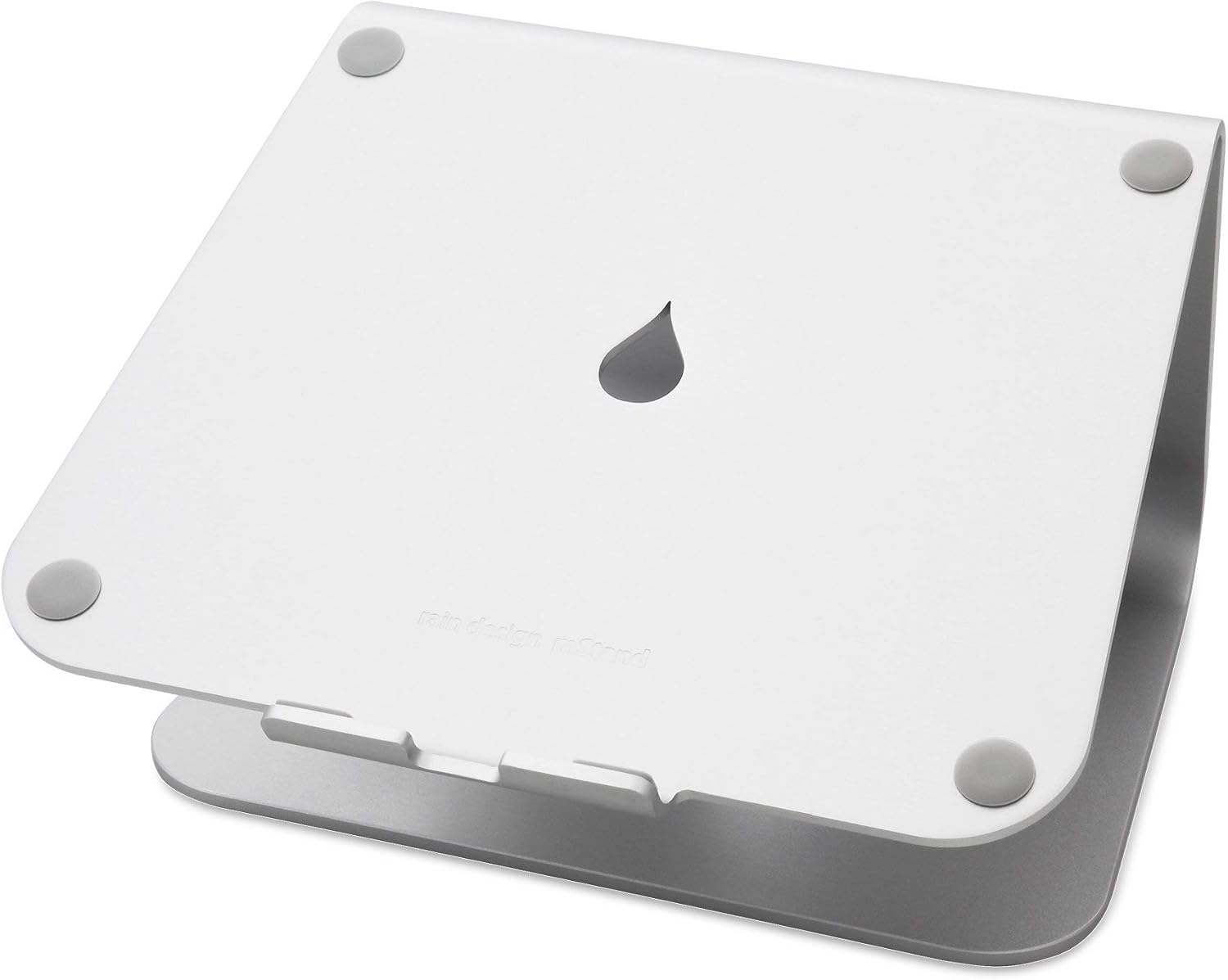
For a home office, the best laptop stand overall is the Rain Design mStand — a single-piece aluminum riser built to last a decade. The Nulaxy C1 is the best budget pick with adjustable height, and the MOFT Invisible Stand is best for travel at just three ounces.
Raising your laptop to eye level is the cheapest way to stop the neck-and-shoulder ache that comes from looking down at a screen all day. The hard part is matching the stand to how you actually work: a fixed perch for a permanent desk, an adjustable riser on a tight budget, or something that travels in the same sleeve as the laptop. We compared three very different laptop stands across the three jobs a home-office worker actually needs them to do.
Who this comparison is for#
- Home-office and hybrid workers who spend long days hunched over a laptop and want to fix their posture without buying a separate monitor.
- Budget-minded desk builders who want adjustable ergonomic height for the price of a couple of takeout lunches, with room for an external keyboard and mouse underneath.
- Frequent travelers and café workers who need a stand that disappears into a laptop bag — or onto the laptop itself — and adds almost no weight.
How we picked#
- Eye-level ergonomics first. Every pick raises the screen meaningfully toward eye level, the single change that does the most to relieve neck strain during long sessions. A stand that only lifts an inch is not worth the desk space.
- External keyboard friendly. Lifting the screen means you should not type on the laptop's own keyboard at an awkward angle. We favored designs that leave clear room for a separate keyboard and mouse, or that pair naturally with one.
- Build quality and stability. A stand that wobbles while you type is a daily annoyance. We leaned toward aluminum construction and wide, grippy bases that hold a laptop steady.
- Reliability signals. Each pick has a long, high-volume review history — thousands of ratings at four stars or better — and comes from a brand with a track record, not a no-name drop-shipper.
- A real price spread. We deliberately chose picks across the range so there is a sensible answer whether you want a buy-it-for-life desk fixture or the cheapest stand that does the job.
Product 1 — Rain Design mStand (Best Overall)#
The Rain Design mStand is the laptop stand we would hand to most home-office workers without a second thought. It is carved from a single piece of anodized aluminum, which means there are no joints to loosen, nothing to adjust, and nothing to break. You set the laptop on it once and forget it exists — which, for a desk fixture you use every working day, is exactly the point.
That single-piece design does double duty. The aluminum body acts as a passive heat sink, drawing warmth away from the laptop's underside so the machine runs a little cooler and quieter under load. The fixed height lifts the top of a 13-to-15-inch laptop close to eye level, which is the whole reason to buy a stand: it pulls your head up and your shoulders back instead of letting you slump toward a low screen. The open space underneath swallows an external keyboard, so your desk stays tidy and your hands stay at a natural typing height.
The trade-off is that the mStand does not adjust. The height is fixed, so very tall users may still want to raise it slightly, and it is too heavy and rigid to travel with. But for a permanent desk setup, that rigidity is a feature, not a flaw — there is nothing to sag, slip, or recalibrate. The brushed finish matches a MacBook almost perfectly and looks at home next to any laptop. A slot at the back routes your charging and peripheral cables out of sight.
This is the classic "buy it once" stand. It costs more than the budget options, but it is the kind of accessory you move from desk to desk for years and never think about replacing.
Key Specs#
Material : Single-piece anodized aluminum (doubles as a heat sink)
Height : Fixed, raises the screen toward eye level for a seated user
Compatibility : Laptops roughly 10 to 17 inches, including all MacBook sizes
Keyboard Space : Open area underneath fits a full external keyboard
Cable Management : Routing slot at the rear hides charging and peripheral cables
Best Trait : Indestructible single-piece build with no parts to loosen
Bottom line#
The most dependable all-rounder here — a heat-dissipating, rock-solid aluminum perch you buy once and use for years.
Product 2 — Nulaxy C1 (Best Budget)#
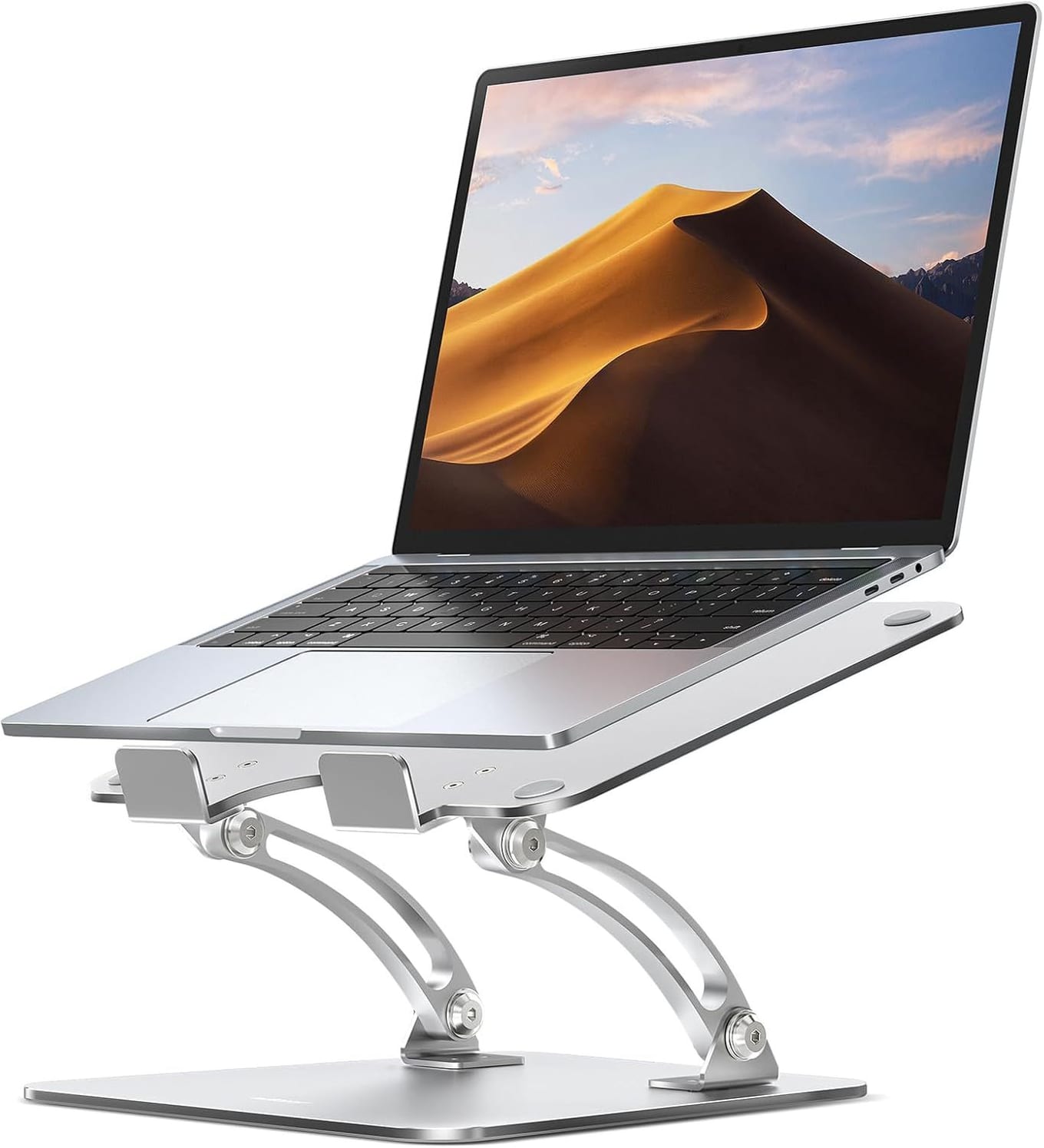
The Nulaxy C1 is the pick for anyone who wants ergonomic height and adjustability without paying premium-brand prices. It regularly sells for a fraction of the mStand, yet it does not feel like a throwaway. The frame is aluminum alloy, the cradle is ventilated to let heat escape, and silicone pads grip the laptop so it does not slide while you type. For a first laptop stand on a budget desk, it covers the essentials and then some.
Its headline advantage over the fixed mStand is the dual-hinge design. Two adjustable arms let you set both the height and the viewing angle, so you can dial the screen to your exact eye level whether you are tall, short, or switching between a sitting and a more upright posture. That flexibility also makes it genuinely useful for more than one person — a shared home desk can adjust the C1 to each user in seconds. The same hinges let it fold flatter for storage or to slip into a bag, so it is semi-portable in a way the mStand is not.
The compromises are the ones you would expect at this price. The build is sturdy but not the seamless single-piece feel of the Rain Design, and the adjustable joints, while stable for typing, are not quite as immovably solid as a fixed aluminum block. Manufacturer figures put its load capacity well above the weight of any normal laptop, so heavy 16-inch and 17-inch machines are not a problem. For a home-office worker who wants adjustable eye-level ergonomics and the freedom to leave room for an external keyboard underneath, the C1 delivers almost everything the premium stands do for a lot less money.
Key Specs#
Material : Aluminum alloy frame with a ventilated cradle
Adjustability : Dual hinged arms set both height and viewing angle
Compatibility : Laptops 10 to 17 inches
Grip : Silicone pads hold the laptop and protect it from scratches
Portability : Folds flatter for storage or transport
Best Trait : Adjustable eye-level height at a budget price
Bottom line#
Outstanding value — adjustable height and angle, a stable ventilated cradle, and a fold-flat design for far less than the name-brand stands.
Product 3 — MOFT Invisible Laptop Stand (Best for Travel)#
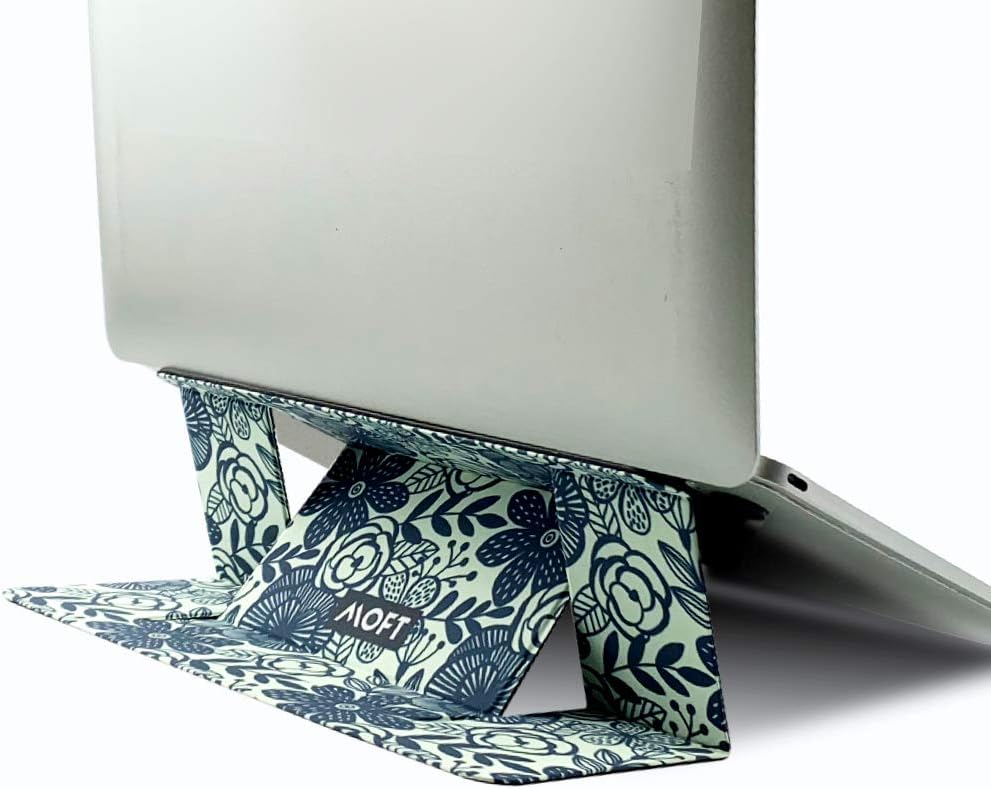
The MOFT Invisible Stand is the one to pick if your "home office" moves between a desk, a kitchen table, a café, and a hotel room. Instead of a separate riser you have to pack, it is a slim adhesive panel that sticks to the bottom of your laptop and stays there. At about three ounces and roughly a ninth of an inch thick when folded flat, it adds essentially nothing to your bag — because it never leaves the laptop in the first place.
When you want elevation, you fold it open into one of two angles. The lower setting lifts the back of the keyboard to a more natural typing slope, while the higher setting raises the screen further toward eye level for focused work. Neither matches the full eye-level lift of a tall desk stand, but both make a real difference to wrist and neck comfort compared with a laptop sitting flat on a table. For typing on the move, that is the meaningful win. The reusable adhesive peels off cleanly if you ever want to remove it, leaving no residue or marks.
The trade-offs are the flip side of its portability. Because you type on the laptop's own keyboard, you do not get the full desktop ergonomics of a tall stand plus an external keyboard, and the maximum height is lower than the mStand or a fully extended C1. It also pairs best with laptops that do not have large bottom vents where the adhesive would sit. But as the stand you literally always have with you, nothing here competes. It is the difference between good posture everywhere and good posture only at your desk.
Key Specs#
Design : Slim adhesive panel that stays attached to the laptop
Weight / Thickness : About 3 ounces; roughly 1/9 inch thick folded flat
Angles : Two fold-out positions for typing and viewing
Adhesive : Reusable and residue-free; peels off cleanly
Compatibility : Laptops up to about 15.6 inches without large bottom vents
Best Trait : Always-attached portability with near-zero weight
Bottom line#
The ultimate grab-and-go pick — an always-with-you stand that improves your posture anywhere, weighs almost nothing, and leaves no trace when removed.
Which one should you buy?#
If you work from a fixed desk and want a stand you will never have to think about again, buy the Rain Design mStand. The single-piece aluminum build is the most stable and durable of the three, the passive cooling is a genuine bonus under load, and pairing it with an external keyboard gives you the best full-day ergonomics here.
If you want adjustable eye-level height but do not want to spend much — or you share a desk and need to re-set the height for different people — buy the Nulaxy C1. It delivers the core benefit of a premium stand, height and angle adjustment, for a fraction of the price, and folds down when you need it to.
If your laptop rarely sits in the same place twice, buy the MOFT Invisible Stand. It is the only pick you never have to remember to pack, because it lives on the laptop itself, and it brings a real posture improvement to café tables and hotel desks where a full stand would be impractical.
For most home-office workers the mStand is the default desk recommendation and the Nulaxy is the budget-conscious alternative. Reach for the MOFT when portability outranks maximum height and a tidy desktop.
FAQ#
Do I need an external keyboard with a laptop stand?#
For a tall desk stand like the mStand or a fully raised Nulaxy C1, yes — once the screen is at eye level, the built-in keyboard sits too high to type on comfortably, so you pair it with an external keyboard and mouse on the desk. The MOFT is the exception: its lower angle is designed for typing on the laptop's own keyboard, which is what makes it work on the move.
How high should a laptop stand raise the screen?#
The goal is to bring the top of the screen roughly to eye level when you are sitting up straight, so your gaze drops only slightly and your neck stays neutral. The mStand's fixed height is tuned for this for most seated users, and the Nulaxy C1 lets you adjust to your exact height. The MOFT lifts less but still improves the angle meaningfully over a flat table.
Which of these is best for travel?#
The MOFT Invisible Stand, by a wide margin. It weighs about three ounces, folds nearly flat, and sticks to the bottom of your laptop so it is always with you. The mStand is far too heavy and rigid to travel with, and while the Nulaxy C1 folds down, it is still a separate item to pack.
Does a laptop stand help my laptop run cooler?#
It can. Lifting the laptop lets air circulate underneath, and the Rain Design mStand goes further by using its aluminum body as a passive heat sink to draw warmth away from the chassis. The ventilated cradle on the Nulaxy C1 also helps airflow. The MOFT raises the back of the machine, which improves circulation versus lying flat but offers no active cooling benefit.
Will the MOFT's adhesive damage my laptop?#
No. The adhesive is designed to be reusable and residue-free, so it peels off cleanly without leaving marks. The main caveat is fit: it works best on laptops with a flat underside and no large bottom vents in the area where the panel attaches, so check your machine's base before sticking it on.
Are these stands sturdy enough for a 16-inch laptop?#
Yes. The mStand's single-piece aluminum easily supports large 15-to-17-inch laptops, and the Nulaxy C1's stated load capacity is well above the weight of any normal notebook. The MOFT supports laptops up to around 15.6 inches; very large or heavy machines are better matched to one of the desk stands.