

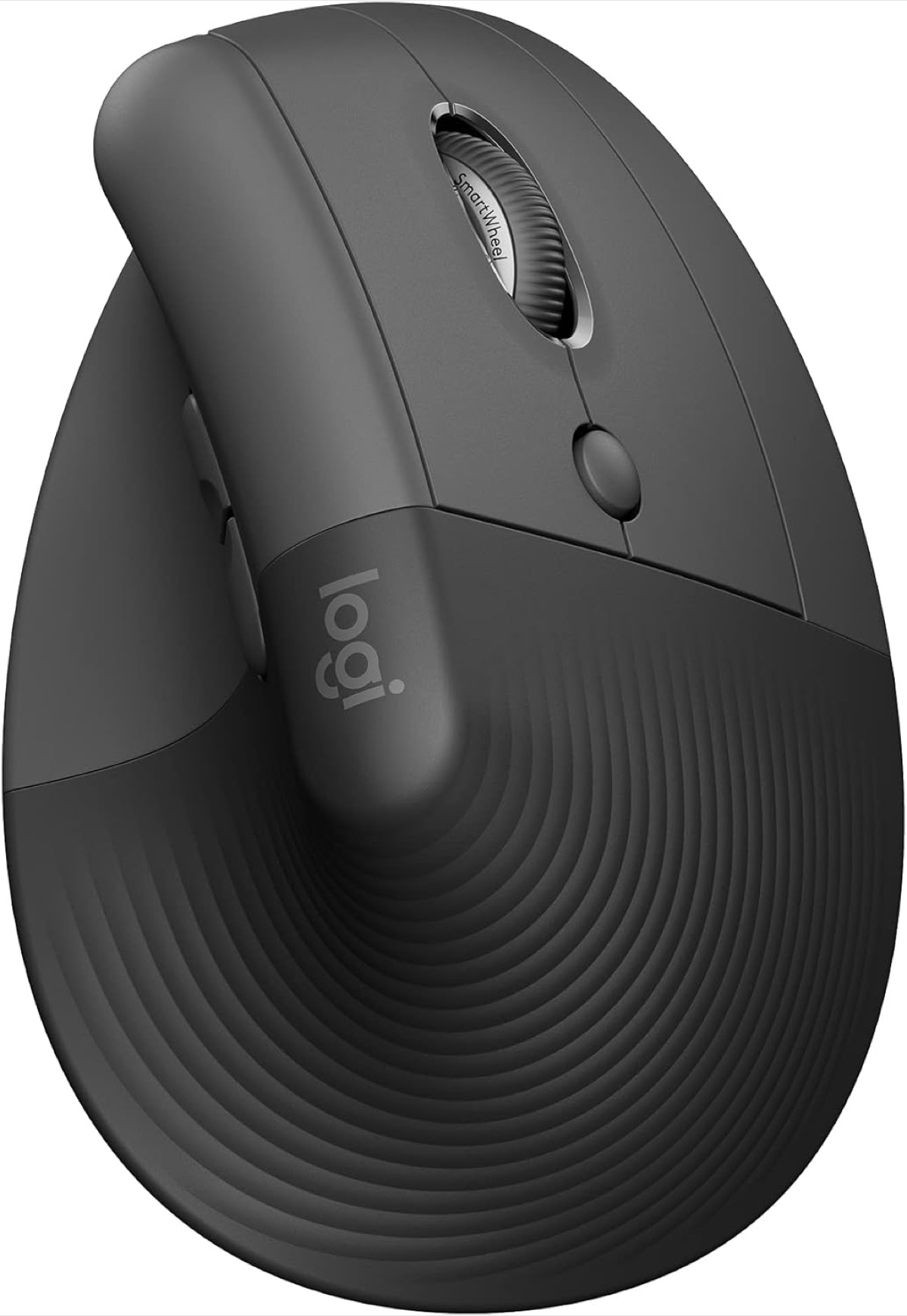
At a Glance#
Product : Logitech Lift Vertical Ergonomic Mouse
Brand : Logitech
Best For : Office workers and remote professionals with small to medium hands who want real ergonomic relief without a steep learning curve
Connectivity : Bluetooth Low Energy or Logi Bolt USB receiver
Buy Now : View on Amazon
Key Highlights:
- 57° vertical shape reduces wrist twist and forearm strain during long workdays
- Quiet-click switches make shared offices and late-night work much less annoying
- Adjustable 4000 DPI optical tracking balances comfort with precise cursor control
- Up to 24 months of battery life avoids the constant charging routine of many premium mice
- Works across Windows, macOS, iPadOS, ChromeOS, Linux, and Android 8 or later
- Right-handed shape only — Logitech sells the mirrored Lift for Left separately
Who Should Buy This#
The Logitech Lift hits a sweet spot for people who know a flat mouse is bothering their wrist, but do not want to jump straight into a huge specialist device. It gives you a more natural hand position, strong cross-platform support, and nearly maintenance-free battery life in a compact body that fits smaller and medium hands especially well.
Perfect for:
- Remote workers who spend six to ten hours at a desk and want less wrist pressure by the end of the day
- Laptop-first professionals who move between a home desk, coworking space, and office and need Bluetooth flexibility
- Small-hand users who find larger ergonomic mice awkward, overbuilt, or tiring to control
- Quiet-office workers who want near-silent clicks for shared spaces, calls, and late-night sessions
Design & Build Quality#
The Lift looks friendly instead of aggressively “ergonomic.” Logitech puts it at 108 mm tall, 70 mm wide and 71 mm deep — compact enough for smaller desks and lighter bags — while the softly textured grip and dedicated thumb rest make it feel planted in the hand. At 125 g, it has enough weight to feel stable without becoming a brick you drag across the desk.
One thing the shape does not do is work both ways round. This is the right-handed Lift; Logitech describes it as a fit for small to medium right hands, and left-handers need the separate mirrored model rather than this one.
Logitech clearly designed this mouse for comfort first, but it does not feel cheap or experimental. The buttons sit within easy reach, the shell has a pleasant matte finish, and the curve supports your hand instead of forcing your wrist flat against the desk. That is the real win here: it feels normal fast.
The construction also avoids the usual ergonomic-mouse penalty of looking awkward in a professional setup. In graphite, it blends in on an office desk, next to a MacBook, or in a minimalist home office without screaming “medical device.”
Key Features#
57° Vertical Ergonomic Shape#
The entire reason to buy the Lift is its 57° handshake angle. Instead of rotating your palm fully downward like a conventional mouse, the Lift keeps your hand in a more neutral posture that reduces wrist pronation and eases pressure through the forearm.
Logitech calls 57° the "natural handshake position" and says it puts less pressure on your wrist through the day, with your arm and upper body in a more natural posture. If you have been ending the day with tight forearms or a sore wrist crease, that is the problem this shape is aimed at.
Built for Small to Medium Hands#
A lot of ergonomic mice work well only if you have larger hands. The Lift is one of the few mainstream options that is intentionally sized for small to medium hands, which makes it easier to recommend broadly. You get ergonomic benefits without the oversized bulk of a full-size productivity mouse.
That sizing matters in real use. Smaller hands can reach the main buttons, scroll wheel, and thumb buttons without stretching or shifting grip constantly. It feels controlled rather than floaty, which is often the difference between an ergonomic mouse you keep using and one that ends up in a drawer.
Quiet Clicks and Easy Everyday Controls#
Logitech gave the Lift whisper-quiet primary buttons and a SmartWheel scroll system that can handle both precise line-by-line control and faster document navigation. The buttons are positioned so you can reach them naturally from the thumb rest, rather than hunting for side controls.
This makes the Lift a strong fit for work environments where noise matters. If you spend your day on calls, in shared offices, or working beside someone else, the softer click sound is an immediate quality-of-life upgrade. Check current availability here: View on Amazon
Adjustable 4000 DPI Tracking#
The Lift uses Logitech Advanced Optical Tracking with a 400 to 4000 DPI range, adjustable in 100 DPI increments. That gives you enough flexibility to dial in slower, precise movement for spreadsheets and design apps, or faster cursor travel on large and dual-monitor setups.
It is not trying to be a gaming mouse, and that is fine. Logitech ships it at a nominal 1000 DPI and calls the sensor Advanced Optical Tracking — the productivity-grade part of its range rather than the high-speed gaming one. The useful part is the full adjustability, which lets you tune pointer speed to your desk size and display setup.
Long Battery Life and Broad Compatibility#
Battery life is rated up to 24 months from a single AA battery, which is a massive advantage if you are tired of yet another device that wants a USB-C cable every week. For most people, the Lift will disappear into the background in the best possible way: it just keeps working.
Connectivity is equally practical. You can pair over Bluetooth Low Energy or use the included Logi Bolt receiver, with a stated 10 m wireless range, and Logitech lists Windows 10/11, macOS 10.15, iPadOS 14, ChromeOS, Linux and Android 8 — each with later versions supported. Read the footnote before you plan around it: outside Windows and macOS, Logitech only guarantees basic device functions without additional drivers, and its Logi Options+ customization app runs on Windows and macOS only. So the Lift will move cursor and clicks anywhere, but remapping those buttons is a two-platform affair.
Ergonomist-Approved Rather Than Feature-Maximalist#
Logitech's own listing copy calls the Lift "ergo-certified", saying it was designed, developed, tested and approved according to criteria set out by leading ergonomists — and unlike some wellness-flavored gadgets the design choices back that up. The vertical angle, thumb support, easy-reach controls, and smaller overall footprint all serve comfort, not just marketing language.
It also sits a tier below the flagship productivity mice rather than alongside them. You are paying for comfort and polish, but not for a huge list of specialist features you may never use. For a first ergonomic mouse, that balance makes a lot of sense.
Technical Specifications#
Dimensions : 108 mm (H) x 70 mm (W) x 71 mm (D)
Weight : 125 g (4.4 oz)
Ergonomic Angle : 57° vertical handshake position
Sensor Type : Logitech Advanced Optical Tracking
DPI Range : 400-4000 DPI, adjustable in 100 DPI increments
Connectivity : Bluetooth Low Energy or Logi Bolt USB receiver
Wireless Range : Up to 10 m (33 ft)
Battery : 1 x AA battery
Battery Life : Up to 24 months
Buttons : Logitech lists 6 — left/right click, back/forward, middle button, scroll wheel with middle click
Scroll Wheel : SmartWheel scrolling
Handedness : Right-handed only (Lift for Left is a separate model)
Compatibility : Windows 10/11, macOS 10.15, iPadOS 14, ChromeOS, Linux, Android 8 and later — basic functions only, without drivers, outside Windows and macOS
Customization App : Logi Options+, Windows and macOS only
Warranty : 1-year limited hardware warranty
Materials : Soft textured plastic shell; the Graphite version uses 70% certified post-consumer recycled plastic in its plastic parts, excluding packaging, receiver, printed wiring assembly, FFC cable and battery
Pros & Cons#
Pros:
- 57° shape noticeably reduces wrist twist during long desk sessions
- Sized properly for small to medium hands instead of oversized flagship ergonomics
- Quiet clicks are great for shared offices and video-call-heavy work
- 24-month battery life is far less hassle than rechargeable weekly devices
- Bluetooth plus Logi Bolt makes it easy to use across multiple setups
- Adjustable 4000 DPI tracking gives enough control for productivity and multi-monitor desks
Cons:
- Not ideal for larger hands that prefer a fuller palm-filling shape
- Right-handed only — left-handers need Logitech's separate Lift for Left
- Uses AA battery power instead of USB-C recharging
- Button remapping needs Logi Options+, which is Windows and macOS only
- Fewer advanced controls than Logitech's MX Master line, and no DPI button among the six
- Vertical mice always require a short adjustment period if you are coming from a flat mouse
Final Verdict#
Buy it. The Logitech Lift is one of the easiest ergonomic mice to recommend because it solves real wrist-comfort problems without becoming bulky, noisy, or overcomplicated.
Our recommendation: If you have smaller hands and spend most of your day at a desk, the Lift is a smarter first ergonomic upgrade than many larger premium alternatives. Check current availability: View on Amazon