

Wrist sore by lunchtime? A flat mouse keeps the forearm twisted into pronation for hours, and that's where the ache builds. Three Logitech picks fix it in different ways. Best overall: MX Vertical (full-size 57° tilt). Best budget: Lift (compact vertical for smaller hands). Best for trackball lovers: MX Ergo S (hand stays planted — zero wrist movement at all).
Who this comparison is for#
- Knowledge workers who put 6+ hours a day on a mouse and feel it in the wrist or thumb base by Friday
- RSI sufferers who have already tried a wrist rest and gel pad and need to change the geometry, not the cushion
- Smaller-handed users who tried a vertical mouse, found it too big, and gave up — the Lift fixes exactly that
How we picked#
- Geometry first: only neutral-handshake verticals or trackballs — anything with the standard pronated grip was disqualified
- Sensor and click reliability: sensors with headroom for big and multi-monitor desks, and switches that do not skip or double-click under daily load
- Multi-device pairing: Bluetooth plus a USB receiver (Logi Bolt on the Lift and Ergo S; the MX Vertical ships with Unifying), Easy-Switch across three devices on the verticals and two on the Ergo S — so the same mouse covers your machines
- Battery measured in months, not days: nobody wants to baby a productivity mouse
- Available in both US and EU markets so the dual affiliate links actually resolve to in-stock listings
Logitech MX Vertical (Best Overall)#
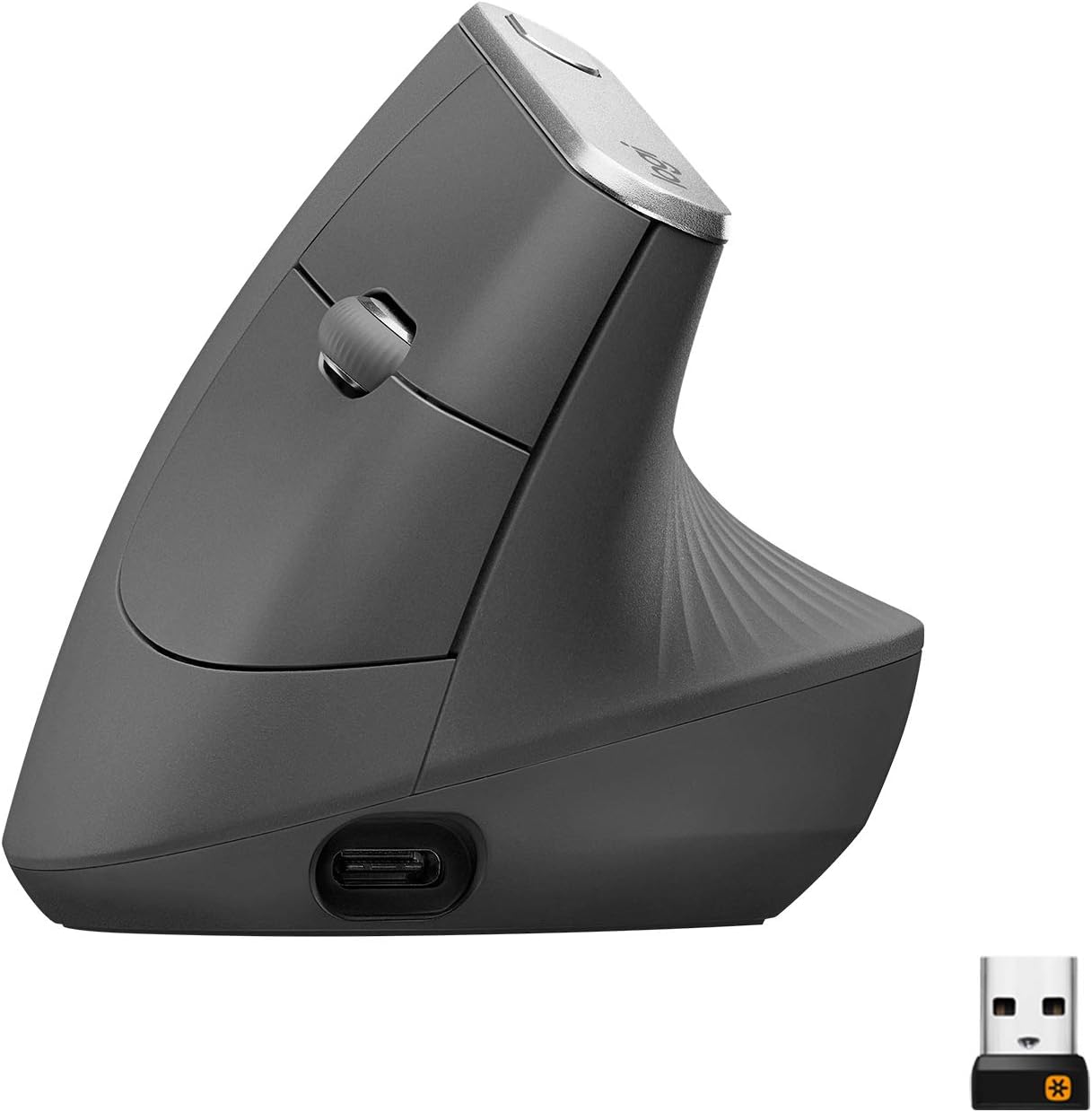
The MX Vertical is what most people picture when they hear "ergonomic mouse." A full-size body tilted to a 57° angle holds your forearm in a relaxed handshake position instead of twisting it palm-down. After a week or two of adjustment, most users report a noticeable drop in wrist tension — the muscles in the forearm simply don't have to fight gravity the same way.
It's the most refined of Logitech's verticals. The 4000 DPI optical sensor means up to four times less hand movement than a standard 1000 DPI mouse, the scroll wheel is precise (not free-spinning), and the textured rubber grip resists palm sweat over long sessions. USB-C rechargeable battery lasts about four months per charge in real use, and a one-minute fast-charge gives you three hours of use — enough to limp to lunch when you forget the night before.
Pairing is flexible: Bluetooth Low Energy plus the included Unifying USB receiver (this 2018 design predates Logi Bolt), with Easy-Switch button to bounce between three paired devices (work laptop, personal desktop, iPad) without re-pairing. Logi Options+ adds per-app button mapping — set DPI lower in Photoshop, higher in browsers, no fiddling.
Key Specs#
Tilt angle : 57° (vertical handshake position)
Sensor : 4000 DPI optical, adjustable 400–4000 in 50 DPI steps
Connection : Bluetooth LE + Unifying USB receiver, Easy-Switch across 3 devices
Battery : USB-C rechargeable, ~4 months per charge, 1 min fast-charge = 3 hours
Hand size : Medium to large (palm grip recommended)
Weight : ~135g
Software : Logi Options+ (Mac, Windows)
Bottom line#
The MX Vertical earns the top slot because it gets every detail right — sensor, grip, scroll feel, battery, multi-device pairing — and it's been Logitech's flagship vertical long enough that the firmware is rock solid.
Logitech Lift (Best Budget)#
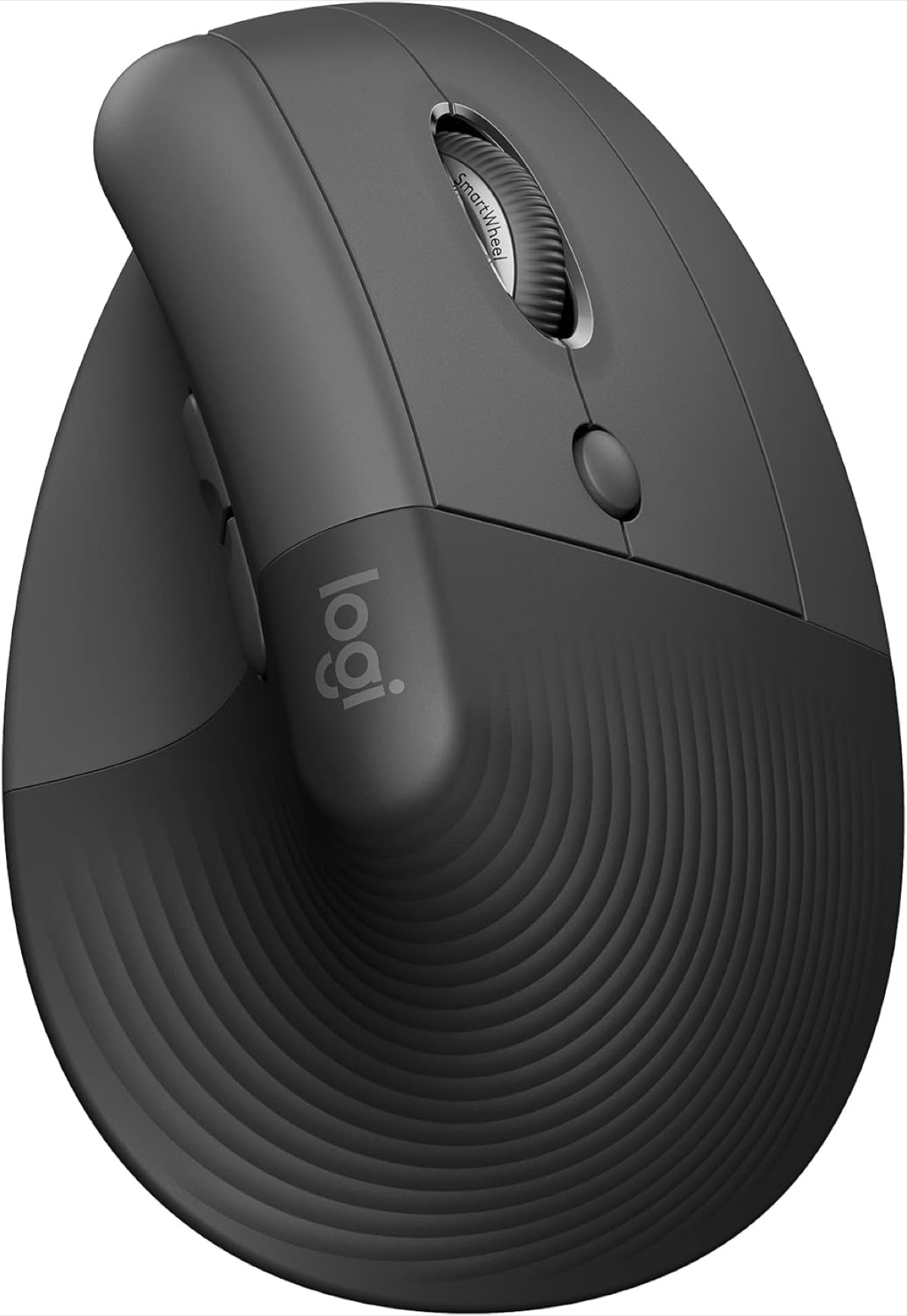
The Lift is the MX Vertical's smaller sibling, and for many buyers it's the better mouse — not just the cheaper one. Same 57° handshake angle, same Easy-Switch multi-device pairing, but a shorter, narrower shell sized for small to medium hands. If you tried a vertical mouse, found it cartoonishly large, and shelved it — this is the pick that converts you.
Two things set the Lift apart from its bigger brother. First, the click switches are silent — no audible "clack," just a soft tactile bump. In a shared apartment or a meeting room, that matters. Second, it runs on a single AA battery for up to 24 months, so you genuinely never think about charging. Slot a fresh cell in once every two years and forget about it.
Logitech also sells the Lift in a true left-handed version (mirrored shell, not just remapped buttons), which is rare in the ergonomic-mouse market. Same DPI ceiling, same Logi Options+ support, same Logi Bolt receiver — the budget pick is not a software-stripped tier, just a smaller body and AA power.
Key Specs#
Tilt angle : 57° (vertical handshake position)
Sensor : 4000 DPI optical
Connection : Bluetooth LE + Logi Bolt USB receiver, Easy-Switch across 3 devices
Battery : Single AA, up to 24 months
Hand size : Small to medium
Weight : ~125g
Variants : Right-handed and left-handed shells (true mirrored mold)
Click feel : Silent switches
Bottom line#
If your hand is on the smaller side, your apartment is on the quieter side, or your wallet is on the lighter side, the Lift is actually the better mouse — not a compromise.
Logitech MX Ergo S (Best for Trackball Lovers)#
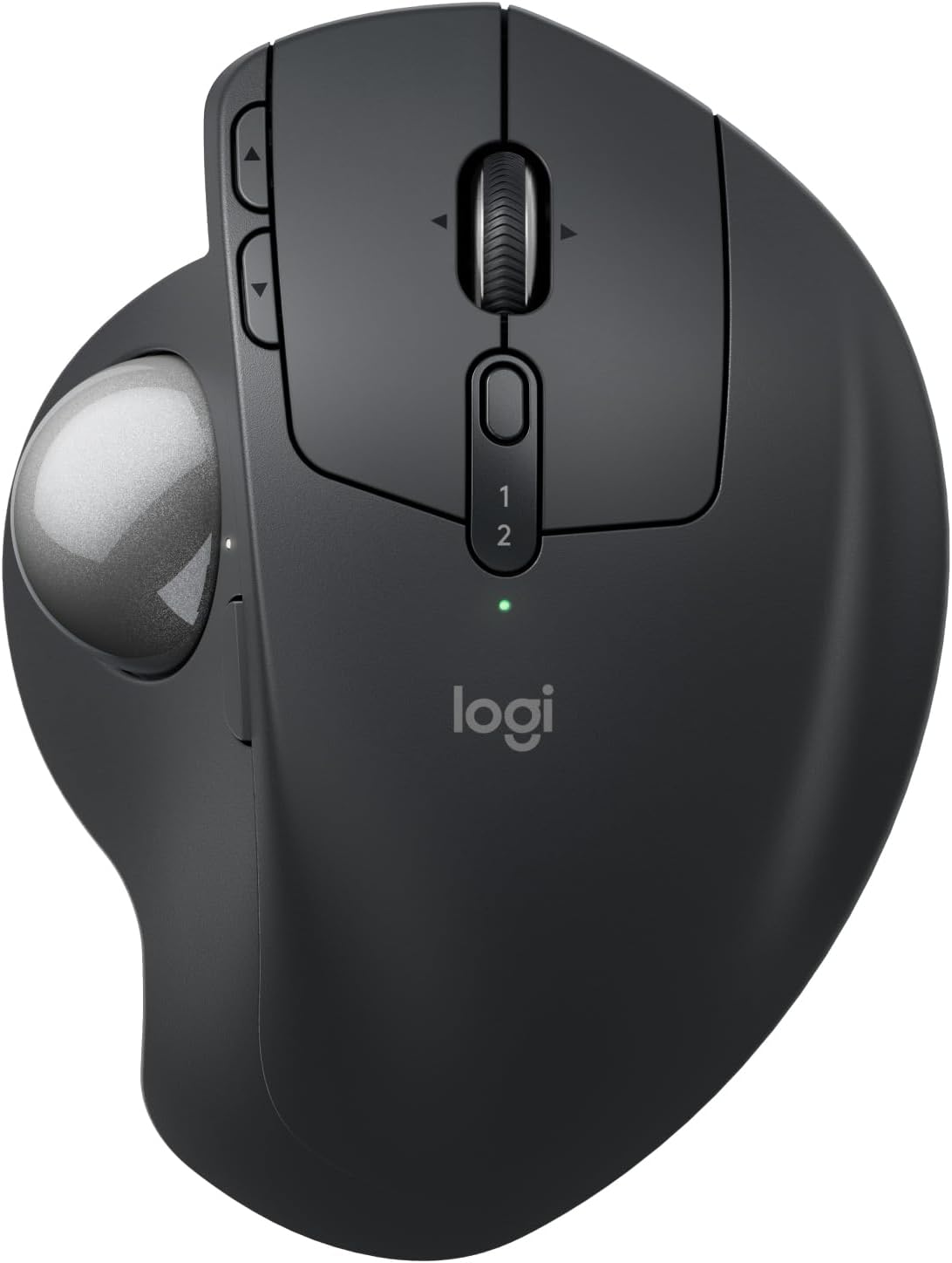
If the underlying problem is wrist movement itself — RSI flare-ups, post-surgery recovery, a narrow desk that forces awkward sweeps — neither vertical mouse will fully solve it. A trackball will. The MX Ergo S keeps your hand planted in one spot; the cursor moves because your thumb rolls a ball, not because your forearm sweeps an arc. For chronic strain cases, that one change does more than any wrist rest ever has.
Logitech updated this generation with quieter switches, a refined ball-bearing seat (smoother roll, less stutter), and a precision-mode button that drops DPI for pixel work. The optional 20° tilt plate magnetically clicks under the base, raising the right side so the hand sits in a partial handshake instead of fully flat — a halfway-house between a flat mouse and a full vertical. Most users settle on the tilted setup within a day.
Heavier than either vertical (~259g) and not portable in the laptop-bag sense — the Ergo S is a desk anchor. The flip side is Easy-Switch pairing across two computers, internal rechargeable battery for ~120 days per charge, and the same Logi Options+ software, so per-app button maps from your Vertical or Lift carry over directly.
For impressions on the new switch feel and the tilt-plate experience, see our full Logitech MX Ergo S review.
Key Specs#
Pointing method : Thumb-operated trackball (hand stays still)
Sensor : Trackball, 100–2000 DPI adjustable; precision mode 512–2048 DPI
Connection : Bluetooth LE + Logi Bolt USB receiver, Easy-Switch across 2 devices
Battery : Internal rechargeable, ~120 days per charge
Tilt option : Magnetic 0° / 20° base plate included
Hand size : All sizes (it's the thumb that does the work)
Weight : ~259g (desk anchor, not portable)
Click feel : Quiet switches (S generation update)
Bottom line#
When the wrist itself is the problem — not the angle, the wrist — go trackball. The MX Ergo S is the ergonomic-trackball benchmark with a software stack that matches its vertical siblings.
Which one should you buy?#
If you have medium-to-large hands and want the most refined vertical experience, pick the MX Vertical. The grip texture, scroll feel, and USB-C fast-charge are details the Lift trims to hit a lower price.
If you have smaller hands, work in a quiet room, or want the cheapest ergonomic upgrade that doesn't feel like a downgrade, pick the Lift. It's also the only one with a true left-handed version.
If your wrist hurts when you move it at all — RSI, carpal tunnel, post-surgery — neither vertical fully fixes that, because both still require forearm sweeps. Pick the MX Ergo S. The hand stays planted; the thumb does the work; the strain pattern is fundamentally different.
Still on the fence between vertical and trackball? Try the cheapest vertical (the Lift) first. It's the smaller change to your muscle memory, and if it isn't enough relief after two weeks, the trackball is waiting.
FAQ#
Does a vertical mouse really help with wrist pain?#
For most users with mild to moderate wrist tension, yes — within one to two weeks. The 57° angle takes the forearm out of full pronation, which removes the constant low-grade twist that builds into ache by end of day. It's not a cure for diagnosed RSI or carpal tunnel, but it's a meaningful geometry change. If pain persists after a week of consistent use, switch to a trackball or see a hand specialist.
Vertical mouse vs trackball — which is better for RSI?#
Different problems. A vertical mouse fixes forearm pronation but you still sweep the whole arm to move the cursor. A trackball eliminates the sweep entirely — the hand stays planted and the thumb (or finger) rolls the ball. If your strain comes from gripping at a bad angle, go vertical. If your strain comes from repeated arm movement itself, go trackball. RSI sufferers often land on the trackball.
Are these mice compatible with both Windows and Mac?#
All three work natively on Windows, macOS, ChromeOS, Linux, and iPadOS over Bluetooth. Logi Options+ (the configuration software) supports Windows and macOS only — on Linux and iPad you get default button behavior, which is fine for everyday use but you can't remap buttons or set per-app DPI.
Do I need different software for each one?#
No — Logi Options+ covers all three. If you upgrade from the Lift to the MX Vertical later, your per-app button maps and DPI settings carry over via the cloud profile.
Can I use the same mouse with multiple computers?#
Yes. The MX Vertical and Lift support Easy-Switch across three paired devices; the MX Ergo S pairs with two. Press the Easy-Switch button to cycle between machines, and the cursor follows. This is one of the strongest reasons to stay in the Logitech ecosystem if you switch machines often.
How long does the battery last on each one?#
MX Vertical: about four months per USB-C charge. Lift: up to 24 months on a single AA cell. MX Ergo S: about 120 days per internal-battery charge. The Lift is the clear winner if "set and forget" matters more than rechargeable convenience.