

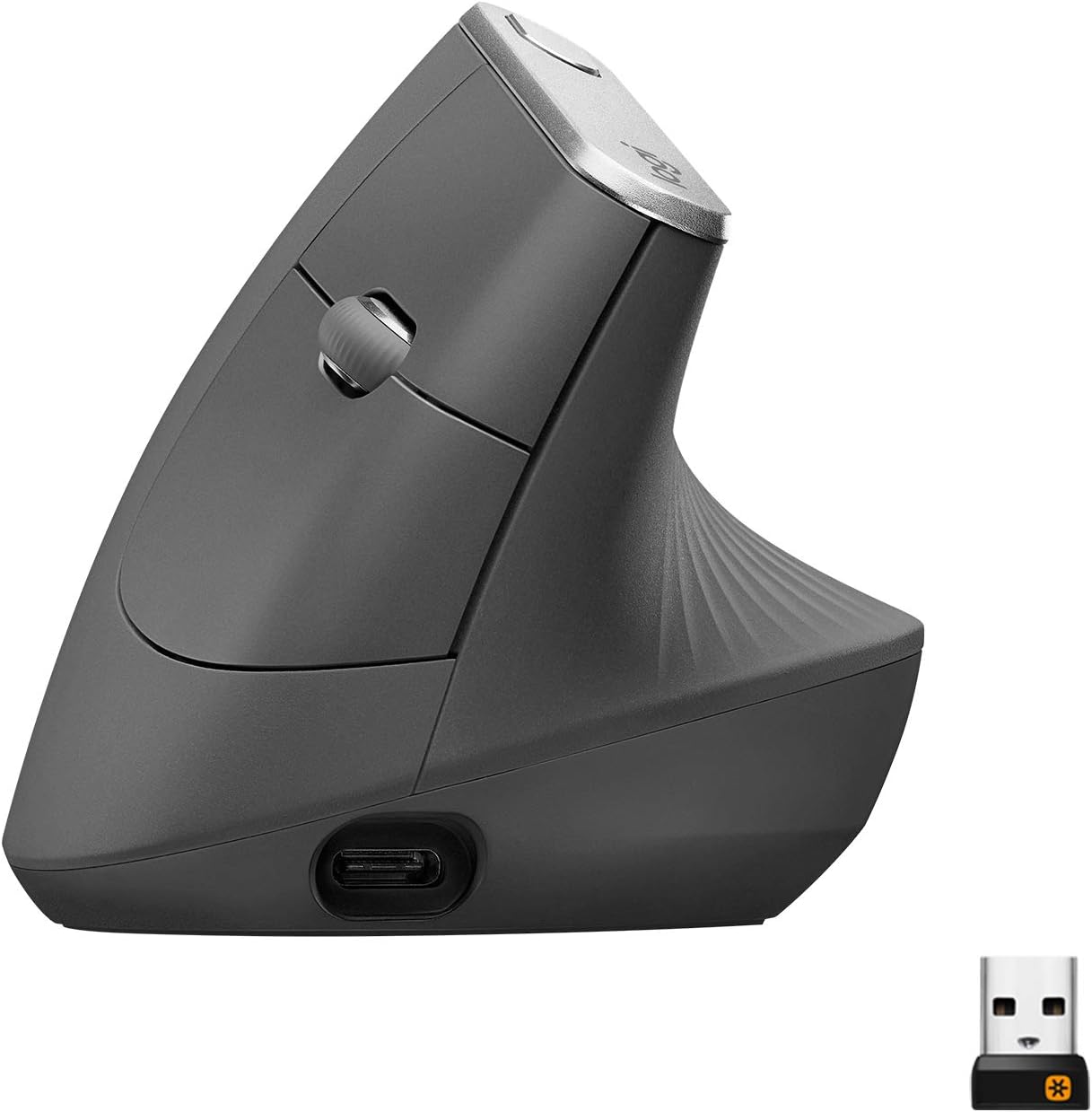
At a Glance#
Product : Logitech MX Vertical Wireless Mouse
Brand : Logitech
Best For : Office workers and developers who spend eight or more hours a day at a mouse and feel wrist or forearm strain by evening
Connectivity : Bluetooth Low Energy plus Logitech Unifying USB receiver (2.4 GHz)
Buy Now : View on Amazon
Key Highlights:
- 57-degree vertical angle reduces forearm rotation and median nerve pressure
- 4000 DPI high-precision sensor with one-touch DPI switching for fast cursor control
- Multi-device Easy-Switch button toggles between three paired computers
- Four-month battery life with USB-C quick charging for instant top-ups
- Logitech Flow moves your cursor and clipboard across up to three computers like one big desktop
Who Should Buy This#
The MX Vertical hits a sweet spot for knowledge workers who want clinical-style ergonomic relief without the price or weirdness of a full trackball. It delivers the wrist-saving handshake angle, premium build, and multi-device control that competing vertical mice from Anker or Kensington often skip, and it integrates with Logitech's Flow and Options ecosystem the way no budget alternative can.
Perfect for:
- Office workers with early signs of RSI who feel a dull ache in the wrist or forearm by mid-afternoon and want to fix the cause, not mask it
- Developers and designers running multi-machine setups who need to move fluidly between a work laptop, a personal desktop, and a side-project tower
- Long-haul writers and editors who push the cursor around for ten-hour stretches and want a tool that does not punish them by hour eight
- Frequent travelers who want a single rechargeable mouse that pairs with anything via Bluetooth and lasts months between charges
Design & Build Quality#
The MX Vertical is shaped like a half-clenched fist resting on its side. Your hand drops onto it the way you would extend it for a handshake, with the palm vertical and the thumb on top instead of pressing into the desk. That single design choice changes how your wrist sits all day.
The body is matte plastic with a textured rubber grip on the thumb side, which keeps it dry and smudge-free over long sessions. Build quality feels closer to the MX Master line than to entry-level Logitech gear. Two side buttons sit under the thumb, the scroll wheel is mid-body where your index finger naturally lands, and a small button behind it switches DPI. On top sit the Easy-Switch button and a power toggle. USB-C charging port is at the front nose.
Key Features#
57-Degree Vertical Handshake Angle#
Most mice force your forearm into 90 degrees of rotation, which compresses the median nerve over time. The MX Vertical drops that rotation to about 33 degrees by tilting the body 57 degrees off the desk. Logitech's testing shows roughly 10 percent less muscular activity in the forearm compared to a flat mouse during the same task.
In practice, you stop noticing your wrist. The first three to seven days feel awkward because your muscle memory is wrong, but by week two the standard horizontal mouse is what feels weird. People with early carpal tunnel symptoms typically report relief within two to three weeks of consistent use.
Multi-Device Easy-Switch and Logitech Flow#
A small button on top cycles through three paired devices. You can pair one over the Unifying USB receiver and two over Bluetooth, which means a work laptop, a personal Mac, and a Linux box can all share the same mouse with a single button press.
Flow takes that further. With Logitech Options installed on two machines, the cursor crosses screen edges between them as if they were one extended desktop. Drag a file from one computer to the other, copy text on Windows and paste it on macOS — it works without any KVM hardware. For anyone juggling two machines on one desk this single feature pays for the mouse.
4000 DPI Sensor and DPI Switching#
The high-precision sensor tracks at 4000 DPI maximum, more than enough for 4K monitors and detail work in Photoshop or Figma. A dedicated button under the scroll wheel swaps between two preset DPI values on the fly. Designers can drop to 400 DPI for pixel-precise edits and jump back to 2500 DPI to whip across multiple monitors.
Four-Month Battery and USB-C Quick Charge#
A full charge lasts about four months under normal eight-hour-a-day use. When the battery does run out, one minute on USB-C delivers roughly three hours of runtime, which is enough to finish whatever task you were on. The mouse remains fully usable while plugged in, so charging is never a workflow interruption.
Logitech Options Software#
The Options app lets you remap every button, set per-application gestures, and tune scroll behavior. The thumb buttons can be turned into back/forward in browsers and tab switchers in IDEs, or anything you want. Pointer speed, scroll direction, and DPI presets are all adjustable. Most ergonomic mice ship with no software at all, so this level of customization is genuinely rare in this category.
Get yours here: View on Amazon
Technical Specifications#
Sensor Resolution : 400 to 4000 DPI, adjustable in 50 DPI increments
Vertical Angle : 57 degrees from horizontal
Connectivity : Bluetooth Low Energy 4.0 plus 2.4 GHz Logitech Unifying USB receiver
Wireless Range : Up to 10 meters (33 feet)
Buttons : 6 (left, right, scroll click, DPI switch, two thumb side buttons)
Battery : Built-in lithium-polymer, rechargeable via USB-C
Battery Life : Up to 4 months on a full charge
Quick Charge : 1 minute of charging provides approximately 3 hours of use
Compatibility : Windows 10 or later, macOS 10.13 or later, Linux, Chrome OS, iPadOS 13.4 or later
Dimensions : 79 x 79 x 120 mm (3.11 x 3.11 x 4.72 inches)
Weight : 135 grams (4.76 ounces)
Cable Included : USB-A to USB-C charging cable
Pros & Cons#
Pros:
- 57-degree handshake angle puts the wrist in a neutral position, cutting forearm muscle activity by around 10 percent
- Most users with early RSI report wrist pain relief within two to three weeks of switching
- Easy-Switch button toggles between three paired computers across Windows, macOS, and Linux
- Logitech Flow lets you share cursor and clipboard between two machines without KVM hardware
- Four-month battery life with one-minute USB-C quick charging that delivers three hours of use
- 4000 DPI sensor with hardware DPI switching satisfies pixel-precise design work and 4K multi-monitor sweeps
- Premium rubber-coated grip and Master-tier build quality at a noticeably lower price than the MX Master
Cons:
- Three to seven days of awkward feel before your muscle memory adapts to the vertical grip
- Body suits medium and large hands best, smaller hands may struggle to reach the thumb buttons comfortably
- Right-handed only, with no mirrored left-handed model in the lineup
- Built-in non-removable battery means the entire mouse is recycled when the cell finally degrades
Final Verdict#
Buy it. The MX Vertical is the proven ergonomic upgrade for anyone whose wrist hurts after eight hours at a standard mouse, and the multi-device tricks and Flow software make it useful even if your wrist feels fine.
Our recommendation: Pair it with a vertical-friendly mousepad and give yourself a full week of consistent use before judging it. The transition is real, but so is the relief on the other side. Get yours here: View on Amazon