

At a Glance#
Product : Logitech MX Ergo S Wireless Trackball Mouse
Brand : Logitech
Best For : Office workers and creatives dealing with wrist strain who need precise cursor control without desk space
Connectivity : Bluetooth Low Energy / Logi Bolt 2.4 GHz / USB-C (charging)
Buy Now : View on Amazon
Key Highlights:
- 20-degree adjustable tilt keeps your wrist in a natural handshake position
- 120-day battery life with 1-minute quick charge for 24 hours of use
- Quiet mechanical switches designed for shared office environments
- Multi-device Easy-Switch pairs with 2 computers and switches instantly
- FLOW cross-computer file drag-and-drop between paired machines
Who Should Buy This#
The MX Ergo S occupies a unique position in the mouse market. It solves real ergonomic problems that regular mice create over years of desk work. The thumb-controlled trackball eliminates repetitive arm sweeping entirely, while the adjustable tilt reduces the internal rotation that causes wrist strain.
Perfect for:
- Office workers with wrist pain who've tried ergonomic mice but still feel strain after 8-hour days at the desk
- Multi-computer users who juggle a laptop and desktop and want seamless cursor control across both without switching devices
- Creative professionals who need precise cursor placement for design work but lack desk space for wide mouse movements
- Remote workers in shared spaces who need quiet clicks that won't disrupt video calls or partners working nearby
If any of those describe you, check the current price: View on Amazon
Design & Build Quality#
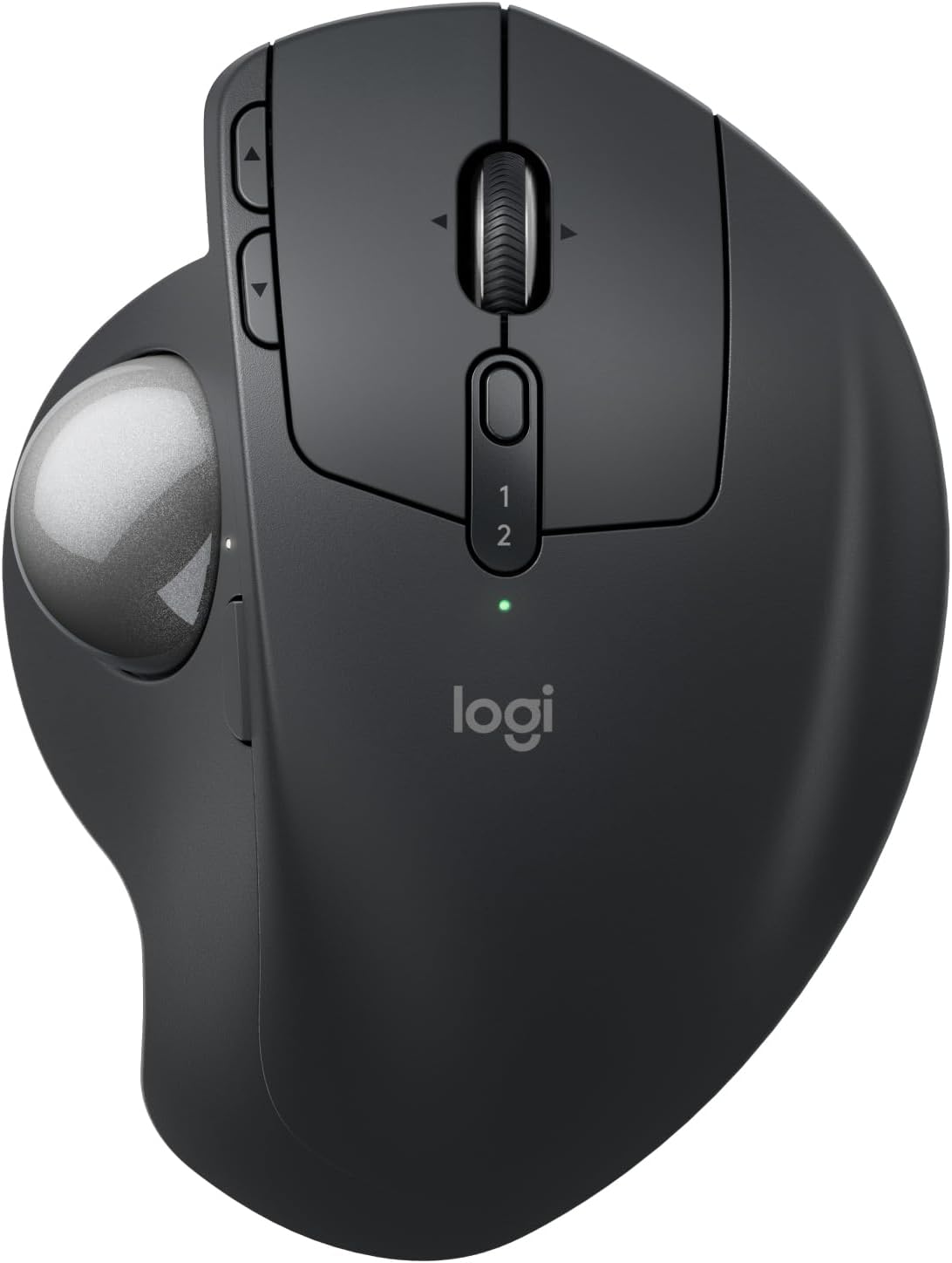
The MX Ergo S feels substantial in the hand. At 259 grams with the magnetic metal plate attached, it sits firmly on your desk without sliding. The sculpted body follows the natural curve of a relaxed right hand, with a soft rubber grip surface that prevents sweat buildup during extended sessions.
The star feature is the adjustable metal hinge on the bottom. Flip it to 20 degrees, and the entire mouse tilts to place your forearm in a neutral position — the same angle physical therapists recommend for reducing carpal tunnel pressure. At 0 degrees, it lies flat like a traditional mouse for users who prefer that position. The hinge clicks firmly into either position with no wobble.
Build materials feel premium. The matte-textured ABS body resists fingerprints, and the PTFE feet keep the base stable on any surface. The 34mm trackball pops out easily for cleaning — just push it from the bottom with a pen.
Key Features#
20-Degree Adjustable Ergonomic Tilt#
Most ergonomic mice force you into a single angle. The MX Ergo S gives you two options: flat (0°) or tilted (20°). That 20-degree tilt rotates your forearm to a handshake position, reducing the internal wrist rotation that causes repetitive strain injury. Logitech cites a 27% reduction in muscle strain for this posture compared to flat mice. You'll notice the difference within the first week — that end-of-day wrist ache starts to fade.
Precision Thumb Tracking with DPI Toggle#
The trackball sits under your thumb, giving you full cursor control without moving your arm at all. A dedicated button toggles between a slowed precision mode for pixel-perfect work and full speed for multi-monitor navigation. The Logitech Advanced Optical sensor tracks accurately with zero smoothing or acceleration, so cursor movement feels direct and predictable.
Multi-Device Easy-Switch and FLOW#
Pair the MX Ergo S with two computers via Bluetooth or the included Logi Bolt receiver. The Easy-Switch button on the top switches between them instantly. Enable Logitech FLOW through Logi Options+ software, and you can move your cursor to the edge of one screen and have it appear on the other machine — dragging files, text, and images between computers as if they shared one desktop. This alone justifies the price for multi-computer setups.
120-Day Battery with USB-C Quick Charge#
The built-in 500mAh lithium polymer battery lasts up to 120 days on a single charge. That's four months of daily use before you need to think about power. When it does run low, one minute of USB-C charging delivers 24 hours of use. A full charge takes about 2 hours. The mouse works while charging, so you're never forced to stop.
Quiet Mechanical Switches#
The MX Ergo S uses quiet mechanical micro-switches rated for millions of clicks. Click noise is reduced significantly compared to standard mice — essential for open offices, video calls, and late-night work sessions. The tactile feedback remains satisfying; you feel the click without broadcasting it to everyone within earshot.
Technical Specifications#
Sensor : Logitech Advanced Optical Tracking (thumb trackball)
DPI Range : 100–2000 software-adjustable (up to 4000 via firmware), with precision-mode toggle
Connectivity : Bluetooth Low Energy / Logi Bolt 2.4 GHz USB receiver
Battery : Built-in 500mAh Li-Po, up to 120 days per charge
Charging : USB-C (cable not included), 1 min = 24 hrs quick charge
Buttons : 8 total (6 programmable via Logi Options+)
Scroll Wheel : 4-way precision tilt (vertical + horizontal)
Tilt Angle : 0° or 20° via adjustable metal hinge
Dimensions : 132.5 x 99.8 x 51.4 mm (5.2 x 3.9 x 2.0 in)
Weight : 164 g without plate / 259 g with magnetic metal plate
Compatibility : Windows 10/11, macOS 12+, ChromeOS, Linux, iPadOS 15+, Android 12+
Trackball Size : 34 mm, removable for cleaning
Pros & Cons#
Pros:
- 20-degree adjustable tilt genuinely reduces wrist strain during long work sessions
- 120-day battery life means you charge it roughly four times a year
- Quiet mechanical switches keep your workspace peaceful during calls
- 1-minute USB-C quick charge delivers a full day of use in emergencies
- Multi-device Easy-Switch and FLOW make multi-computer setups seamless
- Precise thumb control eliminates the need for desk space or a mouse pad
- Logi Options+ software enables deep button and gesture customization
Cons:
- Right-hand only design — no left-handed version available
- Modest DPI ceiling and wireless polling make it unsuitable for competitive gaming
- USB-C cable not included in the box despite the premium price
- Trackball requires 1-2 weeks of adjustment for first-time users
Final Verdict#
Buy it. The Logitech MX Ergo S is the most polished trackball mouse on the market, delivering genuine ergonomic relief with enterprise-grade productivity features that justify its premium position.
Our recommendation: If you spend 6+ hours daily at a computer and notice wrist discomfort, this mouse pays for itself in comfort within the first month. Pair it with your laptop and desktop via Easy-Switch, and you'll wonder why you ever used a regular mouse. View on Amazon