

You probably already own a mechanical keyboard you love — and that is exactly why it should never leave your desk. The good ones are heavy, they cost real money, and you baby them: nobody wants to balance a pricey board on their lap and then knock a drink onto it mid-match. A living-room gaming PC like a SteamOS Steam Machine or the META PCS Steamroller needs a different kind of keyboard — one that is light, wireless, one-handed, and cheap enough that a spilled beer is annoying, not tragic. The four we would actually grab for the couch are the Logitech K400 Plus, the backlit Logitech K830, the Corsair K83, and the ultralight Logitech Pebble Keys 2 K380s, plus the TV-first Logitech K600 TV.
The job here is narrow, and that is the point. On a SteamOS box you play with a controller; the keyboard is for desktop mode, searching the store, typing passwords and messages, and the odd keyboard-and-mouse game. So the couch keyboard does not need premium switches — it needs a trackpad so you are not also juggling a mouse, enough range to reach the sofa, and a battery that lasts months. Every pick below connects over the machine's built-in Bluetooth or its own tiny USB receiver, works on SteamOS/Linux, and is light enough to live on the arm of the couch.
Who this guide is for#
- Steam Machine and Steamroller owners who want a sofa-friendly keyboard and don't want to risk their good desk board.
- Living-room PC users who need a trackpad built in, so there's no mouse to balance on a cushion.
- Anyone setting up a SteamOS box under the TV who mostly needs text entry, browsing and menu control — not competitive typing.
- People who want something cheap and carefree for the couch, but still well-made, not no-name junk.
How we picked#
- Couch-first, not desk-first. Light, wireless, and ideally an integrated trackpad for one-handed use — the opposite of a heavy mechanical you'd be nervous to spill on.
- Works on SteamOS out of the box. Each pick pairs over Bluetooth or a plug-and-play USB receiver and shows up as a standard Linux input device — no Windows-only driver required for the basics.
- Long range and long battery. A board you grab occasionally from the sofa should reach across the room and go a long time between charges — the AA/AAA picks here last months; the rechargeables last days to weeks.
- Carefree, but still good. Proven brands and solid build, at prices where a spill or a drop is a shrug — not a no-name board that dies in a month.
Logitech K400 Plus — Best Overall for the Couch#
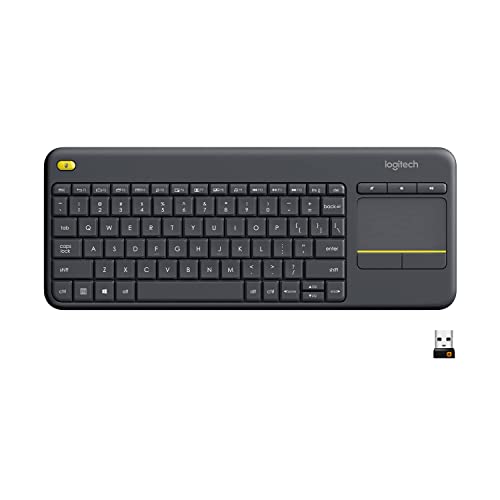
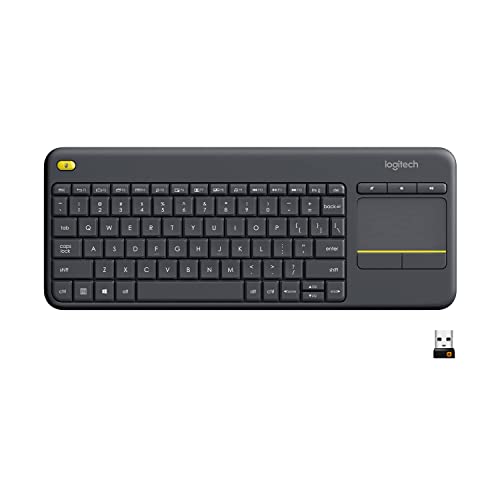
The K400 Plus is where most living-room PC builders start, and for good reason: it puts a full keyboard and a large trackpad on one light, lap-friendly slab, so you can browse, launch a game and move the cursor without a mouse or a table. It reaches about 33 feet, runs for up to 18 months on two AA batteries, and its little USB receiver just works — plug it into the Steamroller and SteamOS sees a standard keyboard and touchpad instantly.
It isn't fancy, and that is the appeal. It's cheap enough that using it on the couch, near snacks and drinks, doesn't make you wince — which is the whole idea of a second keyboard that isn't your precious mechanical.
Key specs#
Type : Wireless keyboard with integrated trackpad (2.4GHz USB receiver, no Bluetooth)
Best for : The default couch keyboard — one-handed browsing and launching from the sofa
Range / battery : ~33 ft range, up to 18 months on 2x AA
SteamOS : Plug-and-play — the receiver enumerates as a generic keyboard + touchpad, no drivers
Bottom line. The carefree couch classic: trackpad built in, long battery, and cheap enough to not baby. If you buy one keyboard for the living room, start here. View on Amazon
Logitech K830 — Best Premium, Backlit#
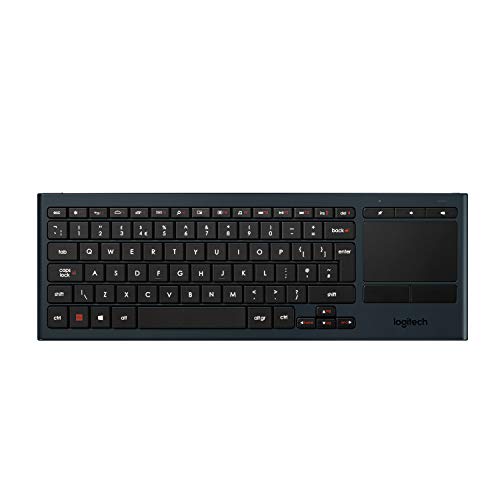
The K830 is the K400's classier sibling, and it fixes the one thing you'll miss in a dark living room: it's backlit. The keys light up as soon as you start typing and the backlight adjusts to the room's brightness automatically, which matters a lot when the only light in the room is the TV. You still get a large right-side trackpad, the same easy 33-foot range, and a rechargeable battery instead of AAs.
It feels more premium than the K400 — slim, solid, with a soft-touch finish — while staying light and lap-friendly. If you do a fair amount of desktop-mode typing or browsing from the couch and want to see the keys, this is the upgrade.
Key specs#
Type : Illuminated wireless keyboard with integrated trackpad (2.4GHz Unifying receiver + Bluetooth)
Best for : Dark rooms — automatic backlight plus a big trackpad
Range / battery : ~33 ft range, rechargeable (USB)
SteamOS : Works as a standard USB-receiver keyboard + touchpad; backlight is hardware-driven, no software needed
Bottom line. The premium couch pick: everything good about the K400 plus a proper backlight for movie-dark rooms. Worth it if you type from the sofa. View on Amazon
Corsair K83 Wireless — Best for Lean-Back Gaming#
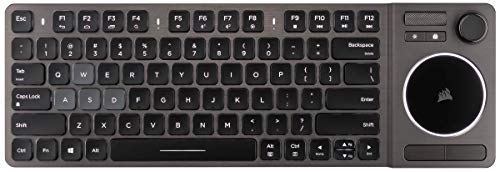
The K83 is the most gaming-flavored of the bunch: a brushed-aluminum board with white backlighting, a round precision trackpad, an aluminum volume roller, and — unusually — a small analog joystick with click buttons on the right. It connects over low-latency 2.4GHz or Bluetooth, and it genuinely feels like a premium living-room device rather than a cheap remote.
One honest caveat for SteamOS: the keyboard, trackpad and media keys work fine on Linux out of the box over the 2.4GHz receiver, but Corsair's iCUE software and full joystick mapping are Windows-only, so treat the joystick as a bonus, not a guaranteed game controller on SteamOS. For lean-back browsing and menu control with a bit of extra flair, though, it's the nicest-feeling board here.
Key specs#
Type : Wireless entertainment keyboard, backlit, with trackpad + analog joystick (2.4GHz + Bluetooth)
Best for : A premium, backlit couch board with media roller and extra controls
Connectivity : Ultra-fast 2.4GHz or Bluetooth
SteamOS : Keyboard, trackpad and media keys work over the 2.4GHz receiver; joystick mapping / iCUE are Windows-only
Bottom line. The premium-feeling gaming lounger: aluminum build, backlight, trackpad and a volume roller — just don't count on the joystick under SteamOS. View on Amazon
Logitech K600 TV — Best for a Pure TV Setup#
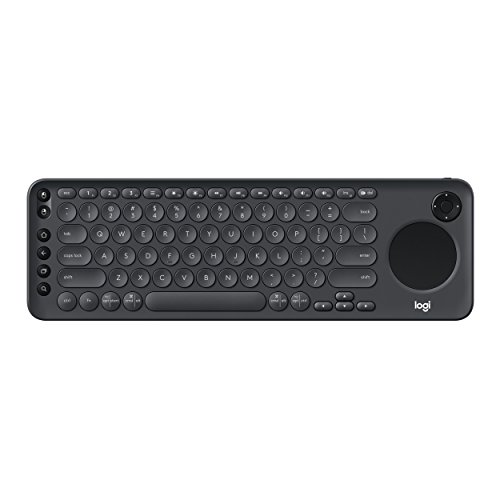
If your Steamroller lives entirely under the TV and you navigate 10-foot menus more than you type, the K600 TV is built for exactly that. It pairs a full keyboard with both an integrated touchpad and a D-pad for grid-style navigation, adds dedicated media keys, reaches up to 15 meters, and lasts up to a year on two AAA batteries. It was designed for smart TVs, so the whole layout assumes you're across the room on a sofa.
The caveat: Logitech markets it for smart TVs, Windows, Mac and mobile, and doesn't officially list Linux — but it connects via a standard USB receiver or Bluetooth, so the keyboard, touchpad and D-pad work as generic input on SteamOS. You just won't get any official support promises.
Key specs#
Type : Wireless TV keyboard with integrated touchpad and D-pad (USB receiver + Bluetooth)
Best for : TV-first setups — 10-foot navigation with a D-pad and touchpad
Range / battery : Up to ~15 m range, up to 1 year battery
SteamOS : Works as a generic HID keyboard + touchpad; Linux isn't officially listed
Bottom line. The 10-foot specialist: D-pad plus touchpad for couch-and-TV navigation, if you can live without an official Linux badge. View on Amazon
Logitech Pebble Keys 2 K380s — Best Ultralight Grab-and-Go#
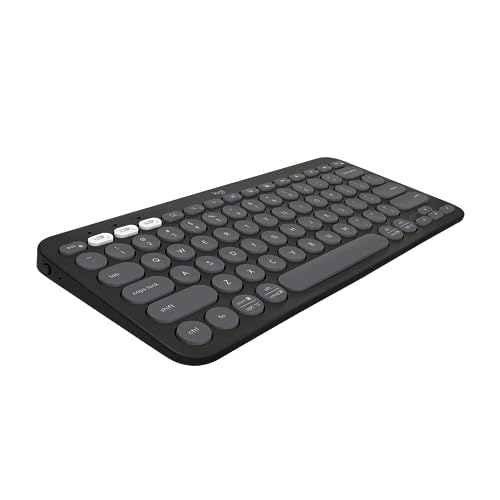
Sometimes you don't want a trackpad at all — you're playing with a controller and just need to type a search or a password now and then. The Pebble Keys 2 is the toss-it-anywhere option: slim, quiet, feather-light, with round keys and up to 36 months of battery on two AAAs. It pairs to three devices over Bluetooth, so it can jump between the Steamroller, a laptop and a tablet.
There's no trackpad and no backlight, so it's not a solo couch driver — but as the cheap, disappears-into-the-cushions keyboard you grab for quick text entry, nothing here is lighter or more carefree.
Key specs#
Type : Slim multi-device Bluetooth keyboard (no trackpad, no backlight)
Best for : Ultralight quick text entry alongside a controller
Range / battery : Bluetooth, up to 36 months on 2x AAA
SteamOS : Pairs once over Bluetooth and persists; standard Linux HID keyboard
Bottom line. The featherweight text-entry pick: pair it, toss it on the couch, forget about it. Best as a companion to a controller, not a solo board. View on Amazon
Why not just use your mechanical keyboard?#
Because the things that make a great mechanical great are the things that make it wrong for the couch. It's heavy and rigid, so it doesn't sit well on a lap. It has no trackpad, so you're back to needing a mouse and a surface. It's often wired, or a precious wireless board you don't want crumbs and drinks near. And the nice ones cost enough that "I'll just use it on the sofa" quietly becomes "I'm now stressed about my keyboard."
Keep the mechanical where it belongs — on the desk, for real keyboard-and-mouse sessions — and let a light, cheap, trackpad-equipped board handle couch duty. That division is the whole idea: the right tool in each place, instead of dragging your good one somewhere it'll get wrecked.
Which couch keyboard should you buy?#
For most people, start with the K400 Plus — trackpad, long battery, and cheap enough to be truly carefree. If your living room is dark and you type from the sofa, step up to the backlit K830. Want the premium, gaming-flavored feel with a media roller and extra controls? The Corsair K83 is the nicest here, as long as you treat its joystick as a Windows bonus. If the setup is pure TV-and-sofa navigation, the K600 TV and its D-pad are made for it. And if you mostly game with a controller and just need to type now and then, the featherweight Pebble Keys 2 K380s is all you need.
Whichever you pick, the point holds: this is the keyboard that lives by the couch so your real one can stay safe on the desk.
FAQ#
Do I even need a keyboard for a SteamOS gaming PC? : For gaming, no — a controller is the primary input, and SteamOS has an on-screen keyboard for quick text. But a physical keyboard makes desktop mode, browsing, logins and keyboard-and-mouse games far less painful. A cheap couch board is the low-effort way to have one on hand.
Will these work on the Steamroller and Steam Machine over Bluetooth? : Yes. Both are SteamOS (Linux) machines with built-in Bluetooth, and the Steam Machine lists Bluetooth 5.3; the Steamroller has Bluetooth via its Wi-Fi card. The Bluetooth boards here pair directly, and the receiver boards just need a free USB port — the K400 Plus is receiver-only, while the K830 offers both its Unifying receiver and Bluetooth.
Why a trackpad instead of a separate mouse? : Because on a couch there's no desk for a mouse. A built-in trackpad lets you navigate one-handed from your lap. It's fine for menus and browsing; for precise aiming in a keyboard-and-mouse game you'd still want a real mouse at a desk.
Are these good for actually gaming, or just for menus? : Mostly for menus, desktop mode and text. They're membrane or low-travel boards over wireless, which is great for navigation and typing but not for competitive keyboard-and-mouse play. For that, use a wired or low-latency board at a desk — and a controller for everything else.
Which one has a backlight for a dark room? : The Logitech K830 has an automatic backlight, and the Corsair K83 has adjustable white backlighting. The K400 Plus and Pebble Keys 2 do not light up, so pick one of the first two if you often use it with the lights off.