

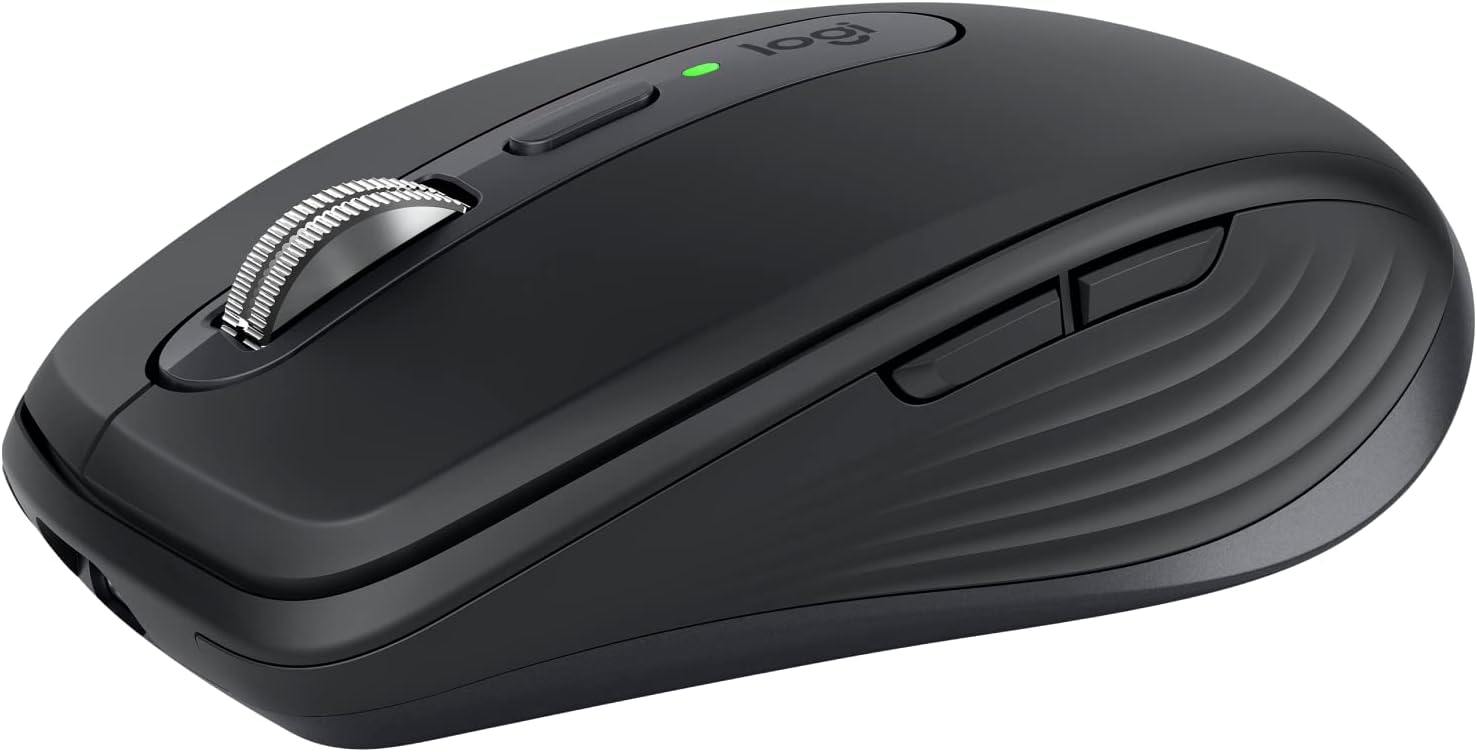
At a Glance#
Product : Logitech MX Anywhere 3S
Brand : Logitech
Best For : Mobile professionals who need precision mouse control across multiple devices and surfaces
Connectivity : Bluetooth Low Energy only in the box — Logi Bolt receiver compatible but not included
Buy Now : View on Amazon
Key Highlights:
- Darkfield sensor tracks on virtually any surface including glass, at Logitech's stated 4 mm minimum thickness — it publishes the ceiling as 8,000 DPI and the floor as either 400 or 200 DPI depending on which of its own pages you read
- Quiet Clicks: Logitech's copy is "the same satisfying feel but with less click noise (than MX Anywhere 3)" — it publishes no percentage for this model
- MagSpeed electromagnetic scroll wheel auto-shifts between ratchet and free-spin, and scrolls 1,000 lines per second
- Up to 70 days on a full charge, and up to 3 hours off a 1-minute USB-C charge
- Pairs with up to 3 devices over Bluetooth on Windows, macOS, Chrome OS or Linux
Who Should Buy This#
The MX Anywhere 3S solves the problem of needing full-size mouse precision in a compact, travel-ready package. It works on hotel desks, airplane tray tables, glass conference room surfaces, and coffee shop counters where optical mice simply give up.
Perfect for:
- Remote workers who split time between home office and coworking spaces and need a mouse that fits in any bag
- Multi-device users who switch between a MacBook, iPad, and desktop PC throughout the day and want one mouse for all three
- Frequent travelers who refuse to sacrifice precision for portability and need tracking on any surface
- Quiet-office professionals who work in shared spaces and want quieter clicks than the previous Anywhere generation
Recognise yourself in that list? Check the current price: View on Amazon
Design & Build Quality#
The MX Anywhere 3S measures 100.5 × 65 × 34.4 mm and weighs 99 g on Logitech's product page — its support specification page says 95 g with the battery and 85 g without, so treat the figure as approximate — making it noticeably smaller and lighter than the MX Master 3S while retaining the same premium build quality. The low-profile silhouette slides into laptop bags and even jacket pockets without adding bulk.
The contoured shape follows Logitech's ergonomic design language with a subtle thumb rest on the left side and textured side grips that prevent slipping during long sessions. Logitech states that the plastic parts include certified post-consumer recycled plastic — 78% on the Graphite colourway this listing sells.
What is actually in the box, because the listing disagrees with itself. The very first line of the listing is unambiguous: "Logitech MX Anywhere 3S comes with a USB-C charging cable (USB-A to USB-C) only, no USB receiver / dongle." Logitech's own package list agrees — three items, the mouse, a "USB-C charging cable (USB-A to USB-C)" and user documentation — and it repeats the point in the bullets: "Compatible with Logi Bolt USB receiver only (receiver not included)." The one surface that disagrees is Amazon's auto-generated Item details panel, whose free-text Included Components string lists a "USB Receiver" and calls the product "Logitech MX Anywhere 3 Compact Performance Mouse" — the previous generation's name, in a field the same panel contradicts one row above with Model Name: MX Anywhere 3S. Budget for a Logi Bolt receiver separately if you want the 2.4 GHz link rather than Bluetooth.
Key Features#
8K DPI Darkfield Tracking#
Logitech does not agree with itself on the sensor's floor: its product page for this SKU says "200-8000 DPI (can be set in increments of 50 DPI)", while its support specification page says "Resolution: 400 - 8,000 DPI". The ceiling of 8,000 and the 50 DPI steps through Logi Options+ are not in dispute. Unlike standard optical sensors that fail on glossy or transparent surfaces, Darkfield tracks accurately on glass as thin as 4mm. This means you can ditch the mousepad entirely and work directly on any desk surface you encounter.
MagSpeed Electromagnetic Scrolling#
The same MagSpeed scroll wheel found in the flagship MX Master 3S makes an appearance here. It auto-shifts between precise ratchet mode for line-by-line scrolling and free-spin mode that covers 1,000 lines per second. The mode-shift button behind the wheel lets you lock your preferred mode. Scrolling through long spreadsheets or documents becomes noticeably faster once you get used to the free-spin flick.
Quiet Click Technology#
Logitech describes Quiet Clicks on this model as "the same satisfying feel but with less click noise (than MX Anywhere 3)" — a comparison against the previous generation with no percentage attached. Do not carry over the MX Master 3S's "90% less Sound Power Level" figure: that number belongs to the Master line, and the only 90% Logitech publishes for the Anywhere 3S is a scrolling claim, "90% more speed and 87% more precision" — and those two halves have different baselines, per the listing's own footnotes: the speed figure is "Compared to regular Logitech Mouse without an electromagnetic scroll wheel", the precision figure "Compared to Logitech Master 2S Mouse with Logitech Options installed and Smooth scrolling enabled". In a quiet office the change from the Anywhere 3 is still the point of the model.
Multi-Device Flow#
Connect with up to 3 devices over Bluetooth on Windows, macOS, Chrome OS or Linux, and move between them without re-pairing. Combine it with Logitech Flow in Options+ software, and you can move your cursor across two computers seamlessly, even copying and pasting files between them. The Logi Bolt receiver is an option, not an inclusion — see the box contents above.
70-Day Battery Life#
The 500 mAh lithium-polymer battery charges via USB-C and, in Logitech's words, "stays powered up to 70 days on a full charge and lasts up to 3 hours off a 1 minute charge". The USB-A-to-USB-C cable for that is in the box.
Technical Specifications#
Sensor : Darkfield High Precision. Logitech's product page says 200-8,000 DPI in 50 DPI steps; its support page says 400-8,000 DPI
Connectivity : Bluetooth Low Energy. Compatible with the Logi Bolt USB receiver, which is not included
Battery : 500 mAh Li-Po, USB-C rechargeable
Battery Life : Up to 70 days on a full charge
Quick Charge : Up to 3 hours off a 1-minute charge
Buttons : 6 — Logitech lists left/right-click, back/forward, wheel mode-shift and middle click
Scroll Wheel : MagSpeed. The listing's spec block says "Yes, with auto-shift"; Logitech's support page calls the same thing SmartShift
Horizontal Scroll : Yes — the listing's spec block reads "by holding the side button while turning the wheel"
Indicator Lights : Logitech lists "Green LED for Normal Voltage. Red LED for Low battery. Three white LEDs for Host."
Wireless Range : 10 meters
In the Box : Mouse, USB-C charging cable (USB-A to USB-C), user documentation
Dimensions : 100.5 × 65 × 34.4 mm (3.96 × 2.56 × 1.35 in)
Weight : 99 g (3.49 oz) on Logitech's product page; 95 g with battery / 85 g without on its support page
Compatibility : Windows 10/11+, macOS 10.15+, iPadOS 14+, Android 8.0+, ChromeOS and Linux. Logitech supports only "device basic functions" without software on systems other than Windows and macOS
Pros & Cons#
Pros:
- Darkfield sensor tops out at 8,000 DPI and tracks on glass from Logitech's stated 4 mm minimum thickness
- MagSpeed wheel auto-shifts between ratchet and free-spin and scrolls 1,000 lines per second
- Quiet Clicks keep the click feel with less noise than the MX Anywhere 3
- Up to 70 days on a full charge, and up to 3 hours off a 1-minute USB-C charge
- Pairs with up to three devices over Bluetooth on Windows, macOS, Chrome OS and Linux, over a range Logitech rates at 10 metres
- Compact at 100.5 x 65 x 34.4 mm and around 99 g, so it fits a laptop bag or a jacket pocket
- Plastic parts include 78% certified post-consumer recycled plastic on Graphite, excluding the wiring assembly, cable and packaging
Cons:
- The Logi Bolt receiver is not included - the listing's first line is "comes with a USB-C charging cable (USB-A to USB-C) only, no USB receiver / dongle"
- Horizontal scrolling needs a modifier: the spec block reads "by holding the side button while turning the wheel"
- Logitech contradicts itself on two published specs - 200 vs 400 DPI minimum, and 99 g vs 95 g
- Sculpted for the right hand only
- Logi Options+ is needed for full customisation and Flow, and is Windows and macOS only
Final Verdict#
Buy it, but budget for the receiver. The MX Anywhere 3S packs flagship features into a mouse of about 99 g: a Darkfield sensor topping out at 8,000 DPI that tracks on 4 mm glass, MagSpeed scrolling at 1,000 lines per second, and up to 70 days per USB-C charge. The catch Logitech states three times over is that the Logi Bolt receiver is compatible but not in the box, so out of the box this is a Bluetooth mouse.
Our recommendation: If you work across multiple devices or travel regularly, the MX Anywhere 3S eliminates the need to carry a mousepad or compromise on precision. Grab it here: View on Amazon — and add a Logi Bolt receiver if your machine's Bluetooth is unreliable.