

At a Glance#
The five decisions : Where you charge, total watts versus per-port watts, whether GaN matters for your case, wired or magnetic, ports and clutter
The one most people get wrong : Reading the headline wattage as if one device gets all of it
The spec that quietly matters : GaN, because it is the reason a modern charger is half the size of an old one
The trade-off nobody mentions : Magnetic charging is slower than a cable, and you buy it for convenience, not speed
Key Highlights:
- A 65W charger rarely gives 65W to one port once a second device is plugged in
- Magnetic power banks charge without cables but add thickness and lose speed
- GaN is what lets a laptop-class charger stay pocket-sized
- Desktop stations solve cable clutter; wall chargers solve travel weight
- Capacity in mAh means nothing until you convert it into "how many phone charges"
Who This Is For#
Charging is the accessory category where the same problem has four completely different answers, and buying the wrong one is how people end up with a drawer full of them.
Especially useful if you are:
- A traveller deciding between one charger for everything or several small ones
- Someone with a cluttered desk wondering whether a charging station is worth it
- An iPhone owner trying to work out whether magnetic power banks are a gimmick
- Anyone whose laptop charges slowly when a phone is plugged into the same brick
1. Start With Where You Charge#
This settles more than it looks like it should, because the four shapes barely overlap.
Wall charger. One plug, one to three ports, goes in a bag. This is the travel answer and the bedside answer. The relevant specs are total watts and how many ports share them.
Desktop station. Sits in one place, replaces several plugs and a power strip. Bought for cable management as much as for power.
Portable battery. Charges you away from any outlet. The number that matters is not mAh but how many times it refills your phone.
Magnetic battery. A portable battery that snaps to the back of the phone so you can keep using it while it charges. Convenience first, speed second.
Our recommendation: name the problem before shopping. "My desk is a mess" and "my phone dies on the train" are different products, and no single device is good at both.
2. Total Watts Versus Per-Port Watts#
This is where most charger disappointment comes from.
A charger advertised at 65W has 65W to distribute, not 65W per port. Plug in only a laptop and it may well get all of it. Plug in a phone alongside and the charger re-splits — often to something like 45W and 20W. Your laptop now charges noticeably slower, and nothing on the box warned you.
So the question to ask is not "how many watts" but "how many watts to the port I care about, while everything else I use is also plugged in." Good manufacturers publish this split; the ones that do not are usually hiding a disappointing one.
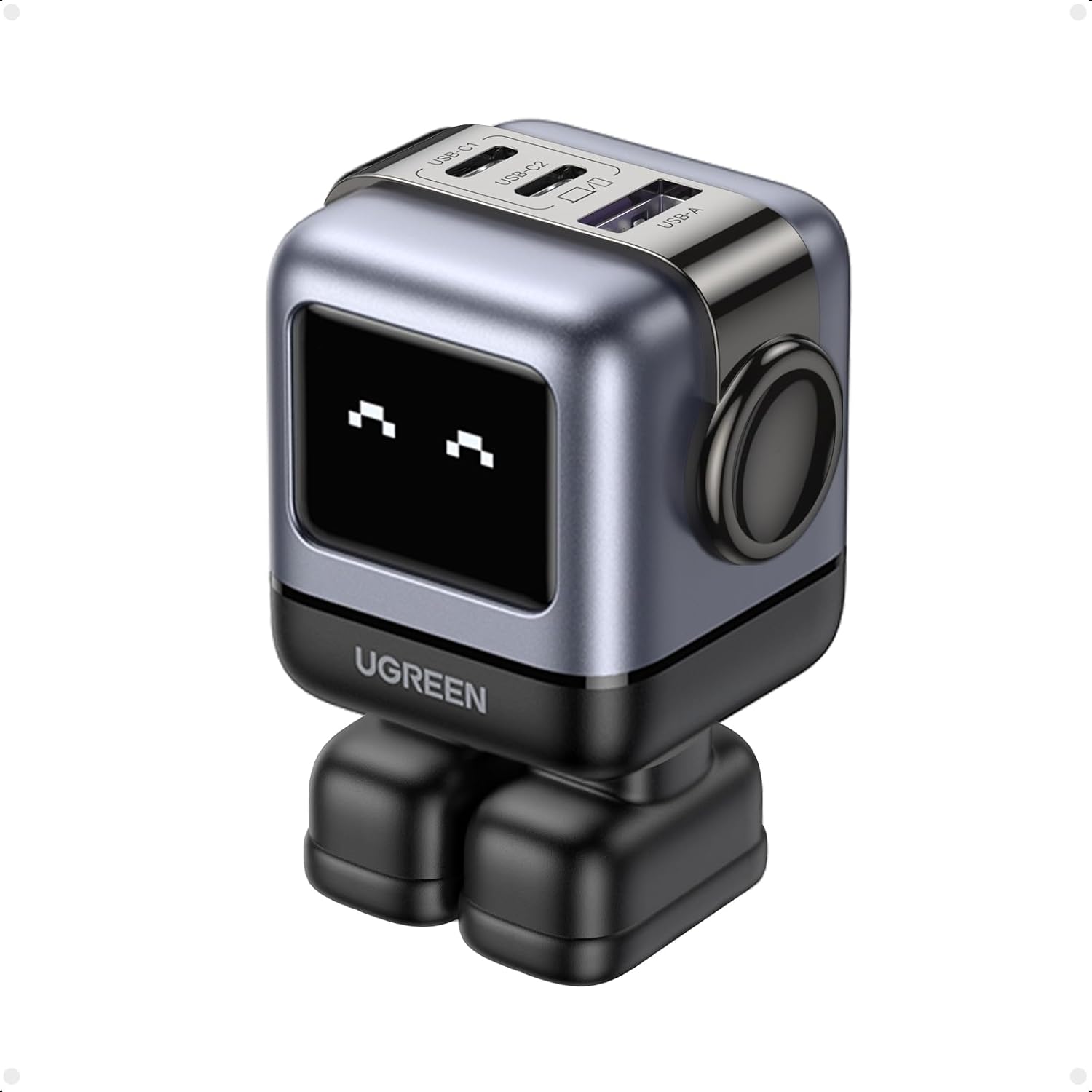
The UGREEN Uno 65W is a clean example of both the shape and the catch. Two USB-C ports and a USB-A, up to 65W, in a GaN body small enough to travel — but read its own distribution table before you plan around it. The main USB-C port alone takes the full 65W. The two USB-C ports together split 45W and 20W. All three at once, and it becomes 45W plus 7.5W plus 7.5W — enough for a laptop and two small accessories, not for a laptop, a phone and a tablet together. It is a good illustration of why the total on the box is the wrong number to shop on: View on Amazon
Our recommendation: decide which single device must charge fast, then check that device still gets what it needs with your other devices attached. The Anker 735 is dissected in its own review, and the Anker Prime 67W's per-port ladder — 45W + 20W across two ports, or 30W + 20W + 12W across three — in the Anker Prime 67W review.
3. Why GaN Is On Every Box Now#
Gallium nitride replaced silicon in the switching components of chargers, and the practical consequence is simple: less waste heat, so the same power fits in a much smaller body.
That is the whole story from a buyer's perspective. GaN does not charge faster than an equivalent non-GaN charger — it lets a 65W charger be the size a 30W charger used to be, and run cooler doing it.
Where it matters is travel and multi-port units, because that is where old-fashioned chargers became genuinely bulky. Where it matters less is a charger that lives permanently behind your desk and never moves.
Our recommendation: on anything you carry or anything above about 45W, treat GaN as the default. On a stationary charger, it is a nice-to-have. If you want to see how far the size saving goes at the top end, our 100W GaN charger comparison covers chargers that run a laptop and two phones from a body you can still pocket.
4. Magnetic Charging: What You Gain and What You Pay#
Magnetic power banks snap onto the back of a compatible iPhone and charge it with no cable at all. You can keep using the phone, walking with it, holding it — which is exactly the moment a cable is most annoying.
The costs are real and rarely stated. Magnetic wireless charging is slower than a cable and wastes some energy as heat, so a magnetic bank delivers less of its stated capacity into the phone than a wired one would.
Both of the magnetic banks here charge wirelessly at 7.5W — half the 15W a standard Qi2 or MagSafe puck manages, and slower still than the same bank over its own cable. That gap is the price of the convenience, and it is the number neither box leads with.
The category splits by how much bulk you accept. The Anker 621 MagGo takes the thin route: 5,000mAh, about half an inch thick, 4.5oz, which Anker rates at about 0.8 of an iPhone 13 charge — a top-up you forget is in your pocket. It also has a USB-C port that does 12W wired, so "cable-free" describes the magnetic mode rather than the only mode: View on Amazon
The Anker 633 MagGo takes the other route: 10,000mAh, which Anker rates at about 1.8 full charges for an iPhone 13 Pro, a 20W USB-C port for wired charging and pass-through, and a fold-out kickstand so the phone stands up while it charges. Heavier, and it turns a train table into a screen stand: View on Amazon
Our recommendation: thin banks get carried, thick banks get left at home. Be honest about which you are. The full range of the magnetic category, thin to heavy, is laid out in MagSafe power banks for iPhone.
5. Ports, Clutter and the Desktop Case#
If the problem is a desk with four bricks and a tangle behind it, more watts will not fix it — port count and layout will.
Check three things. How many of each type, because a USB-C-only charger is a problem if half your cables are USB-A. Whether mains sockets are included, since a monitor or a lamp cannot use USB. And where the ports face, which sounds trivial until every cable in your setup runs across the desk. For the extreme version of this problem — one brick feeding an entire desk — see our CukTech 30 Ultra charging station review.
The Anker 525 Charging Station is built for exactly this: seven outputs in one unit — three mains sockets, two USB-C and two USB-A — with up to 67W from a single USB-C port, though the two USB-C ports share 65W between them and drop to roughly 30W, 20W and 12W once the USB-A ports are working too — the same lesson as section two, on a desk where by definition several things are plugged in. The USB ports face front for things you plug and unplug, the mains sockets face back for things that stay, and a flat-plug five-foot cord lets it sit behind furniture: View on Amazon
Our recommendation: count the devices actually on your desk, including the ones that need a mains socket, before comparing wattage at all.
Four Chargers, Four Different Problems#
None of these competes with the others; each answers a different question.
The UGREEN Uno 65W answers travel. Two USB-C and one USB-A, up to 65W from the main USB-C port but only 45W plus 7.5W plus 7.5W with all three occupied, GaN so it stays small, magnetic feet, and an LED face that shows charging status: View on Amazon
The Anker 525 Charging Station answers desk clutter. Seven outputs including three mains sockets, 67W from one USB-C port and 65W shared across both, front USB and rear mains, surge protection, flat plug: View on Amazon
The Anker 621 MagGo answers the pocket top-up. 5,000mAh, half an inch thick, 4.5oz, 7.5W magnetically or 12W over its USB-C port, about 0.8 of an iPhone 13 charge by Anker's own figure: View on Amazon
The Anker 633 MagGo answers the all-day-out problem. 10,000mAh, which Anker rates at about 1.8 iPhone 13 Pro charges, a 20W USB-C port with pass-through, and a kickstand so you can watch while it charges: View on Amazon
How to Choose in Five Minutes#
Start by naming the problem, not the product. Travel weight, desk clutter, and running out of battery away from an outlet are three different purchases.
If it plugs into a wall, work out the per-port split with everything you actually use attached, and ignore the headline number.
If you carry it, insist on GaN above about 45W — that is the difference between a charger that lives in your bag and one you leave behind.
If you are considering magnetic, accept that you are buying convenience rather than speed, and then decide honestly whether you will carry the thick one.
And if the real problem is the desk, count mains sockets and port types before you look at watts at all.
If you want one charger for a bag that has to handle a laptop and a phone together, the Uno 65W is the one that clears all five: View on Amazon