

Your M-chip Mac runs local AI models beautifully — right up until its small, non-upgradeable internal SSD fills with model files. A USB4 enclosure fixes that for a fraction of what Apple charges per terabyte. The UGREEN 40Gbps USB4 Enclosure is our best overall pick, the ACASIS TBU405 Pro is the best budget option, and the ACASIS TB501 Pro (Thunderbolt 5) is the one to get for M4 and M5 Pro/Max Macs.
Here's the part most guides get wrong, so let's be honest up front: on Apple Silicon, models run in unified memory (your RAM), not on the disk. A faster, bigger external drive lets you store a much larger library of models and load them into memory far quicker — it does not make a loaded model generate text any faster. That ceiling is set by your Mac's RAM and chip. What an enclosure buys you is escape from the "Apple storage tax": Apple's built-in storage can't be upgraded after purchase and costs multiples per terabyte of a bare NVMe drive, so a USB4 enclosure plus your own SSD is the cheap, sane way to give a local-AI Mac room to breathe.
Who this comparison is for#
- People running local LLMs (LM Studio, Ollama, GPT4All, Jan) on an Apple Silicon Mac who have run out of internal storage for model files.
- Anyone who took one look at Apple's storage-upgrade pricing and decided to add terabytes externally instead.
- Developers, researchers, and creators who keep a big collection of models — or video and photo libraries — and want near-internal speed without paying Apple's per-terabyte rate.
How we picked#
- Every pick is a bare enclosure: you supply your own M.2 NVMe SSD. They all work with every Apple Silicon Mac (M1 through M5), because all of them ship with Thunderbolt / USB4 ports.
- We were honest about the real speed tier, because the marketing blurs it. A true USB4 enclosure (ASMedia ASM2464PD controller) reaches roughly 3,700 MB/s. A Thunderbolt 3-era controller caps closer to 2,800 MB/s. Thunderbolt 5 reaches about 6,000 MB/s. We tell you exactly which chip each one uses.
- Active cooling mattered. Loading multi-gigabyte models back-to-back heats the SSD, and a hot drive throttles — so we favored enclosures with a built-in fan.
- All three use known controller chipsets, not anonymous no-name boards.
- We kept the AI reality in view: the right enclosure is the one that stores your whole model library and loads it quickly, not the one with the biggest number on the box. More on that in the FAQ.
UGREEN 40Gbps USB4 NVMe Enclosure (Best Overall)#
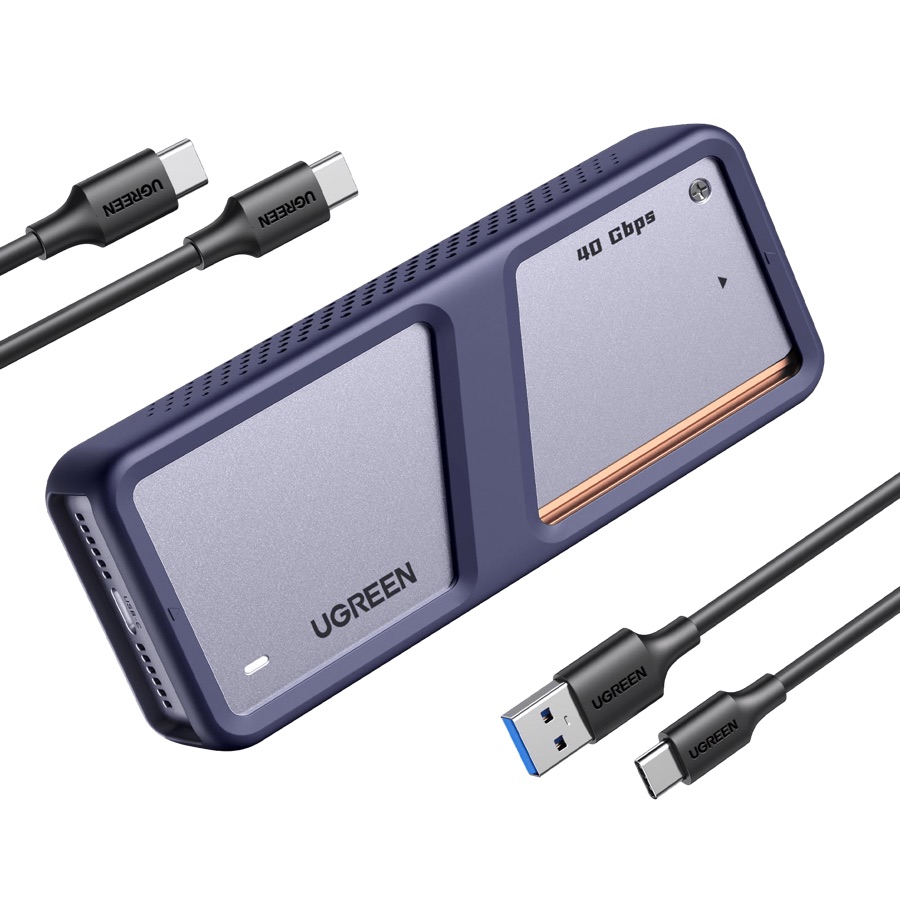
This is the enclosure to buy if you just want the fastest, most trouble-free external storage tier that every current Mac can actually use. It runs the ASMedia ASM2464PD controller — genuine native USB4 — which delivers around 3,700 MB/s in the real world. That's the fastest you can go before stepping up to Thunderbolt 5, and it saturates the USB4 / Thunderbolt 4 port on any M1–M5 Mac.
For a local-AI setup, that speed shows up in one place you actually feel: load time. A 40GB quantized model that crawls off a slow USB drive in a couple of minutes drops into memory in seconds here. Swap between three or four models a day and those seconds add up. It takes M.2 drives up to 4TB per UGREEN's official spec — enough to keep a serious library of quantized models, plus datasets, off the internal disk.
The built-in fan is the quiet hero. Sustained multi-gigabyte reads heat any NVMe drive, and once a drive gets hot it throttles; the active cooling here keeps speeds flat during long sessions. The aluminum body with an anti-drop cover is built for daily carry with a MacBook. Just remember the enclosure is only half the equation — it needs a fast NVMe drive inside to hit these numbers, so pair it with one of our best NVMe SSDs for a Mac AI model vault.
Key specs#
Controller : ASMedia ASM2464PD (native USB4)
Interface : USB4, 40Gbps
Real-world speed : Around 3,700 MB/s read with a fast Gen4 SSD
PCIe : Tunnels PCIe Gen4 x4 (Gen3 compatible)
Max SSD capacity : 4TB (UGREEN official spec)
M.2 sizes : 2230 / 2242 / 2260 / 2280, M-key and B+M-key
Cooling : Built-in active fan plus aluminum shell
Cable : USB-C to USB-C 40Gbps cable included
Compatibility : Thunderbolt 4/3, USB4, USB 3.2/3.1/3.0; macOS and Windows; all Apple Silicon Macs
Best for : The great majority of M-chip Mac owners who want the fastest widely-usable tier
Bottom line. Native USB4 speed, active cooling, and 4TB of headroom make this the default pick for a local-AI Mac. Pair it with a fast SSD and it disappears into your workflow.
ACASIS TBU405 Pro 40Gbps Enclosure (Best Budget)#
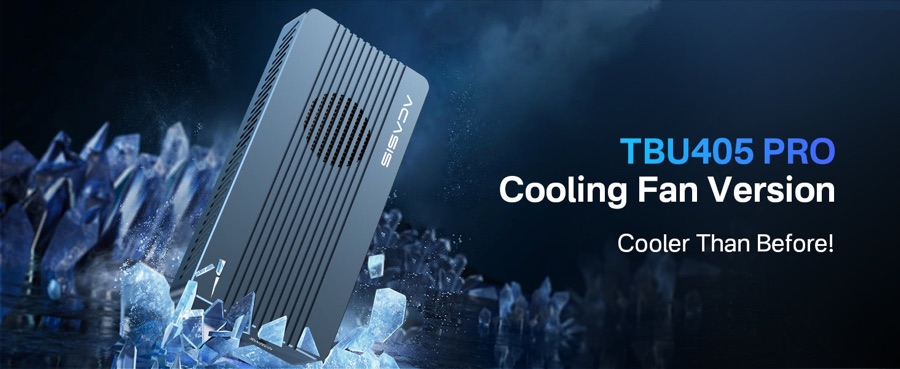
The TBU405 Pro is the pick when you want reliable, fast-enough external storage without paying for the top tier. One honest note the box won't tell you: this enclosure uses an Intel Thunderbolt 3-era controller (JHL7440), not the newer native-USB4 chip in the UGREEN. In practice that means it tops out around 2,800 MB/s rather than 3,700 — real, measurable, but not a dealbreaker for AI work, because 2,800 MB/s still loads big models fast.
What you get in exchange is rock-solid Mac behavior. Intel's Thunderbolt controller is about as plug-and-play as external NVMe gets on macOS — it mounts instantly and rarely drops out, which is not always true of the cheapest USB4 boards. It has its own cooling fan, takes drives up to 8TB, and it's genuinely compact and light at around 163g, so it travels well with a MacBook.
Think of this as the sensible-budget path to a local-AI storage vault: a little slower on paper, noticeably cheaper, and completely fine for storing and loading a large model collection. If your Mac is an Air or a base M-chip model, you were never going to see more than 40Gbps anyway, which makes the small speed gap even less relevant.
Key specs#
Controller : Intel JHL7440 + Realtek RTL9210B (Thunderbolt 3 class)
Interface : Thunderbolt 3/4 and USB4-compatible, 40Gbps link
Real-world speed : Around 2,800 MB/s read
Max SSD capacity : 8TB
M.2 sizes : 2230 / 2242 / 2260 / 2280
Cooling : Built-in fan plus aluminum body
Size and weight : About 118 x 57 x 18mm, ~163g
Cable : Thunderbolt-rated USB-C cable included
Compatibility : Thunderbolt 4/3, USB4, USB 3.x; macOS and Windows; all Apple Silicon Macs
Best for : Budget-minded buyers who want dependable, fast-enough storage on any M-chip Mac
Bottom line. Not the fastest, and not native USB4 — but the cheapest genuinely reliable way to add a big, quick model vault to a Mac. For most people the ~900 MB/s gap versus the UGREEN never shows up in daily use.
ACASIS TB501 Pro 80Gbps Thunderbolt 5 Enclosure (Best for M4/M5 Pro & Max)#
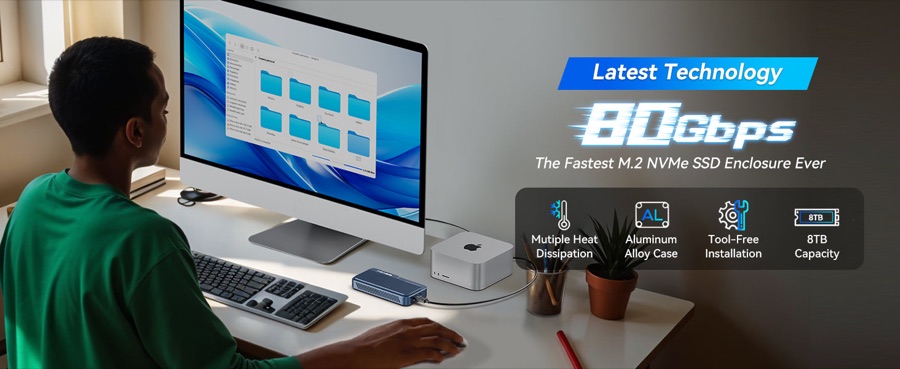
This is the fast lane — but only some Macs can drive it. The TB501 Pro uses Intel's JHL9480 Thunderbolt 5 controller and reaches roughly 6,000 MB/s, nearly double a USB4 enclosure. That speed is only unlocked on Macs with a Thunderbolt 5 port: the M4 Pro, M4 Max, M5 Pro, M5 Max and M3 Ultra machines. On a base M4/M5 chip or any M1/M2/M3, it quietly falls back to ~3,700 MB/s and behaves like a (pricey) USB4 enclosure.
If you do have a Pro/Max Mac and you work with very large models, this is where an enclosure earns its keep. Halving the load time of a 70B-class model — the kind that's tens of gigabytes even when quantized — is genuinely useful when you switch models often. It takes Gen5 and Gen4 M.2 drives up to 8TB, and the current retail unit ships the revised controller that fixes early PCIe Gen5 compatibility.
The trade-offs are real and worth stating. It runs hot and leans on its fan, so ventilation matters. It's the most expensive of the three. And its Windows recognition can be finicky — which is a non-issue here, since macOS is where it's rock solid. Buy it only if your Mac has a true Thunderbolt 5 port and you'll pair it with a fast Gen5 or Gen4 SSD; otherwise the UGREEN gives you the same real-world speed for less.
Key specs#
Controller : Intel JHL9480 (Thunderbolt 5), current B2 revision
Interface : Thunderbolt 5 / USB4 v2, 80Gbps
Real-world speed : Up to around 6,000 MB/s
PCIe : Tunnels PCIe Gen5 x4 (Gen4/Gen3 compatible)
Max SSD capacity : 8TB
M.2 sizes : 2230 / 2242 / 2260 / 2280
Cooling : Adjustable active fan (auto on at ~55°C)
Cable : Thunderbolt 5 USB-C cable included
Compatibility : Thunderbolt 5, back-compatible with TB4/TB3/USB4/USB 3.x; best on M4/M5 Pro & Max Macs
Best for : M4/M5 Pro and Max owners pairing it with a fast Gen5/Gen4 SSD
Bottom line. The fastest external tier you can buy — but only worth it on a Thunderbolt 5 Mac. On anything older it's an expensive way to get UGREEN-level speed.
Which one should you buy?#
For the vast majority of M-chip Mac owners — MacBook Air, base MacBook Pro, iMac, Mac mini, any M1/M2/M3 machine — buy the UGREEN 40Gbps USB4 enclosure. It's the fastest tier your Mac can actually use, it's actively cooled, and it holds up to 8TB of models. This is the safe default.
If you're watching the budget, buy the ACASIS TBU405 Pro. You give up roughly 900 MB/s versus the UGREEN and it's a Thunderbolt 3-era chip rather than native USB4, but it's cheaper, dependable, and completely adequate for storing and loading a large model library.
Only reach for the ACASIS TB501 Pro if your Mac is an M4/M5 Pro or Max (or M3 Ultra) with a Thunderbolt 5 port and you'll put a fast Gen5/Gen4 SSD inside. On any other Mac it can't stretch its legs, and the UGREEN gives you the same practical speed for less money.
Whichever you choose, remember an enclosure is one of three pieces. It needs a fast, roomy drive inside — see our best NVMe SSDs for a Mac AI model vault — and a cable that can carry the speed, covered in our best USB4 and Thunderbolt cables for external SSDs. If you also want desk connectivity, our best USB-C hubs for MacBook setups pairs well with any of these.
FAQ#
Will a faster enclosure make my local AI models run faster?#
No — and this is the single most important thing to understand. On Apple Silicon, a model runs in unified memory (RAM). Once it's loaded, how fast it generates text is set by your Mac's memory bandwidth and chip, not by the SSD. A faster enclosure loads the model into memory quicker and lets you store more models, but it does not raise tokens-per-second. The one exception is if a model is too big to fit in your RAM and the system streams it from disk during use — then everything crawls, and the fix is more RAM or a smaller model, not a faster drive.
How much storage do I actually need for local AI models?#
More than you'd think. A small 7B–8B model is a few gigabytes, a 70B model is tens of gigabytes even quantized, and it's easy to accumulate a dozen models plus datasets. A 2TB drive comfortably holds a serious working library; 4TB or more is for people who hoard every new release. That's exactly why external storage makes sense — you can size it to your habit for a fraction of Apple's per-terabyte pricing.
Do I need Thunderbolt 5, or is USB4 enough?#
For almost everyone, USB4 (40Gbps) is plenty — it loads even large models quickly. Thunderbolt 5 (80Gbps) only delivers its speed on M4/M5 Pro and Max Macs (and M3 Ultra); base M4/M5 and all M1/M2/M3 chips are USB4 / Thunderbolt 4. If your Mac isn't a Pro or Max model, a Thunderbolt 5 enclosure can't run at full speed, so save the money and get the UGREEN.
Does this work on my MacBook Air or base M-chip Mac?#
Yes. Every Apple Silicon Mac has at least a Thunderbolt 4 / USB4 port, so the UGREEN and ACASIS TBU405 Pro run at their full 40Gbps tier on any of them. You just won't benefit from the Thunderbolt 5 enclosure's extra speed unless you have a Pro/Max machine.
Is an external SSD really cheaper than upgrading Apple's storage?#
Substantially. Apple's internal storage can't be changed after you buy the Mac, and each capacity step up costs multiples of what the equivalent bare NVMe drive costs. A USB4 enclosure plus your own SSD typically gives you far more terabytes than an Apple upgrade tier, at a small fraction of the price — and you can move it between machines.
Can I run models directly off the external drive?#
Yes. Tools like LM Studio and Ollama let you point their model folder at the external drive, so your whole library lives there instead of on the internal SSD. When you load a model, it's read from the enclosure into RAM — which is why a fast enclosure (and a fast SSD inside it) makes loading noticeably quicker.